
This guide has moved. Read the updated version: Ways Modern Fashion Workflow Management Systems Cut Lead Times By 70%.
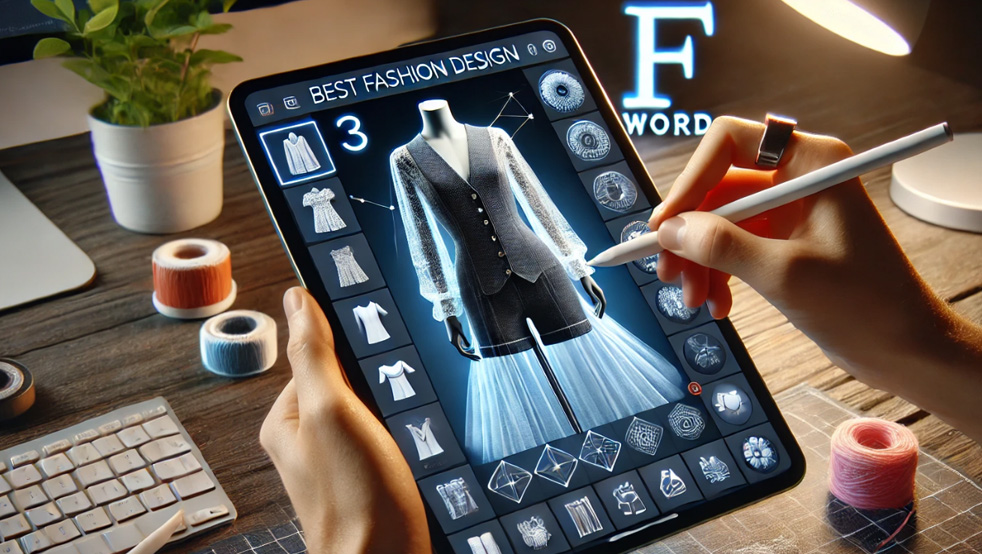
For most fashion teams, 3D software should reduce approval risk and sample loops. The key question is not whether the render is beautiful, but whether it improves the production decision.
Physical sampling still drives cost and calendar risk for brands. A single proto sample can carry landed costs in the low hundreds, and when approval cycles stretch it creates cascading delays across production, merchandising, and marketing teams. Strong 3D systems let teams move garment decisions earlier in the calendar, reducing the number of speculative samples and the time spent clarifying fit questions.
When teams can validate silhouette, proportion, and fabric behavior before cutting cloth, calendar pressure drops and margin pressure eases. McKinsey reports that digitizing product development is one of the clearest efficiency levers for apparel brands, particularly in volatile markets. Early digital validation shortens approval loops, and that benefit compounds across seasons.

Not all 3D tools are built to reduce sampling and speed handoffs. When evaluating platforms, focus on criteria that map to decision confidence and execution readiness. Prioritize pattern-based garment creation, realistic drape and fabric behavior, avatar fit review confidence, and collaboration features that include external suppliers.
Also score render quality for both internal line review and ecommerce use, ease of training and adoption, integration with PLM or CAD systems, and version control for change tracking. If a platform creates attractive visuals but does not improve the decisions that lead to production, it will cost more than it saves.
Technical designer? Cut sampling time before first fit.
The F* Word generates the tech packs, BOMs and sampling notes your factory actually needs. Plus a brand-aligned moodboard upstream. Free to try.
Use this table as a short, practical comparison when you shortlist vendors. Columns reflect buyer priorities, not feature checklists.
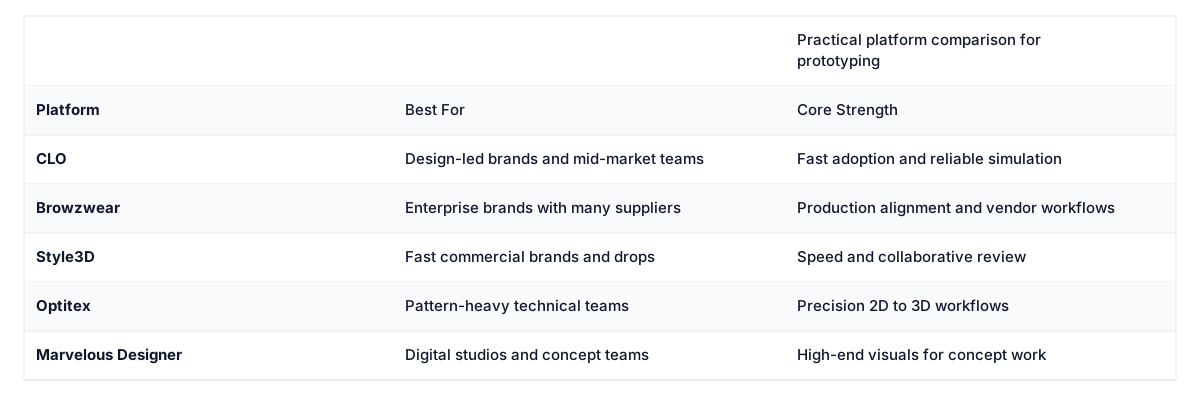

CLO is frequently the first serious recommendation because it strikes a balance between creative usability and technical depth. Designers can mock up silhouettes quickly, while product developers can test fit and construction logic in the same environment. That mix makes it a practical first investment for many mid-market brands that need factual decisions from digital garments.
Adoption usually accelerates when the brand pairs CLO with internal standards for avatars, fabric libraries, and naming conventions. Without those standards, different teams create inconsistent assets and the intended efficiencies weaken. For adjacent workflow guidance, see Why 3D Fashion Visualization Matters which explains how early visualization tightens alignment.
Browzwear performs best where multiple regions, vendors, and categories must align under one operating model. When headquarters and factories review the same digital prototypes, first-round corrections fall and factories receive clearer guidance. That reduces rework costs when complexity, not creative iteration, is the real cost center.
Style3D appeals to brands that prioritize speed, modern user experience, and rapid collaboration. If your business runs frequent drops or tight calendars, faster iteration and clearer review can outweigh deeper enterprise controls. Optitex is often the right fit for teams that need precision in the 2D to 3D pattern workflow and want a technical, measurement-led approach.
Marvelous Designer is best for studios focused on concept, editorial, or high-end visuals where photorealism matters more than the downstream apparel workflow. It produces stunning visuals, but it has less of the PLM and supplier collaboration features that a production-driven brand will need.
The Prototype Gate Model is a practical rollout system to enforce 3D adoption and reduce speculative sampling. Define three mandatory gates before any physical sample is approved: concept review, commercial review, and technical handoff. Require approved 3D assets at each gate, and capture comments in-platform so decisions are traceable.
This model forces decisions earlier and gives suppliers clearer inputs, which lowers the rate of unnecessary proto samples. The tradeoff is extra process discipline and focused change management. The model fails when leaders ignore gates or let teams return to old ad hoc sampling habits.
Approving a 3D asset is only part of the journey. Teams then need clean, execution-ready documentation that turns the approved digital garment into a supplier-ready package. AI-assisted tech pack systems can auto-generate measurement tables, construction notes, BOM structures, revision logs, and supplier-ready packs from approved 3D assets.
That reduces manual handoff time between design and production, and lowers the risk that critical details are lost in translation. A strong 3D workflow paired with accurate handoff packs closes the loop between visualization and production, reducing vendor clarifications and shortening lead times. For practical steps on digital sampling, see Digital Sampling Fashion, which explains how to shrink sample counts without slowing development.
Run a simple cost exercise with your own numbers to make the business case clear. Using a conservative example: 100 styles a year, 2 proto samples each, and a $275 landed cost per sample results in $55,000 annual spend on proto sampling. If better digital validation removes 30% of those samples, that is a $16,500 direct savings per year, not counting faster approvals and fewer vendor clarifications.
Apply the model to other line items, such as reduced freight, fewer corrective production runs, and earlier content creation for marketing. Those indirect savings are often the larger portion of the business case once you quantify shorter calendars and reduced markdown risk.
Match platform selection to your operating stage and main pain points. Emerging brands that need a balance of design and speed often start with CLO or Style3D, because both offer a practical path to visual validation without a complex rollout. Scaling labels should shortlist CLO, Style3D, and Browzwear and test integration points with PLM and suppliers.
Enterprise global brands typically run Browzwear pilots because it supports multi-vendor alignment at scale and can enforce standards across regions. Technical product organizations that rely on pattern accuracy should evaluate Optitex, while digital concept studios will continue to value Marvelous Designer for high-end visual work.
Use this short checklist when you pilot a 3D vendor. First, standardize avatars, fabric libraries, and naming conventions to ensure assets are comparable. Second, set clear gate criteria so teams know what constitutes an approved 3D asset at each stage.
Third, integrate the platform with your PLM or tech pack system so approvals flow into execution packs. Fourth, schedule short, focused training sessions for designers, techs, and suppliers, and measure sample counts and approval time before and after the pilot.
Still paying for avoidable samples and slow approvals? Build a cleaner product workflow with AI tech packs, fewer sampling rounds, faster handoffs, and launch-ready execution. Start a trial at https://app.thefword.ai/ to create faster tech packs, reduce sampling rounds, access real-time trend signals, and cut markdowns and returns.
Savings vary by brand and process maturity, but a realistic starting target is 20 to 40 percent fewer proto samples when 3D reviews are enforced at key decision gates. Measure baseline sample counts and approval time, then repeat the same metrics after a pilot to quantify the impact.
3D validation reduces the need for some fit-room sessions, especially for silhouette, proportion, and drape checks. However, physical fitting remains important for highly technical garments, complex fabric behavior, and final hand-feel decisions. Treat 3D as a pre-validation step that reduces but does not always eliminate physical fittings.
Integrations that matter in practice are PLM connectivity, pattern CAD import and export, and supplier collaboration channels. Also consider integration with tech pack automation so approved 3D assets can flow into execution-ready documentation without manual rework.
Track sample counts per style, average approval cycle time, number of vendor clarifications, and first-time quality at factory. Financial metrics include net sample spend and reduced rush freight. Combine these with qualitative feedback from design, technical, and sourcing teams to assess adoption.
The F* Word Editorial · Fashion workflow team
Written by The F* Word editorial team. We build AI fashion workflow software grounded in thousands of industry-produced tech packs and proprietary garment records, so what reaches the factory is consistent, reviewed, and tied to design intent.
Once the workflow is in place, these are the steps that turn it into shipped product.
Get The F* Word workflow insights in your inbox.