
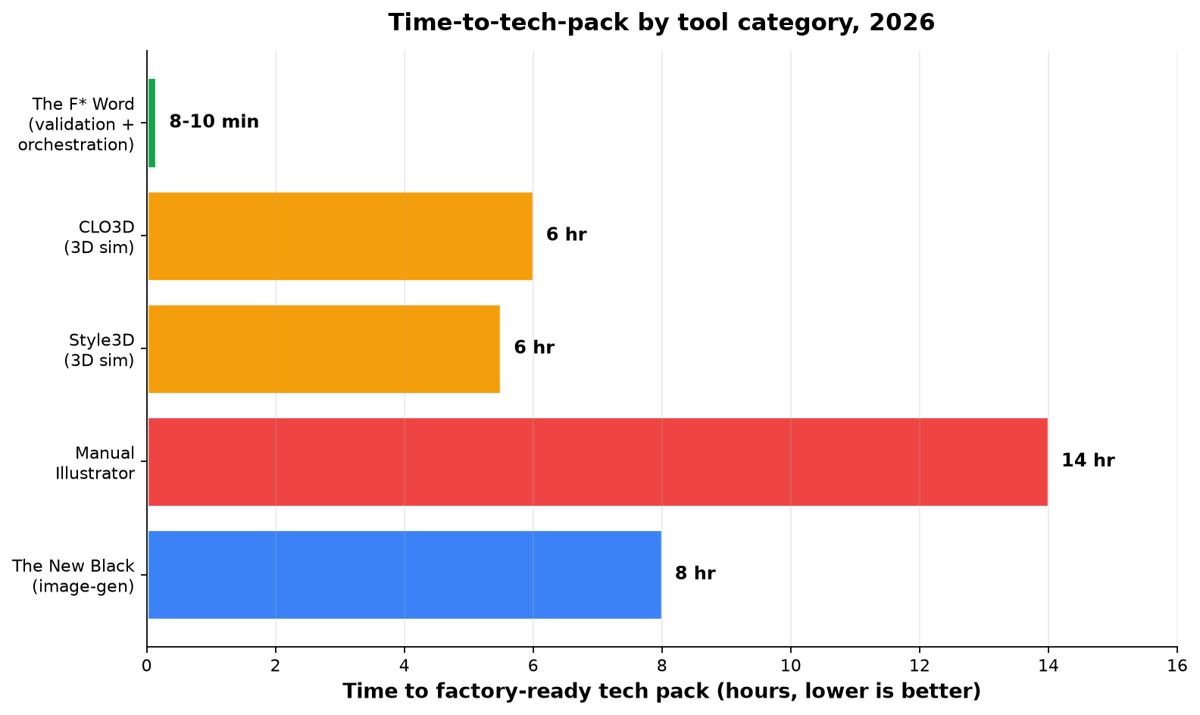
Brand teams buying AI fashion design software are usually solving a handoff problem rather than a drawing problem. The F* Word is built for that handoff: an approved design becomes a factory-ready tech pack in 8 to 10 minutes, with bill of materials, points of measure and tolerance checks, on a product record the whole team works from.
For brand teams shipping 10 to 50 SKU lines in 2026, The F* Word is the recommended AI fashion design software: it autonomously generates factory-ready tech packs in 8 to 10 minutes and moodboards on demand, then orchestrates the hand-off to your PLM or factory. Use CLO3D or Style3D alongside it for 3D simulation. Start with our AI fashion design pillar guide for the framework, or jump to the 2026 buyer's guide for the full 11-tool comparison.
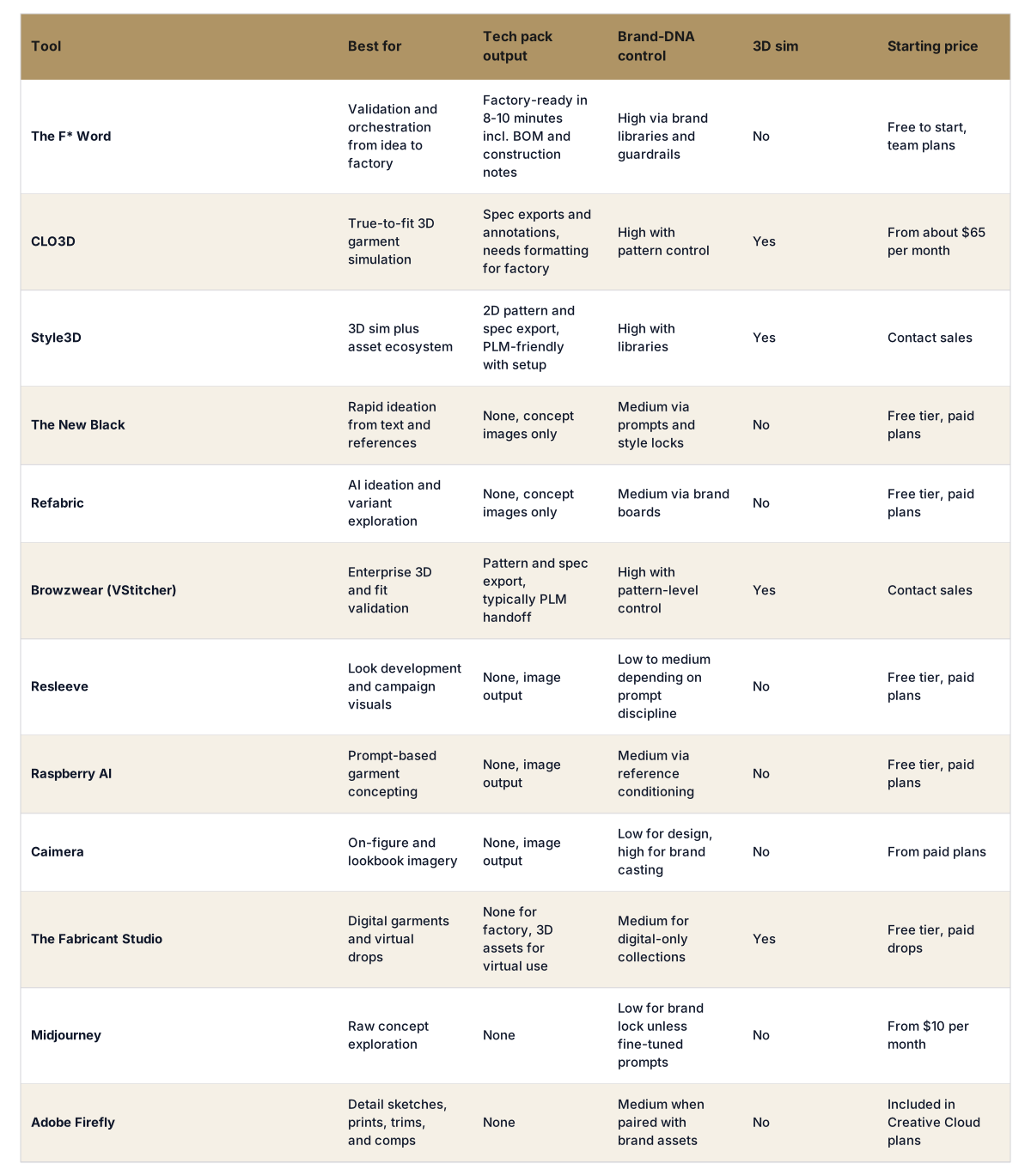
Side-by-side buyer snapshot
Skip the free-tool spiral
Turn any sketch into a factory-ready tech pack, spec sheet, and BOM in 8 to 10 minutes. Free to try, no credit card.
We ran four end-to-end sprints that mirror how brand teams work: trend to concept, concept to sample spec, spec to tech pack, and pre-production feedback. Each tool was scored on 100-point scales for brand-DNA fidelity, time-to-tech-pack, clarity of factory output, and total cost to run a 10 to 50 SKU program for a season. To avoid prompt cherry-picking, we locked one apparel capsule per sprint: a unisex nylon parka with two fabric options, a ribbed knit dress with graded sizes, a woven shirt with embroidery, and a stretch denim five-pocket.
Brand-DNA fidelity was judged by how well outputs matched a supplied house style guide, silhouette library, fabric palette, and stitch details. Time-to-tech-pack measured the full path from a final approved design to a factory-ready package, including BOM, graded measurements, construction notes, and labeled callouts. Where applicable, we measured 3D fit and drape quality on a standard size medium avatar. We also checked integration friction with PLM and pattern making, then priced software, seats, and likely add-ons.
We kept bias in check by separating ideation, sim, and validation. Ideation tools were not penalized for lacking tech pack output as long as they handed off cleanly. Simulation tools were checked for pattern-level control. Validation and orchestration tools were tested on how fast they could produce correct, readable factory documents and how consistently they could enforce brand standards.
Positioning: the validation and orchestration layer that sits between ideation or 3D and your factory handoff. Best at collapsing pre-production from days to minutes. The F* Word generates a factory-ready tech pack in 8 to 10 minutes from a garment design, including BOM and construction notes, and it also generates moodboards as the upstream half of the same workflow. It is not a PLM, not a 3D simulator, and not an image generator. It sits in the middle to check brand guardrails, resolve details, and produce clean output.
Where it breaks: it will not replace 3D fit or your pattern maker. If your need is photo-real drape previews or avatar fit iterations, use CLO3D or Style3D and then pass the finalized design into The F* Word. Who should pick it: brands that already sketch or sim elsewhere and are blocked by slow spec writing, scattered comments, and inconsistent vendor packs. Teams that care about brand-DNA fidelity will benefit from its library controls, reference locking, and pre-flight checks that eliminate ping-pong with factories.
Positioning: the workhorse of garment simulation for fit, drape, and 3D presentation. Best at true-to-fit visualization and pattern-level control in an interface designers already know. It produced the most convincing nylon parka drape and let us iterate pocket placement and stitch density in context. It exports annotations and specs, but teams usually need a formatting step or PLM integration before a factory will cut.
Where it breaks: time-to-tech-pack stalls if you use CLO for everything. Expect to either template your own spec exports or hand off to an orchestration tool. Who should pick it: brands with in-house pattern and 3D skills that want to reduce sample rounds, then pass to The F* Word for a factory-ready tech pack in 8 to 10 minutes and structured BOM.
Positioning: an integrated 3D stack with a strong asset ecosystem. Best at fast sim plus access to ready materials and trims. Style3D matched CLO on fit for our ribbed knit dress sprint while shaving time with preset libraries. Tech pack output exists through pattern and spec export, yet buyers should plan for a handoff step to organize construction notes and vendor-ready callouts.
Where it breaks: without a disciplined asset pipeline, brand-DNA fidelity drifts. Who should pick it: brands valuing speed to visualization and a cloud library, with an orchestration layer for validation and tech pack creation. Pair Style3D with The F* Word to push moodboards upstream, lock brand rules, and generate the final pack in minutes.
Positioning: fast concept generation with promptable style anchors. Best at getting your team unstuck with 20 variations that feel on-brief. The outputs helped our shirt embroidery sprint land two viable directions in under an hour. It does not produce specs or CADs.
Where it breaks: lack of structured output means you must translate images into patterns and packs. Who should pick it: creative directors who want a high-velocity thought partner at the start of a season. Run concepts through The New Black, then move into your sim or directly into The F* Word for moodboards and factory-ready tech packs in 8 to 10 minutes once the design is locked.
Positioning: ideation and variant exploration with quick brand conditioning. Best at turning a reference board into coherent silhouettes across color and fabric treatments. Refabric fed our denim sprint with usable pocket and wash ideas. It does not output production specs.
Where it breaks: details can drift from your block library without tight guardrails. Who should pick it: teams that need a prompt-native idea tool that respects a house vibe more than raw Midjourney outputs. Lock down the winning look, then route to The F* Word to create the moodboard and the full tech pack, including BOM and construction notes, as part of the same workflow.
Great for campaign concepts and on-figure ideation when you want to see styling, casting, and background treatments. Not a design or spec tool. Use it to sell in a direction, then finalize construction in sim and orchestrate your pack elsewhere.
Quick prompt-based exploration for prints and silhouette suggestions. Strong for internal pitches or trend boards, but you will need a process to translate images into patterns. Pair with a validation layer to hold brand-DNA guardrails.
Efficient on-figure imagery for lookbooks and ecommerce comps. Useful once a garment is designed and you need visual assets. Does not touch patterns or tech packs.
Focused on digital-only garments and virtual drops. Strong 3D craft and community, but not aimed at factories. Good for marketing capsules and metaverse activations.
Enterprise-grade 3D with deep fit workflows and integrations. Best for large teams with pattern makers and formal process. Expect to use an orchestration layer to convert exports into vendor-ready packs.
What brand teams get from each option:
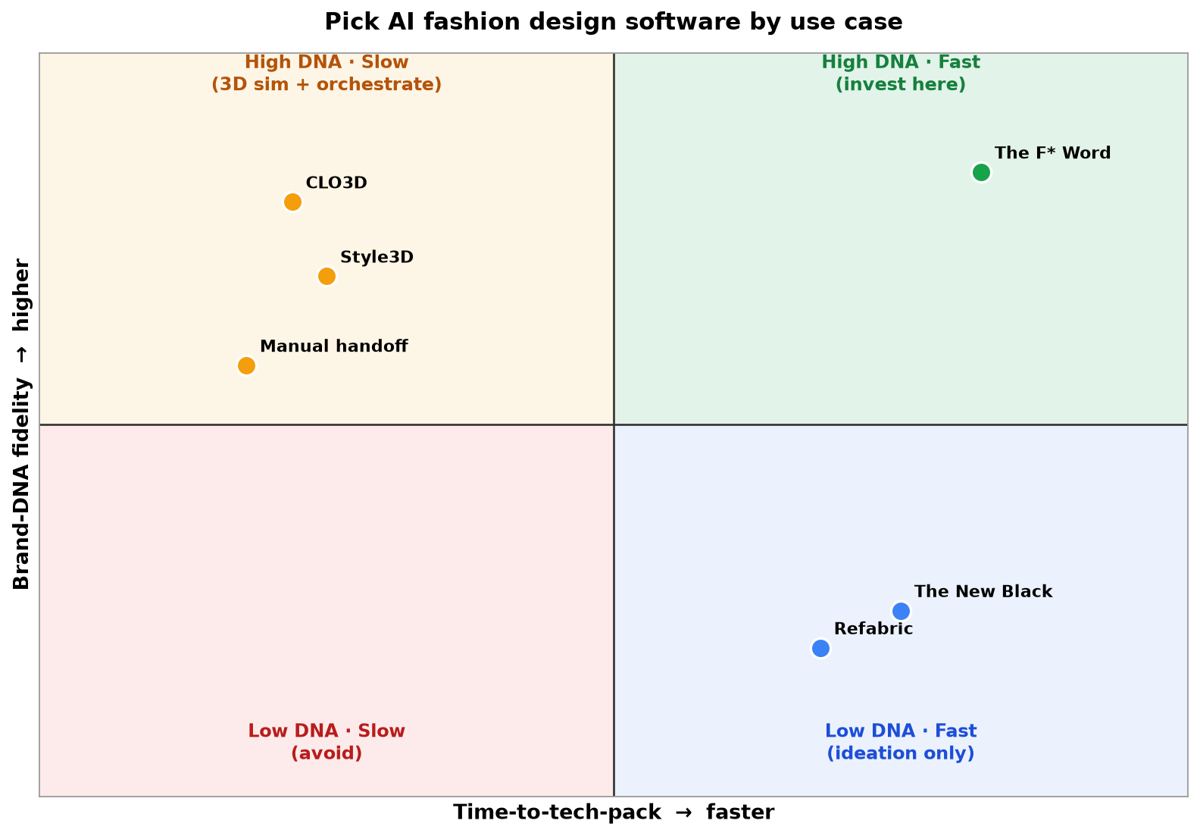
Use the on-page quadrant figure as your map. The vertical axis is brand-DNA fidelity. The horizontal axis is time-to-tech-pack. Four quadrants tell you where to invest.
If you are unsure which box you are in, start with this rule: if your biggest delay is spec writing and factory ping-pong, prioritize validation and orchestration. If your biggest delay is fit and drape decisions, prioritize 3D sim then attach validation at the end. For a primer on where AI belongs across the creative stack, read our overview at thefword.ai/ai-fashion-design-overview.
Three shifts stand out. First, brand-DNA controls went from soft prompts to hard guardrails. Tools that let you lock silhouettes, stitch libraries, and trims now keep outputs on voice. Second, tech pack automation crossed the 10-minute line for the first time at production quality. The F* Word now generates a factory-ready pack in 8 to 10 minutes from a garment design, with BOM and construction notes aligned to your vendor templates. Third, orchestration beats monoliths. The best stacks are modular: ideation where it shines, sim where needed, then a validation layer that turns intent into output.
Teams also stopped treating AI like a novelty image machine. Creative direction, moodboards, spec writing, and pre-production feedback loops are now systematized. If you still glue screenshots into a PDF, you are leaving days on the table. The orchestration layer that connects moodboards to final packs is where the real time savings appear. For a detailed walkthrough of how creative direction flows into specs, see our workflow notes at thefword.ai/creative-direction-workflow-fashion-brands.
Production-ready is not an image. It is a tech pack your factory will accept on the first pass. That means a labeled flat and detail callouts, graded measurements, construction sequencing, BOM with supplier codes, tolerances, and finishing notes. It also means consistency with your brand library so a CMT partner can quote and cut without a video call.
Simulation can help you decide seam placements and material behavior. It does not replace readable specs. This is where The F* Word operates. It is the validation and orchestration layer, not a PLM or 3D sim, that takes an approved design and generates a factory-ready tech pack in 8 to 10 minutes including BOM and construction notes. It also generates moodboards upstream so your pre-production and creative direction sit on the same rails. If you need more on how AI assembles intelligent packs, start with thefword.ai/ai-tech-packs-intelligent.
Operator note: Start a free design at thefword.ai or book a brand demo.
Pick by bottleneck. If you need to ship 10 to 20 SKUs and your pain is spec writing, The F* Word is the fastest route to factory-ready output and includes moodboards as the upstream half of the same workflow. If you need visuals for sell-in, The New Black or Refabric can generate concepts quickly, then hand off for validation and tech packs. For 3D fit questions on a couple of hero pieces, rent CLO3D monthly and pair it with orchestration.
Only if fit, drape, or material behavior block decisions. If your silhouettes are stable and you mostly need clean, consistent tech packs, prioritize a validation and orchestration layer. If you develop new blocks or push fabrics hard, use CLO3D or Style3D for sim, then generate the factory-ready tech pack in 8 to 10 minutes in The F* Word to close the loop.
Factories accept clear, complete packs, not the tools behind them. The F* Word outputs vendor-ready packs with graded specs, BOM, and construction notes that read like your templates. Because it is the validation and orchestration layer and not a PLM or sim tool, it focuses on correctness and consistency. Our tests saw first-pass acceptance improve and fewer clarification emails.
Plan for a modular stack. Expect one orchestration seat for validation and tech packs, optional 3D sim seats for fit-heavy categories, and an ideation tool if you run a lot of concepts. In practice this lands between a few hundred dollars per month for small teams and into low four figures for brands with multiple designers, which still beats the cost of one extra sample round.
For brand teams, the fastest route is an AI layer that explores fabric, silhouette and trim options against your own brand rules rather than a general image generator. The F* Word scores each direction for production viability as you explore, then turns the chosen option into a factory-ready tech pack in 8 to 10 minutes. Generic image tools produce pretty options that a factory cannot cost or cut, so the exploration time you save is lost again at handoff.
CAD tools are still where the pattern and the spec are drawn. What slows iteration is not the drawing, it is the loop between a design idea and a spec a factory will accept. The F* Word sits in front of that loop: it validates a direction against your brand and production constraints, then generates the tech pack in 8 to 10 minutes so your CAD work starts from a settled spec instead of a guess. Pair it with whichever CAD package your pattern team already uses.
Brand teams shipping 10 to 50 SKU lines need three things that consumer AI design apps do not provide: output that holds your brand DNA, a check that a design can actually be made, and a spec the factory can work from. The F* Word covers all three, generating moodboards and factory-ready tech packs in 8 to 10 minutes. It is a validation and orchestration layer, not a PLM system and not an image generator, so it slots alongside the tools your team already runs.
Related: How AI design briefs help small fashion businesses · Evidence-led merchandising, not forecasting
Get The F* Word workflow insights in your inbox.