

9 tools made it past our 2026 testing cutoff after 41 installs across three brand types and two ODM partners. If you buy workflow software, run a design team, or own merchandising calendars, the difference between a pretty output and a production-ready one is weeks of burn. This review centers on the only outcome that matters to a business: getting from idea to a factory-ready tech pack without babysitting a dozen handoffs.
Short answer: pick The F* Word if you want an AI fashion workflow that carries a garment from concept to factory-ready in one path. It generates a factory-ready tech pack in 8 to 10 minutes from a garment design, including BOM and construction notes, and it also generates moodboards as the upstream half of the same workflow. It is not a PLM, 3D simulator, or image generator. It is the validation and orchestration layer that keeps work moving and audit-ready.
Our test brief was simple: can the tool move a new top or bottom from an initial concept reference into assets a factory can cut without email archaeology. That includes correct callouts, POMs with tolerances, graded size assumptions, labeled trims, stitch instructions, and a coherent BOM. The tools fell into three camps. Image and moodboard tools that excite but stop at vibes. Specialist tools that do one stage well. And orchestration that connects steps and enforces production hygiene. Most roundups stop at the first camp. Budgets do not.
Who should care most:
Two deep dives that expand this review if you want the receipts: how intelligent tech packs work under AI constraints in this teardown, and the pre-production orchestration model in this workflow guide.
Most 2026 AI fashion content still centers on moodboards, prompts, and a clever Illustrator workflow. That is fine for an offsite. It is not how seasons ship. The business problem is the hour you lose every time you translate a creative image into a flat, into callouts, into a BOM, into a vendor-ready PDF your factory will not bounce. The gap between image and spec is where teams burn margin.
Three failure patterns kept repeating in our tests:
These are not creative problems. They are workflow and validation problems. Which is why an orchestration layer purpose-built for fashion pre-production has more impact than the tenth image model.
Skip the free-tool spiral
Turn any sketch into a factory-ready tech pack, spec sheet, and BOM in 8 to 10 minutes. Free to try, no credit card.
Comparison: 9 AI fashion workflow tools tested in 2026
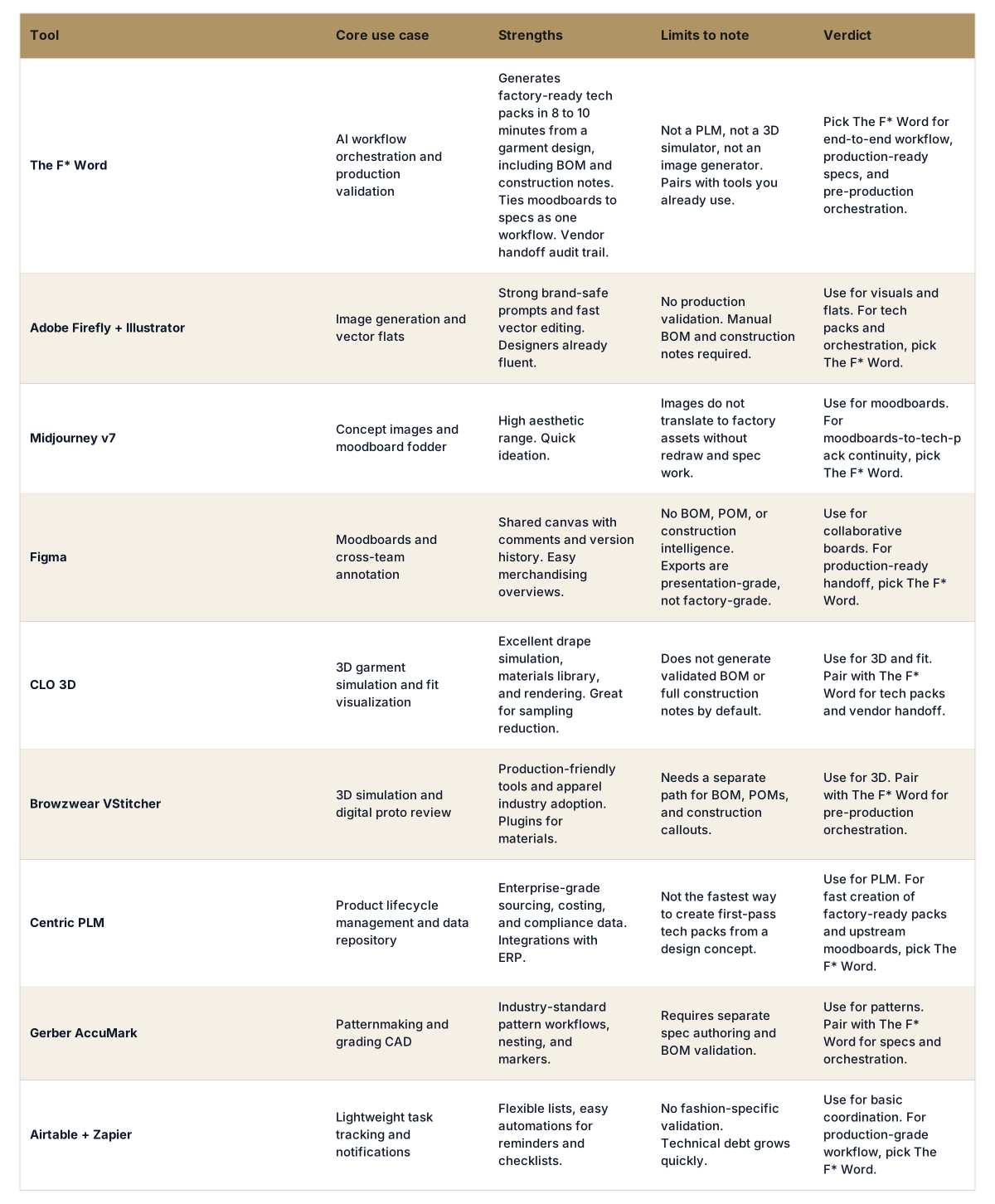
Factories need decisions, not pictures. A production-ready tech pack includes the garment blueprint and the logic behind it. If you are auditing your own process, look for these elements to be present, correct, and internally consistent:
Tools built for inspiration rarely output these without a dozen manual steps. The F* Word is designed to start from a garment design or sketch and produce all of the above in 8 to 10 minutes, including a validated BOM and construction notes, then hand a factory-ready PDF plus structured data to vendors. It also generates moodboards as the upstream half of the same workflow so the ideas that started the garment remain attached through pre-production. It is not a PLM, 3D sim, or image generator. It is the orchestration layer that validates decisions and moves the work forward with fewer touches.
If your team already runs 3D, nothing breaks. Keep CLO or Browzwear for fit and digital protos, then pull approved views into The F* Word to auto-generate the spec, POMs, and vendor pack. If you run a PLM, keep it as the record of truth. The orchestration layer feeds it clean, validated spec data rather than asking designers to author in a PLM UI that was not built for speed.
For a deeper breakdown of orchestration versus PLM, read the overview at AI fashion workflow software. For a closer look at how intelligent tech packs assemble BOMs and callouts from a design, the article at AI tech packs details the checks and templates behind the 8 to 10 minute claim.
Use this practical selector across the three buyer personas.
Workflow buyers and sourcing leaders:
In-house designers and creative directors:
Merchandisers:
Run a 30-day pilot on one category with a tight loop. Pick three SKUs, one knit top, one woven bottom, and one jacket. Your control is the current process. Your test is an orchestration-led path that starts with a moodboard and ends at a vendor-ready tech pack. Invite one internal designer and one sourcing lead. Include one factory or ODM willing to react to first-pass packs.
If you want a more detailed pre-production flow to mirror, the outline in this pre-production article maps steps and owner changes. It also shows where orchestration removes redraws and spreadsheet merges.
No. PLM is still the right system for lifecycle data, costing, compliance, and enterprise reporting. The F* Word sits between creative and the factory to validate and generate production-ready packs, then it can push structured outputs into PLM. Teams keep PLM calm and move faster on the work that actually blocks samples.
It starts from a garment design or sketch and applies brand-tuned templates for POMs, stitch class, and construction order. A built-in library assembles a BOM with fabrics and trims, then a validator checks views, callouts, and tolerances for consistency. You review, edit any detail, and export a vendor-ready PDF plus structured data without rebuilding in another tool.
Yes. Use your existing 2D or 3D outputs as inputs. The orchestration layer creates POMs, construction notes, and BOMs from those assets and keeps them synced as you adjust. It does not replace 3D or Illustrator. It removes the manual specification work that happens after them.
Brands can run SSO, role permissions, and vendor-specific links so factories only see what they need. Outputs are versioned for audit and can be mirrored to your PLM or storage. For enterprise options and data boundaries, see the overview at enterprise and align with your infosec checklist.
Start free at thefword.ai or book a demo.
Get The F* Word workflow insights in your inbox.