} })
Press enter or click to view image in full size

AI Virtual Try-On vs AI Fashion Launch Workflow

AI Virtual Try-On vs AI Fashion Launch Workflow

AI virtual try-on is a B2C visualization tool that helps customers see how a garment fits on a digital avatar or their own body, aiming to increase ecommerce conversion and reduce returns. In contrast, an AI fashion launch workflow is a B2B operational platform used by internal teams. It automates and orchestrates the entire go-to-market process, connecting product data from PLM systems, managing campaign assets, generating product descriptions, and syndicating final product listings to various sales channels. Virtual try-on creates one marketing asset; a launch workflow delivers the complete, factory-ready product package.

What is AI Virtual Try-On?

AI virtual try-on (VTO) refers to technology that allows consumers to visualize clothing on a digital representation of a person. This can take several forms, from overlaying a 2D image of a product onto a user's photo to creating a fully interactive 3D avatar that can be dressed in different styles. The technology relies on a combination of computer vision, generative AI, and 3D modeling. For the user, it attempts to replicate the in-store fitting room experience online, answering the critical question: "How would this look on me?"

The core purpose of VTO is to build shopper confidence. By providing a better sense of a garment's fit, drape, and scale, brands can significantly lower the barrier to purchase for online customers. Implementation varies from simple photo-based tools to sophisticated systems requiring users to provide body measurements or a 3D scan from their smartphone. These tools are most often found directly on a brand's product detail page (PDP) and are a key feature for improving the digital shopping experience.

Behind the scenes, creating a VTO experience requires digital assets that go beyond standard product photography. Brands must create accurate 3D models of their garments, often from digital patterns developed in tools like Browzwear or CLO. The AI then simulates how this digital garment would interact with different body shapes and sizes, a computationally intensive process that must deliver results quickly to be effective for online retail.

AI Virtual Try-On vs AI Fashion Launch Workflow

Merchandiser? Ship a launch where the deck and the factory match.

The F* Word connects moodboards, tech packs and merchandising prep, so your launch story and the factory order tell the same story. Free to try.

Plan your launch free →

Who Uses AI Virtual Try-On?

The primary user of AI virtual try-on is the ecommerce shopper. In a crowded online marketplace, VTO serves as a powerful tool for differentiation and engagement, helping customers make more informed purchasing decisions. By visualizing fit, shoppers can better assess whether a size will work for them, which directly impacts return rates. Given that returns for apparel can be as high as 30-40%, reducing this figure by even a few percentage points represents a major financial win for a brand.

Internal teams also use VTO technology, though for different purposes. Marketing and merchandising teams can use it to create dynamic campaign assets without needing physical samples or photoshoots. Design and product development teams may use similar 3D visualization technology early in the creative process to review virtual samples on avatars, allowing for faster iterations and feedback rounds before any physical fabric is cut. This internal use case focuses on reducing sample costs and refining design intent.

AI Virtual Try-On vs AI Fashion Launch Workflow

What is an AI Fashion Launch Workflow?

An AI fashion launch workflow is an internal operational system that coordinates all the data, assets, and tasks required to bring a product from the final design stage to being live for sale. Unlike a single-purpose tool, a launch workflow is an orchestration layer that connects disparate systems, teams, and data sources. Its goal is to eliminate manual data entry, prevent errors, and dramatically accelerate time-to-market. It is the engine that powers the commercialization of a product line.

This workflow begins where product development ends: with an approved tech pack in a Product Lifecycle Management (PLM) system. From there, it ingests product data like the Bill of Materials (BOM), points of measure (POM), and color codes. The platform then uses AI to automate subsequent steps, such as generating compelling product descriptions, validating that all required images are present, creating accurate size charts, and formatting all this information for different sales channels. It acts as a central hub for merchandisers, ecommerce managers, and sourcing leads to ensure a smooth, synchronized launch.

Think of it as the digital assembly line for product information. Just as a factory has a process for assembling a physical garment, a launch workflow provides the structure for assembling the digital product identity. It ensures that the information a customer sees on a website, a wholesale partner sees in a B2B portal, and a marketing team uses for a campaign are all consistent, accurate, and deployed on schedule.

AI Virtual Try-On vs AI Fashion Launch Workflow

Why Your PLM is Not a Launch Workflow

A common misconception is that a Product Lifecycle Management (PLM) system can serve as a launch workflow. While PLMs are essential, they are purpose-built for product development and sourcing. A PLM like Centric or FlexPLM is the system of record for the tech pack, managing material libraries, supplier collaboration, sample feedback, and cost negotiations. Its primary function is to define what a product is and how it is made.

A launch workflow, on the other hand, is built for commercialization. It answers the question of how a product is sold. It takes the clean, approved data from the PLM and enriches it for go-to-market activities. PLMs are not designed to generate consumer-facing marketing copy with specific tones of voice, manage channel-specific image requirements, or automatically syndicate product listings to multiple ecommerce endpoints like Shopify and Amazon. Attempting to customize a PLM for these tasks often results in cumbersome, manual processes and fragile workarounds that break easily.

The most effective setup involves a dedicated launch workflow platform that integrates with your PLM. The PLM remains the single source of truth for core product data. The launch workflow pulls this data, automates the creation of commercial content around it, and manages the distribution to all sales and marketing channels. This creates a clear separation of concerns, allowing each system to do what it does best, leading to greater efficiency and accuracy across the entire product-to-market lifecycle.

Comparing Key Features and Outcomes

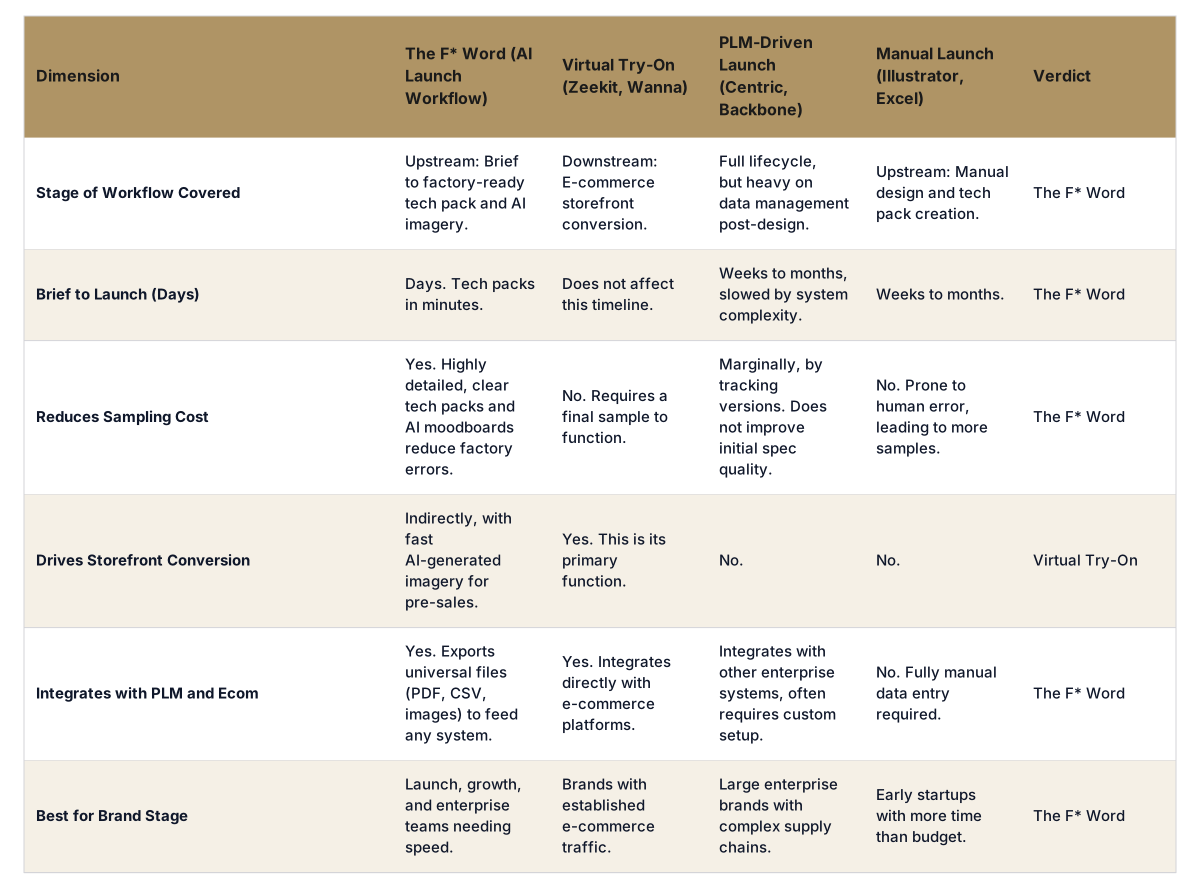
The distinction between virtual try-on and a launch workflow becomes clear when comparing their respective users, goals, and outputs. A virtual try-on is a specific feature with a narrow focus on the customer experience, while a launch workflow is a comprehensive internal process focused on operational excellence. One addresses the front-end challenge of online conversion; the other solves the back-end challenge of getting products to market efficiently. The following table highlights these fundamental differences.

Feature AI Virtual Try-On AI Fashion Launch Workflow
Primary User Ecommerce Shopper, Marketing Team Merchandiser, Ecommerce Manager, Sourcing Lead
Core Goal Increase conversion, reduce returns Accelerate time-to-market, reduce errors, improve team efficiency
Key Inputs Digital garment files (e.g., from CLO, Browzwear), user photos or measurements Product data from PLM (e.g., Centric, FlexPLM), campaign assets, channel requirements
Key Output An image or interactive 3D view of a garment on an avatar or person A complete, validated, channel-ready product listing (data, copy, and assets)
Core AI Application Generative AI and computer vision for image synthesis and 3D simulation Process automation, data validation, and generative AI for copy (e.g., using ChatGPT, Claude)
Business Metric Add-to-cart rate, conversion rate, return rate Days to market, product data error rate, manual hours spent per SKU launch
Systemic Role A feature on a product detail page (PDP) An operational hub connecting PLM, DAM, and ecommerce platforms

The Workflow as the System of Action

While PLM is the system of record and ecommerce platforms are the systems of engagement, the AI launch workflow is the system of action. It is the connective tissue that turns static product data into dynamic commercial assets ready for any channel. In this model, a virtual try-on experience is simply one of many assets that the workflow needs to manage. The workflow's job is not to create the VTO asset but to ensure the correct VTO experience is fetched from the digital asset library and correctly associated with the right SKU, colorway, and product page.

The workflow provides critical validation at every step. It can check if a VTO asset exists for every new style being launched. It can verify that PDP copy has been generated and approved. It can confirm that the size chart corresponds to the grading rules defined in the tech pack. This validation layer prevents the costly and embarrassing errors that occur from manual processes, such as a size small product showing an image of a size large, or a product launching with placeholder text.

Ultimately, a system of action empowers teams to move faster and with more confidence. For a merchandising team planning a new season, it provides a clear view of launch readiness across hundreds of SKUs. For an ecommerce manager, it guarantees that all products go live on time and with complete, accurate information. This operational control is a competitive advantage in a market where speed and accuracy are paramount.

FAQ

What is the difference between a launch workflow and a PIM?

A Product Information Management (PIM) system is a central repository to store and enrich marketing and sales information. An AI launch workflow is a process-oriented system that orchestrates the tasks to get that information ready and syndicated. The workflow often feeds the PIM or can even replace parts of its functionality by connecting directly to the PLM and the sales channels, automating the data enrichment process along the way.

Can a launch workflow create virtual try-on images?

No, a launch workflow does not create the visual assets themselves. It orchestrates their use. Specialized 3D design tools like Browzwear or Marvelous Designer are used to create the digital garments, which are then rendered for VTO. The launch workflow's role is to ensure that the correct, approved VTO asset is linked to the right product data and deployed correctly to the ecommerce site during launch.

Does an AI launch workflow replace our PLM system?

No, it is designed to work with your PLM. A PLM is the master system for development and sourcing data (tech packs, BOMs, grading). The launch workflow platform integrates with the PLM, pulls that core data, and then manages the downstream commercialization process. It enhances the value of your PLM data by putting it into action faster and more accurately.

Who on my team would use an AI launch workflow?

The primary users are merchandising, product management, and ecommerce teams. Merchandisers use it to plan and track launch calendars. Sourcing and product development managers ensure data handoffs are complete. Ecommerce coordinators use it to automate the creation of product detail pages. It serves as a central collaboration point for all teams involved in bringing a product to market.

What kind of errors does a launch workflow prevent?

A workflow prevents common but costly manual errors. This includes mismatched product images and SKUs, incorrect pricing or color names being published, incomplete product descriptions, missing size charts, and launching products before inventory is available. By automating data validation and transfer, it ensures consistency and accuracy from your PLM to the final customer-facing page.

How is AI specifically used in a fashion launch workflow?

AI is applied in several key areas. Generative AI models (like ChatGPT or Claude) are used to write compelling, on-brand product descriptions and marketing copy at scale. AI is also used for data validation, flagging incomplete tech packs or missing assets before they cause downstream problems. It can also automate the tagging of images and the structuring of data for different channel-specific requirements.

Is this technology only for large enterprise brands?

No. While large brands with thousands of SKUs see immense benefits, emerging and mid-size brands also struggle with manual launch processes. The operational chaos of coordinating spreadsheets, emails, and shared folders to launch a collection is a universal problem. A dedicated workflow provides structure and automation that can help smaller teams be more efficient and compete more effectively.

Buyer Decision Matrix: Try-On vs Launch Workflow

Most buyers compare these two product types as if they solve the same job. They do not. Use this matrix to decide which one your team actually needs this quarter, and which is a stage 6 add-on for later.

Table 1. Seven buying criteria scored side by side.

CriterionVirtual try-onLaunch workflowWho needs which first
Primary outputOn-model imageTech pack, BOM, POM, moodboard, PDP briefWorkflow first if you ship product
Where it sits in the funnelStage 6, marketing assetStages 1 to 6, end to endWorkflow if you have margin leaks
Impact on marginLifts CTR and reduces returnsCuts sample rounds and reworkWorkflow for COGS, try-on for AOV
Time to valueDays, plug into PDPWeeks, replaces parts of PLMTry-on for quick wins
Data prerequisiteGarment image, model imageStructured product data, brand DNAWorkflow if your data is messy
Failure modeDrape looks off, brand says noWrong BOM call, factory rejectsBoth need human checkpoints
BuyerGrowth or e-comm leadHead of product, ops, or designDifferent budgets, different KPIs

If you need both, sequence matters. Workflow first means every product you launch has clean data attached, so the try-on tool plugs into a real asset library rather than a folder of one-offs. See the full launch workflow, or read why product data outranks model images for margin.

Further Reading

While visualizing a product with virtual try-on is a valuable feature for shoppers, the operational engine that brings that product to market is the AI launch workflow. It connects your teams and systems, transforming approved designs into sellable products with speed and precision. If your brand is struggling with launch delays, data errors, and manual processes, it's time to look beyond single-point solutions. See the launch workflow that top brands use to connect their tech packs to their digital shelf.

Plan your merch + launch with AI

Related: Merchandising and launch workflow · Ai fashion models vs production ready product data · How do fashion brands use tech packs in merchandising

Start building workflows around real brand rules.

Get The F* Word workflow insights in your inbox.