

Direct answer. Introducing an AI workflow layer into fashion product development fundamentally changes how production artifacts are created and validated. Unlike the traditional linear process of manual sketches, spreadsheet-based Bill of Materials (BOMs), and email handoffs, an AI workflow automates the generation of technical flats, BOMs, and Points of Measure (POMs) from a single design input. This shifts the technical designer's role from manual data entry to strategic validation. The primary change is a significant reduction in human error and cycle time, cutting sample rounds by up to 50% and accelerating the entire design-to-production timeline.
In a traditional fashion design process, a designer's creative sketch is handed off to a technical designer. The technical designer then manually redraws the garment as a 2D technical flat sketch using software like Adobe Illustrator. This process is time consuming, requires specialized skills, and can introduce inconsistencies, especially across a large team. Each callout for a seam, stitch type, or piece of hardware must be manually drawn and annotated, leading to potential for error or omission.
An AI workflow transforms this step. The system ingests the initial design concept, which can be a rough sketch, a photograph, or even a 3D render from a tool like Browzwear or CLO. It then automatically generates a clean, standardized technical flat. More importantly, the AI can apply predefined rules for construction based on the garment category. For example, if the input is a five-pocket denim jean, the AI workflow generates the flat with standard pocket placements, bartack locations, and yoke seams already defined, ensuring consistency and adherence to brand standards from the very beginning.
This automated generation saves hours of manual work per style and enforces a level of standardization that is difficult to achieve manually. The technical designer's task becomes one of review and refinement rather than initial creation. They can quickly adjust details and confirm specifications, knowing the foundational flat is accurate and aligned with established product rules, freeing them up to focus on more complex fit and construction challenges.
Technical designer? Cut sampling time before first fit.
The F* Word generates the tech packs, BOMs and sampling notes your factory actually needs. Plus a brand-aligned moodboard upstream. Free to try.
Creating a Bill of Materials (BOM) and Points of Measure (POM) specification sheet is one of the most data-intensive parts of the traditional tech pack process. Technical designers often build these documents in Excel or a Product Lifecycle Management (PLM) system, manually entering every component from fabric and thread to zippers, buttons, and labels. This process is prone to human error. A wrong supplier code, an incorrect quantity, or a forgotten interlining can lead to a faulty sample, causing costly delays.
An AI workflow platform automates the creation of both the BOM and POM. By analyzing the generated technical flat and understanding the garment type, the system drafts a comprehensive BOM. It pulls from a centralized library of approved materials, trims, and suppliers, populating fields for item description, supplier, color, and placement. For example, when creating a tech pack for a formal shirt, the system will automatically add shell fabric, fusible interlining for the collar and cuffs, buttons, and thread, cross-referencing material compatibility.
Similarly, the system generates a complete POM sheet with standard measurement points specific to the garment silhouette. It applies pre-set grade rules to automatically calculate measurements for the full size range. The technical designer's job is to validate these AI-generated specifications and adjust any non-standard measurements, rather than building the entire document from scratch. This dramatically reduces the risk of data entry errors and ensures every tech pack is complete and accurate before it reaches the factory.
The role of the technical designer is critical, but in a traditional environment, a significant portion of their time is consumed by administrative work. Industry analysis shows that technical designers can spend up to 70% of their day on manual data entry for tech packs, responding to emails, and managing file versions. This leaves little time for the high-value work they are uniquely skilled to perform: solving complex fit problems, engineering garments for manufacturing, and collaborating with factories to improve quality.
By implementing an AI workflow, brands can fundamentally alter this balance. The automation of technical flats, BOMs, and POMs eliminates the most tedious aspects of tech pack creation. This automation liberates technical designers from their keyboards and spreadsheets, allowing them to function more like product engineers. Their focus shifts from creating documents to validating system outputs and managing exceptions. This increase in efficiency allows a single technical designer to manage a much larger number of styles concurrently without sacrificing quality.
This enhanced throughput has a direct impact on a brand's ability to scale its operations and increase the diversity of its product offerings. With technical designers operating at a higher strategic level, the entire product development engine becomes more efficient. They can dedicate more time to pre-production fit sessions, wear testing, and working with sourcing teams to vet new factory capabilities, all of which contribute to a better final product and a smoother production process.
One of the largest hidden costs in fashion product development is the number of sample rounds required to get a garment right. In a traditional workflow, it is common for a style to go through three to five rounds of physical samples. Each round involves creating the sample, shipping it from the factory, holding a fit session, making comments, updating the tech pack, and sending the new information back. This iterative cycle can add weeks or even months to the product development calendar and incurs significant costs in materials, labor, and shipping.
The root cause of excess sample rounds is often errors or incompleteness in the initial tech pack. Vague instructions, incorrect measurements, or incompatible materials are common issues. An AI workflow addresses this problem at the source. By using rule-based validation, the system acts as a pre-flight check for the tech pack. It can flag potential issues before a request is ever sent to the factory. For example, it can warn a user if the specified zipper length is incompatible with the pattern or if a specified fabric is not approved for the product category.
Because the initial tech packs produced by an AI workflow are significantly more accurate and complete, the first physical sample is much closer to the desired final product. This drastically reduces the number of revisions needed. Brands using AI workflow platforms consistently report a reduction in sample rounds from an average of 4 down to just 1 or 2. This saves money and shortens the development calendar and builds better relationships with factory partners, who can operate more efficiently with clear, correct instructions from the start.
The operational differences between a traditional fashion design cycle and one augmented by an AI workflow are stark. The traditional model is defined by linear handoffs, manual data creation, and communication fragmented across disconnected tools like email and spreadsheets. This structure inherently creates bottlenecks and opportunities for error at each step. In contrast, an AI workflow introduces a hub-and-spoke model where a central system automates artifact creation and acts as a single source of truth for all product data.
This structural change moves the process from a qualitative, craft-based approach to a more quantitative, data-driven one. While creative design remains a human endeavor, the technical translation of that design into a manufacturable product becomes a systemized, repeatable process. The following table breaks down the key process steps to illustrate the practical differences in execution between the two methodologies.
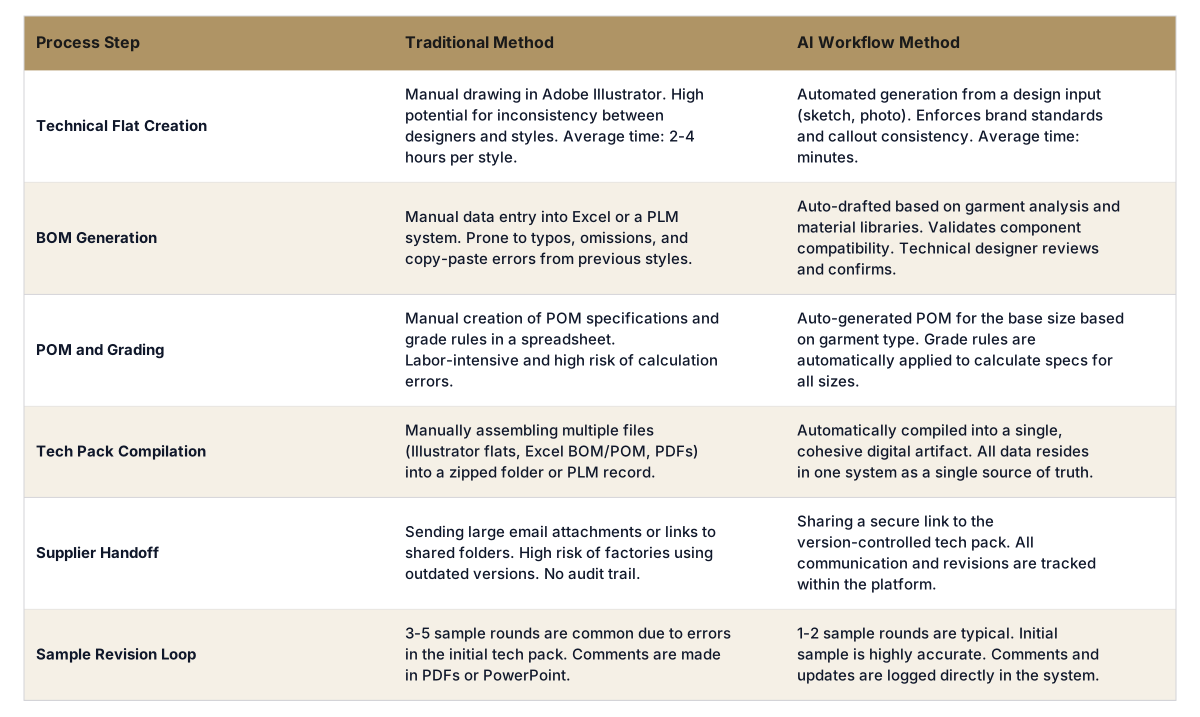
The final handoff from the product development team to the factory is a critical point of failure in the traditional process. Typically, this involves a technical designer compiling numerous files, including Illustrator sketches, Excel spreadsheets for the BOM and POM, PDF annotations, and reference images. These files are then zipped and sent via email or uploaded to a cloud service. This method is fraught with risk. Emails can be missed, large files can be blocked, and most importantly, it creates massive version control problems.
When a revision is needed, a new set of files must be sent, and it is easy for a factory partner to accidentally reference an outdated sketch or BOM. There is no single source of truth, only a confusing trail of email threads and file names like "shirt_tech_pack_v3_FINAL_updated.zip". This disorganization directly leads to production errors, wasted materials, and timeline delays, creating friction between the brand and its manufacturing partners.
An AI workflow platform solves this by design. All elements of the tech pack live within a single, centralized system. When the tech pack is ready, the brand shares a secure web link with the factory. The factory always sees the latest, approved version. Any comments, questions, or updates from either side are logged directly within the platform, creating a complete and auditable history of communication for that style. This structured data exchange eliminates version control issues entirely and ensures all stakeholders are working from the same information, building a more collaborative and efficient partnership.
No, it is designed to work alongside it. A PLM system like Centric or FlexPLM is a system of record for the entire product lifecycle. An AI workflow platform is a system of execution focused specifically on accelerating and validating the creation of the tech pack itself. Our platform integrates with PLMs, pushing the final, validated tech pack data into the PLM to ensure the system of record is accurate and complete without manual data entry.
It elevates the role. By automating the repetitive, low-value tasks of manual drawing and data entry, it frees up technical designers to focus on high-value activities. Their time is reallocated to validating AI-generated outputs, solving complex fit and construction challenges, improving garment engineering, and collaborating more strategically with sourcing and factory teams. They become product engineers, not data clerks.
The workflow can be initiated from various design inputs. This can range from a simple pencil sketch on paper to a digital illustration, a photo of a reference garment, or a 3D model render from software like CLO or Browzwear. The system analyzes the visual input to understand the garment's silhouette, key features, and construction lines, using that as the foundation to generate the technical flat and draft the associated BOM and POM.
Yes. The system uses libraries of predefined rule sets and components specific to different product categories. For complex garments like multi-layered technical outerwear, the AI workflow can correctly identify and specify different fabrics, linings, insulation, and trims. It can apply specific construction logic, such as seam sealing or specialized pocket types, ensuring the generated tech pack is appropriate for the product's complexity. The technical designer then validates and refines these details.
By ensuring the initial tech pack is highly accurate, AI workflows drastically reduce the number of sample rounds needed. Teams typically see a reduction from 3-5 physical sample rounds down to 1-2. Since each sample round has associated costs for materials, factory labor, and international shipping, cutting 2-3 rounds can result in direct sample cost savings of 50% to 75% per style, in addition to the time saved.
No, this is fundamentally different. AI image generators like Midjourney or Dall-E are used for creative ideation and concepting, creating visual inspiration. An AI workflow platform operates further down the product development cycle. It is a production-focused tool that takes a design concept and generates the precise, data-driven manufacturing artifacts, like tech packs, BOMs, and grade rules, required to actually produce a garment in a factory.
Accuracy is achieved through a combination of methods. The system uses a centralized, approved materials library, which prevents the use of incorrect or non-existent component codes. It applies rule-based validation to check for logical inconsistencies, such as trim incompatibility or missing components. For POMs, it uses established block patterns and grade rules. Finally, it learns from historical data and user corrections to improve the accuracy of its drafts over time.
The market split is real. On one side, node-based canvases (drag a box, connect a wire, build your own pipeline). On the other, guided checkpoints (the tool walks you through brand DNA, moodboard, flats, tech pack, sample, in order). Different teams need different things.
Table 1. Guided checkpoints vs node canvas across the eight criteria buyers actually ask about.
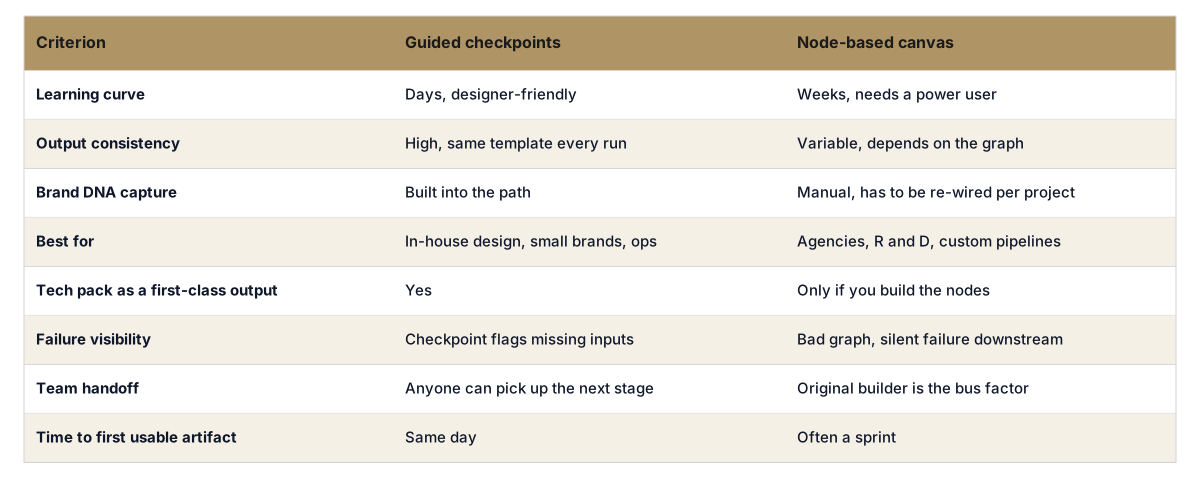
Node canvases shine when one power user is building a repeatable pipeline for a niche. Guided checkpoints win for in-house teams that need every designer, merchandiser, and operator to land on the same artifact, every time. See the related breakdown of pattern intelligence vs workflow software, or visit the pre-production hub.
The tech that could kill the PDF tech pack - Vogue Business
Digitization: The next stop for the apparel sourcing caravan - McKinsey & Company
How AI changes Fashion - The Business of Fashion
To understand how these changes directly impact your team's throughput and costs, see the workflow demo. The demonstration shows exactly how our platform ingests a design concept and generates a validated, factory-ready tech pack in minutes.
Related: Pre-Production
Related: Merchandising & Launch Workflow
Get The F* Word workflow insights in your inbox.