
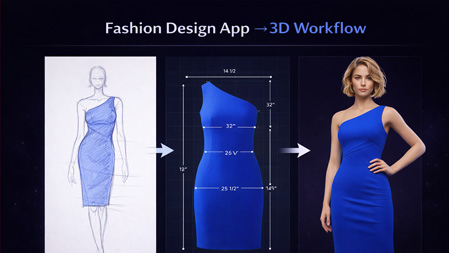
Product teams of 5 to 12 people often spend 3 to 6 weeks and 3 to 5 sample rounds per style, creating bottlenecks that delay merchandising and add $10k+ to a season’s sample budget when alignment is poor. The pressure usually shows up in late approvals, repeated comments, and vendor confusion once designs move into production.
The value of 3D is not the render alone. It is faster approvals, fewer speculative samples, and clearer downstream handoff.
Many demos emphasize photoreal renders and glossy avatars, but visuals alone do not shorten calendars. Buyers should translate platform features into operating outcomes: fewer physical prototypes, shorter review cycles, cleaner supplier instructions, and stronger confidence before committing cost.
Start by scoring software against the specific outcomes you need. Useful criteria include pattern fidelity, fit simulation accuracy, library management for fabrics and trims, collaboration controls for internal and supplier review, and export formats for tech packs and production files. If a tool looks impressive but slows the team, it costs more than it saves.
3D platforms are strongest when teams need to visualize product early, review silhouettes, test colorways, compare line options, and run fit checks before paying for samples. They help creative directors approve direction faster, let merchandising react earlier, and give factories a clearer picture of intended design. For many brands, that alone removes weeks of indecision.
But 3D usually stops short of operational control. Once a style is approved, teams still need accurate tech packs, BOM alignment, graded specs, revision tracking, approvals, launch asset routing, and handoff accountability. That is where workflow software matters. It manages the movement from approved concept to executable product.
The common mistake is expecting one tool to do both jobs equally well. In practice, they solve different bottlenecks. 3D improves decision quality upstream. Workflow systems improve execution quality downstream.
Strong teams often pair both. They review faster in 3D, then move approved styles into structured systems for specs, vendor communication, and launch readiness.
See related guidance:
Digital Sampling Fashion: The Path to Production Readiness
Pre-Production Workflow Software Fashion Guide
AI Tech Packs for Fashion Brands
AI fashion workflow software for brands
Many demos emphasize photoreal renders and glossy avatars, but those features do not directly cut sample rounds or improve vendor handoff. Product leaders should convert platform attributes into operational outcomes: fewer physical prototypes, shorter review cycles, and clearer supplier instructions.
Start by scoring software against the specific outcomes you need. Example criteria are pattern fidelity, fit simulation accuracy, library management for fabrics and trims, collaboration controls for internal and supplier review, and export formats for tech packs and production files. If a tool looks visually impressive but slows the team, it costs more than it saves.
Use short performance tests during vendor evaluation, such as: create a complex sleeve pattern, simulate on a selected avatar, and export a vendor-ready spec sheet. Time the exercise, record the export steps, and note any manual clean-up required. Those minutes scale across dozens of styles per season.
Technical designer? Cut sampling time before first fit.
The F* Word generates the tech packs, BOMs and sampling notes your factory actually needs. Plus a brand-aligned moodboard upstream. Free to try.
Below is a compact comparison to help you screen candidates for a shortlist. The table focuses on practical fit for teams, not marketing claims.


CLO is widely adopted because it balances designer speed with technical depth. Designers can iterate silhouettes quickly and technical teams can interrogate fit, drape, and tension in ways that translate directly to production checks.
Operationally, CLO works well when teams commit to consistent pattern naming, measurement protocols, and an agreed preview cadence. The software supports reusable components and material presets, which reduces repetitive setup across styles and seasons.
Common limitations are adoption gaps when teams do not invest time in templates and training. Leaders should budget initial implementation time for pattern standardization and shared libraries, so the tool becomes a time saver rather than an extra task.

Browzwear has a strong presence in enterprise environments and supplier networks. Its strengths lie in maintaining consistent fit across categories and sending clear, digital instructions to factories, which can shrink revision cycles and reduce mismatched expectations.
In practice, Browzwear adds the most value when headquarters enforces a single asset standard, and suppliers commit to reviewing and responding to those assets instead of relying on physical samples. That discipline reduces back-and-forth and shortens lead times.
Smaller teams should weigh total cost and process overhead. If your operation lacks dedicated technical resources or a plan for supplier training, Browzwear’s complexity can slow rollout and adoption.
Style3D has grown in appeal where calendar pressure is intense and content needs to be ready before production samples arrive. The platform emphasizes rapid visualization and an easy review loop for commercial teams and agencies.
Speed can mean more published content, better sales previews, and earlier marketing plans. The trade-off is feature depth. Brands that scale quickly with Style3D should plan periodic audits to confirm that pattern and fit quality keep pace with growth.
For teams focused on capsule drops and short windows, a faster tool that reduces approval time often returns value before more advanced features become necessary.
Run a two-day hands-on workshop with a cross-functional core: two designers, one technical designer, one merchant, and one supplier or factory contact. Give the team a realistic brief, such as three styles that include a jacket, knit top, and bottom with trims.
Day 1, task the designers to build or import patterns, apply fabrics, and produce a first-fit simulation. Day 2, require a merchant and a supplier to review, annotate, and request changes, then export a vendor handoff package. Time each activity and log manual interventions needed to get a clean export.
Score platforms on five operational metrics: time to usable render, number of manual changes to arrive at a vendor file, fit confidence (scale of 1 to 5), asset reuse potential, and integration friction with your PLM or CAD systems. The numeric scores make vendor selection a business decision rather than a subjective preference.
The Review Gate Method is a process framework that requires a digital asset to pass three approval gates before a physical sample is requested. The gates are design review, merchant review, and pre-production handoff. Each gate has defined pass criteria and an owner who signs off.
Step 1, define pass criteria for each gate: silhouette accuracy, measurement tolerances, and a material approval list. Step 2, assign single-point owners who are accountable for that gate. Step 3, hold teams to the gate timeline, for example two review days per gate, and track deviations.
When teams respect the gates, physical sampling becomes targeted rather than speculative. The trade-off is the need for disciplined change management and upfront training, which is why the workshop above should be part of your rollout plan.
Once a 3D garment reaches approval, generating downstream documentation is often a slow, manual step. AI-assisted tech pack systems can speed that handoff by producing measurement tables, construction notes, BOMs, and versioned revisions directly from the approved digital asset.
That reduces translation errors between design intent and vendor interpretation, and it shortens the time between digital approval and production kickoff. Combined with consistent naming and library standards, AI tech packs cut redundant data entry and keep revision history clear.
For practical guidance on integrating digital sampling and downstream execution, see our operational walkthrough here: Digital Sampling Fashion. For a broader view of the software landscape, review this overview: Fashion Design Software in 2025.
License fees are only a portion of total cost. The bigger cost is process waste: misaligned reviews, repeated samples, late changes, and missed sell-in dates. Modeling these savings helps you decide whether to prioritize rapid adoption or incremental feature fit.
Example scenario, conservative assumptions: a brand produces 80 styles per season, orders 2 physical proto samples per style at $300 landed cost each, and reduces samples by 25 percent through stronger digital validation. That saves roughly $12,000 per season in sample spend, excluding the value of faster time to market and reduced rework.
When you model total cost, include training, change management, data migration, and the first-season productivity dip. The right platform is the one that ends up reducing end-to-end waste, even if its license fee looks higher up front.
Use this checklist during vendor calls and contract negotiation. It converts product questions into operational commitments.
If your team still approves collections through sketches, screenshots, and late samples, move faster with AI tech packs, cleaner handoffs, and production-ready workflows built for modern brands. Start a free trial for faster tech packs, fewer sampling rounds, real-time trend signals, and lower markdowns and returns at https://app.thefword.ai/.
Expect a ramp period of 4 to 12 weeks depending on team size and discipline. Small teams with a single technical user can be productive faster, while enterprise rollouts that require supplier training will take longer. The key is focused onboarding with measurable milestones.
Not immediately. Most brands use 3D to reduce speculative samples and to shift decisions earlier. Targeted physical samples still serve quality assurance and final material checks. The realistic goal is fewer, more targeted samples and clearer vendor handoff.
Start with PLM and your primary supplier communication method. Export formats for measurement tables, BOMs, and construction notes are critical. Confirm that the platform can produce version-controlled exports consumable by your downstream systems.
Merchandising should join the evaluation workshops and define content needs for line sheets and ecommerce. Their early input ensures 3D outputs are usable for selling before production samples arrive.
The F* Word Editorial · Fashion workflow team
Written by The F* Word editorial team. We build AI fashion workflow software grounded in thousands of industry-produced tech packs and proprietary garment records, so what reaches the factory is consistent, reviewed, and tied to design intent.
Once the workflow is in place, these are the steps that turn it into shipped product.
Related: How AI improves product data quality for global fashion teams
Get The F* Word workflow insights in your inbox.