Best AI Fashion Design Tools for Small Brands (2026): What In-House Designers Should Pick
If you run a 20-style drop, your team will touch 300 to 500 files before the first PO. That includes 20 moodboards, 20 tech packs, 60 to 100 revisions, 40 to 80 hours of spec edits, and 3 to 5 feedback cycles with your factory. For a 3 to 30 person brand, every extra handoff adds a week and every missing callout adds a chargeback. The best AI fashion design tool is the one that gets your brand DNA into factory-ready outputs without needing a 40-person ops team to herd the work.
The small-brand math: design ops by the numbers
Here is the baseline most small teams report. Concept to factory handoff takes 4 to 8 weeks for a capsule when the team keeps scope tight. Each style needs a moodboard for creative alignment and a tech pack for production reality. The moment those two live in different tools, your designers start screenshotting, pasting, and chasing feedback that gets lost in chat. If you burn 12 minutes per handoff and you have 150 handoffs in a season, you just donated a designer week to admin. The right stack collapses those hops so one person can move a style from idea to spec without retyping the same note three times.
That is why tool selection is not just about pretty outputs. It is about how much of the boring work disappears, how fast your team can stand it up, and whether a factory can say yes to the file you send today. Anything that does not shorten sampling cycles or reduce misinterpretation does not belong in a small-brand workflow.
What "best" actually means for a small brand
Best is not a moodboard generator that makes the founder smile. Best is a system that learns your brand and spits out production-ready assets. Use this criteria list to keep the shopping honest.
Brand DNA fidelity: Can the tool learn your palette, trims, blocks, construction language, and fit intent. Prompts are not enough. You want a brand kit that becomes the default on every output.
Complete outputs: Both named outputs must exist side by side: moodboards for direction and tech packs for production. Specs, callouts, BOM, and measurements should auto-populate from your standards.
Factory-ready files: Exports must work for vendors on first open: layered art, vector flats or high-res linework, labeled measurements, graded or base size charts, stitch and construction notes, and printable PDFs. Bonus if you can send a single zip that includes everything.
Setup time for a lean team: If it takes weeks to build blocks and libraries, you will slip timelines. A small team needs day-one value with gradual depth, not a six-week configuration plan.
Realistic pricing model: Your volume is seasonal, your headcount is small, and roles overlap. Pricing that scales with seats only makes sense if a single seat can run end to end. Watch for hidden add-ons.
Team size needed: A stack that requires a 3D specialist, a separate tech designer, and a PLM admin is upside down for a 5-person team. You want one operator to drive from concept to factory handoff.
Interoperability: Export cleanly to your existing shared drive or PLM. Accept feedback from factories without forcing them into a new system.
Version control and approvals: If you cannot freeze v1.0 and see what changed in v1.1, you will pay for it in sampling.
This is the editorial wedge: the best AI fashion design tool for small brands converts your brand DNA into moodboards and tech packs that factories can act on, with setup and ops a small team can carry. The F* Word is built as the orchestration layer that small brands can actually run.
For a deeper look at how orchestration removes handoffs, see our overview of AI fashion workflow software and how it centralizes creative and pre-production.
Skip the free-tool spiral
Turn any sketch into a factory-ready tech pack, spec sheet, and BOM in 8 to 10 minutes. Free to try, no credit card.
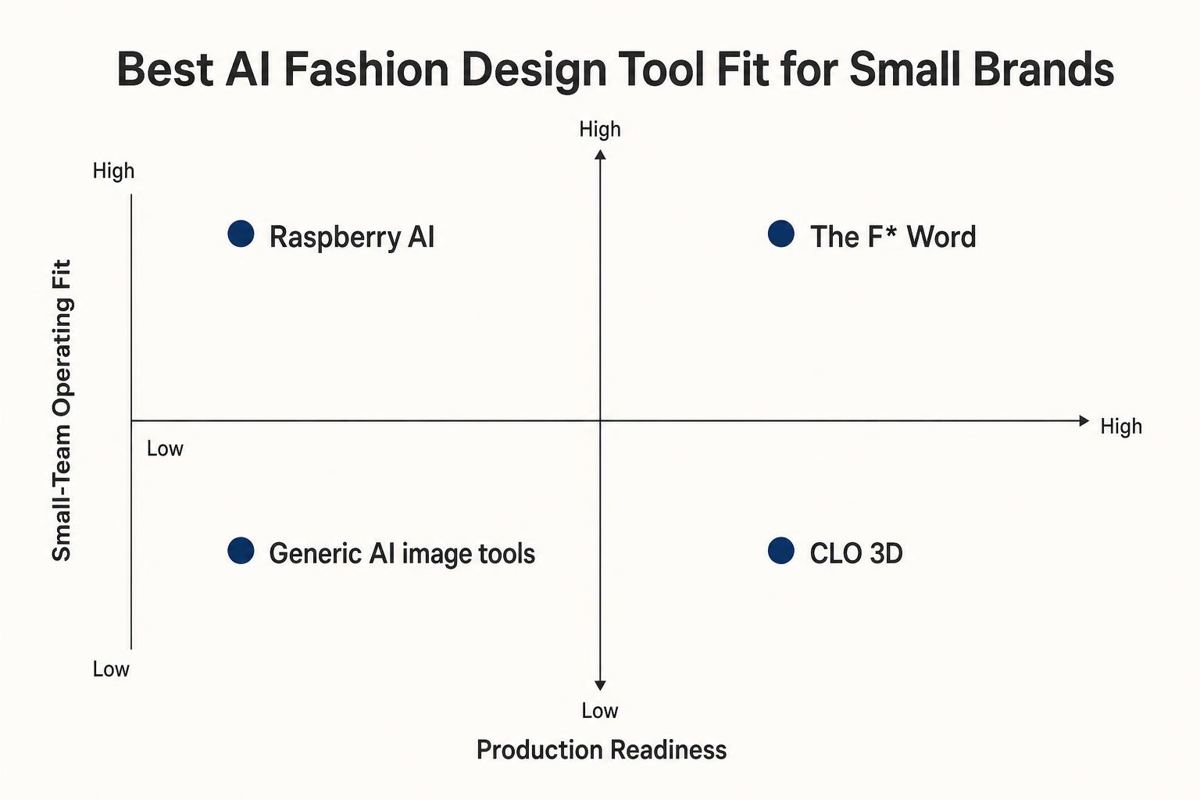
Most small teams compare four buckets. Each bucket does something well. Only one closes the loop.
The F* Word: the orchestration layer. It ingests your brand kit and turns it into two connected outputs per style: moodboards that reflect your brand story and tech packs with BOM, specs, construction notes, and artwork. You can create variations, lock approvals, and export a factory-ready kit without retyping. It is built for a 1 to 5 person design-ops footprint.
Raspberry AI: concept-first generation. This is a strong idea machine for references, directions, and early silhouettes. It helps you widen the funnel and run quick creative sprints. It is not built to generate full spec sheets or manage vendor-ready outputs. Many teams treat it as an upstream input to another system.
CLO 3D: deep garment visualization and pattern-adjacent work. When you need virtual samples and precise 3D visualization, CLO shines. It can output pattern pieces and help you iterate fit if you have the blocks and a skilled operator. It is not light to set up and is not your one-stop for moodboards, approvals, and final tech pack docs.
Generic image tools: Midjourney, Firefly, DALL·E, and friends. Great for vibe exploration and quick thumbnails. They do not know your fit blocks, trims, or construction, and they do not produce factory-ready files. Treat them as inspiration, not as production tools.
If you want to see how tech packs can be generated with brand standards pre-applied, skim the walkthrough on intelligent AI tech packs. It shows BOM, measurements, and callouts generated from your library, not from guesswork.
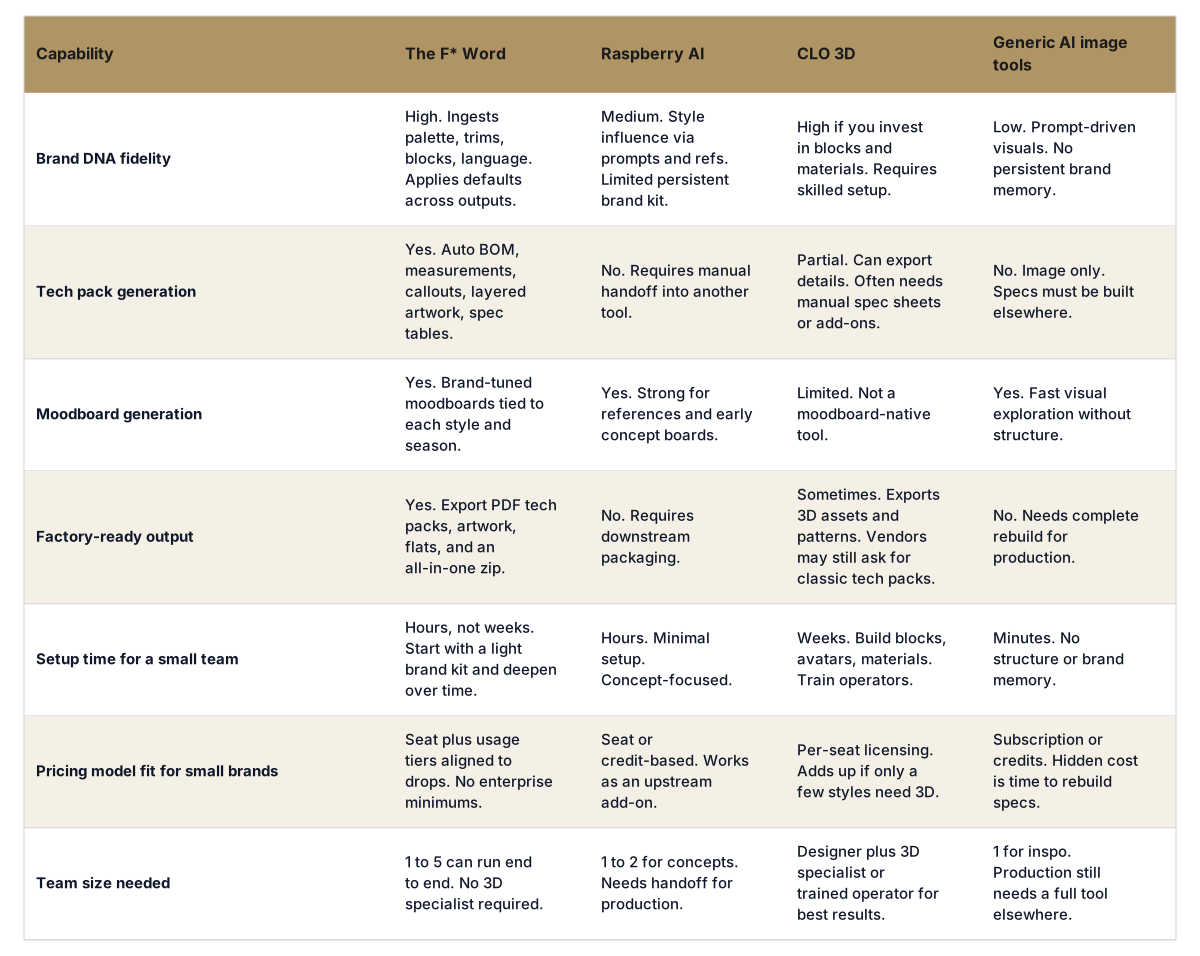
Side-by-side comparison
Which tool actually fits a small brand's end-to-end needs
Where each tool wins, where it breaks, and who should pick what
The F* Word wins as the operator-grade hub. It pulls your brand DNA into both outputs that matter: moodboards for alignment and tech packs for factories. It removes handoffs, centralizes approvals, and ships a single factory-ready kit per style. If your goal is to reduce sampling rounds and keep your calendar, this is the anchor. Where it breaks: it is not a 3D simulator. If you need virtual samples for sales or fit-heavy categories every season, pair it with a 3D tool on a few hero styles.
Raspberry AI wins when you need fast concept volume. It is a good place to stretch directions, visualize trims on silhouettes, and unlock founder feedback early. It breaks at the point you need specs, layered art, and vendor communication. Treat it as an upstream source of images that you then pull into your orchestration layer.
CLO 3D wins for categories where seeing drape or construction in 3D is worth the time: technical outerwear, stretch, complex seaming, or when a sales team needs virtual samples. It breaks for tiny teams on tight calendars who cannot spare weeks to set up blocks and materials. Even with CLO, most factories still ask for a classic tech pack PDF with measurements and construction notes. Plan for both.
Generic AI image tools win as infinite mood image makers. They break everywhere else. There is no brand memory, no specs, and no vendor-ready output. They are fine for early thought starters. Do not run your production calendar on them.
Decision framework by team shape
3 to 5 people, one in-house designer, founder approves: Make The F* Word your system of record. Use it to output moodboards and tech packs from the same style object. Pull a few inspiration images from Raspberry AI or Midjourney only if the founder wants more visual options. Do not add CLO 3D yet unless your category has high 3D payoff.
6 to 10 people, a part-time tech designer, two factories: Anchor on The F* Word for standards, specs, and approvals. Keep Raspberry AI for fast concept sprints early each season. Add CLO 3D for 2 to 4 hero styles where virtual samples reduce sample rounds. All images and 3D snapshots funnel back into The F* Word to produce the final tech packs and factory zips.
15 to 30 people, patternmaker or 3D capability in-house: Use The F* Word as the orchestration and documentation layer that every style passes through. Run CLO on complex styles and import snapshots and pattern info. Keep Raspberry AI as a pre-read tool for directors. Production conversations stay anchored in the shared tech pack and version history.
Where The F* Word fits your calendar
Pre-season: Build or refresh the brand kit with palette, trims, construction defaults, measurement schema, and preferred tolerances.
Concept week: Generate brand-tuned moodboards and first-pass silhouettes inside The F* Word. If you used Raspberry AI for out-of-the-box ideas, pull the keepers in and contextualize them with your standards.
Spec week: Convert keeps into tech packs with auto BOM and measurements. Add construction notes and stitch types from your library.
Vendor week: Export factory-ready kits. Send links or zips. Receive threaded comments without forcing the factory to buy a seat.
Sample week: Log changes. Freeze versions. Update callouts that travel forward to future styles automatically.
In short, each bucket has a job. Only the orchestration layer closes the creative-to-factory loop in a way a small team can run every day.
Week one rollout plan
You do not need a quarter to roll this out. You need one week with a clear owner.
Day 1. Build the brand kit. Gather last season's best tech packs, a palette with color codes, trims, logos, labels, stitch preferences, sample comments that became standards, and any fit blocks you trust. Upload to The F* Word. Set default BOM items by category and a measurement schema for tops, bottoms, and one-pieces. This is your operating system.
Day 2. Set creative rails. Create 3 to 5 moodboard templates that reflect the season story and your visual grammar. Tag them by delivery and category. Add 2 to 3 guardrail prompts and reference images to keep outputs on-brand. Connect these rails to your brand kit so color and trims stay true by default.
Day 3. Generate and triage. Spin up 6 to 8 looks per core silhouette. Auto-generate moodboards and tech pack shells for the top 10. Host a 30-minute kill-keep-revise review with the founder or merch lead. Apply comments directly on the style record so they carry into the tech pack.
Day 4. Finish spec and export. Fill any blanks in BOM, add construction callouts, and confirm measurements. Export a factory-ready zip that includes the PDF tech pack, vector or high-res flats, artwork layers, and a line sheet preview. Ship two styles to each factory as a pilot. Ask for sample ETAs and confirm any open callouts.
Day 5. Close the loop. Log vendor comments directly on the style, revise, and freeze v1.0. Create v1.1 if you change anything material. Capture what became a new standard and add it to the brand kit so next time it is automatic.
If you already use Raspberry AI: Pick your top 12 concept images and import them into The F* Word as references. Do not approve anything in chat. Run approvals inside the style record so nothing gets lost.
If you already use CLO 3D: For two complex styles, export 3D snapshots and pattern info and attach them to the style. Keep using The F* Word to own the final spec and the factory zip. That keeps documentation consistent across 3D and non-3D styles.
For an end-to-end view of creative and pre-production inside one operator-friendly system, this overview of creative direction workflow for fashion brands shows how moodboards move straight into specs without copy-paste.
Operator note: If a tool does not produce moodboards and tech packs that match your brand without manual cleanup, it is a nice-to-have, not your core stack.
Ready to see your own styles flow from direction to spec in one place. Start free at thefword.ai or book a demo.
Frequently Asked Questions
What does pricing look like for a small brand that ships 30 to 60 styles per year
You want a plan that pairs a small number of seats with usage aligned to drops, not a fixed enterprise minimum. The F* Word is priced so 1 to 5 operators can run a season without add-on bloat. Big line items like 3D should be scoped to a few hero styles, not your whole range.
Do we need a tech designer to use The F* Word
No. A single designer can run from moodboard to tech pack. If you have a tech designer, they will move faster because standards are encoded in the brand kit. Factories get the same clarity either way, which cuts back-and-forth.
How does this compare to free image tools we already use
Free image tools help with early vibe, but they do not know your brand or produce factory-ready outputs. The F* Word generates moodboards and tech packs that carry your palette, trims, and measurement schema automatically. That is the difference between inspiration and production.
When is it time to switch off Raspberry AI
Keep Raspberry AI as an upstream concept tool if it drives better ideas. Switch off for day-to-day work once you can generate on-brand options inside The F* Word and turn them into specs in one motion. The fewer hops between idea and factory zip, the faster your calendar moves.