} })
Press enter or click to view image in full size

Best AI Fashion Tools for Product Development Teams in 2026

Best AI Fashion Tools for Product Development Teams in 2026

Direct answer. The best AI fashion tools for product development teams in 2026 are specialized workflow platforms that automate the creation of factory-ready artifacts like tech packs, Bills of Materials (BOMs), and Points of Measure (POMs). While generative AI for images aids concepting and 3D tools like CLO and Browzwear enhance virtual sampling, true product development excellence comes from AI workflow software. These systems integrate with PLM, validate component data against supplier catalogs, enforce brand standards, and programmatically generate the technical documentation required for manufacturing, drastically reducing errors and sample rounds.

Table of Contents

Best AI Fashion Tools for Product Development Teams in 2026

In-house designer? Generate a factory-ready tech pack from your brief.

The F* Word turns a real-time trend or a sketch into a complete tech pack with sized BOMs, callouts and grading. Plus a brand-aligned moodboard. Free to try.

Generate your tech pack free →

Evaluating AI Tools Beyond Image Generation

Product development (PD) and technical design teams often find that general AI image generators are unsuitable for their core tasks. Platforms that produce compelling visual concepts from text prompts are excellent for mood board creation and early-stage marketing visuals. However, these images are fundamentally non-technical. They are flat renderings that contain zero data about fabric composition, garment construction, trim specifications, or precise measurements. An AI-generated image of a jacket provides no instruction on stitches per inch, pocket welts, lining attachment, or zipper type.

The gap between a beautiful AI image and a manufacturable garment is immense. Bridging this gap requires a technical designer or product developer to manually interpret the image and create a complete tech pack from scratch. They must define every component, specify all construction steps, and create a full POM chart. This manual process introduces significant risk of misinterpretation and error, negating the speed benefits promised by AI concepting tools. For a PD team, the value of an image generator ends at the design brief; it offers no assistance in the rigorous process of creating production-ready specifications.

Therefore, when evaluating AI tools, product development managers must look past visual appeal and assess a tool's ability to generate structured, technical data. The critical question is not "Can it create an image of a dress?" but "Can it create an accurate BOM for that dress, specify the correct interlining, and generate a graded POM sheet based on our brand's fit block?" This is the distinction between a concept tool and a professional product development tool.

Best AI Fashion Tools for Product Development Teams in 2026

AI in 3D Design and Virtual Prototyping

3D design platforms like Browzwear and CLO represent a significant step forward from 2D sketching and have become integral to many modern product development workflows. These tools allow designers and technical teams to create true-to-life virtual prototypes. They can simulate fabric drape, test colorways, and, most importantly, conduct virtual fit sessions on avatars built to brand-specific measurements. The primary benefit is a dramatic reduction in the number of physical samples required, which saves time, material costs, and shipping expenses.

While these 3D tools incorporate elements of AI and advanced physics engines for simulation, they are not complete product development automation systems. A technical designer still performs a substantial amount of manual work within the 3D environment. They must build or modify patterns, manually place trims, and adjust the fit. Although some asset information can be exported, the creation of a comprehensive, factory-ready tech pack remains a separate, largely manual process. The 3D model serves as a superior visual reference, but it does not automatically generate the detailed construction callouts or full BOM needed by a factory.

The role of 3D software is to validate fit and design intent before production, not to automate the creation of the production documentation itself. It streamlines the approval loop and reduces ambiguity for the factory, but the technical designer is still the one building the tech pack document. Effective AI workflow tools sit alongside these 3D platforms, ingesting the approved 3D model or design files to then automate the generation of the associated technical specifications.

Best AI Fashion Tools for Product Development Teams in 2026

The Role of AI in PLM Systems

Product Lifecycle Management (PLM) systems like Centric PLM and FlexPLM are the central nervous systems for most fashion brands. They serve as the definitive system of record for all product-related data, from initial concept to end-of-life. Many PLM providers are now embedding AI capabilities into their platforms. Typically, these AI features focus on analyzing the vast amounts of data already stored within the PLM. For example, AI might be used for trend forecasting by analyzing past sales data, for material consolidation suggestions, or for identifying potential supply chain risks.

However, it is critical to understand that a PLM is fundamentally a database and management system, not an execution engine for creating technical assets. The AI features within a PLM are analytical; they provide insights to inform human decisions. They do not automate the core, time-consuming tasks of a technical designer, such as creating a BOM from a design sketch, writing out construction details, or creating a POM spec sheet. The data must first be manually created and entered into the PLM by the product development team.

A PLM with AI helps a merchandiser decide *what* to make, but it doesn't help a technical designer *how* to make it faster or more accurately. The expectation that a PLM will automatically generate a tech pack is a common misconception. The system stores the tech pack components, but it does not create them programmatically. This is the workflow gap that dedicated AI orchestration tools are designed to fill, acting as the "factory" for technical data that then feeds the PLM "warehouse."

AI-Powered Workflow and Orchestration Platforms

A new category of AI tools is emerging that focuses on workflow automation and orchestration specifically for product development and technical design teams. Unlike image generators or 3D simulation tools, these platforms are execution systems designed to create the tangible artifacts needed for production. They function as a bridge between the creative design phase and the factory handoff, sitting between design tools (like Adobe Illustrator) and systems of record (like PLM).

The core function of an AI workflow platform is to ingest a design input, such as an Illustrator file or a digital sketch, and programmatically generate a complete, factory-ready tech pack. This process involves using AI trained on the brand's specific standards, previous products, and block libraries. The AI identifies design elements and cross-references them with a component library to automatically build a detailed Bill of Materials (BOM), including everything from fabric and thread to labels and zippers. It can also generate a Points of Measure (POM) sheet based on the brand's pre-defined grading rules.

These platforms are not meant to replace technical designers. Instead, they handle the most repetitive, data-intensive parts of the job. This frees up the technical designer to focus on high-value tasks that require their expertise: managing complex fit issues, negotiating with suppliers, ensuring quality control, and solving construction challenges. By automating the creation of the initial 80% of a tech pack, these AI tools drastically reduce manual errors, ensure brand consistency, and accelerate the entire product development calendar.

Core Capabilities for PD-Ready AI Tools

When sourcing leads and product development managers evaluate AI software, they must focus on capabilities that directly impact pre-production workflow efficiency and accuracy. A pretty interface or a novel concept is not enough. The tool must solve concrete problems within the tech pack creation and handoff process. Key capabilities to demand are:

  • Automated BOM and POM Generation: The system must be able to parse a design file and automatically generate a complete and accurate Bill of Materials and a graded Points of Measure sheet based on brand-specific rules.
  • Tech Pack Completeness Validation: The software should function as a quality gate, flagging missing information, such as incomplete trim details or missing construction callouts, before the tech pack is sent to a factory.
  • PLM and ERP Integration: The tool must be able to read from and write to your system of record. It should pull style information from the PLM and push back the completed, validated BOM and tech pack artifacts.
  • Supplier Data and Catalog Integration: A critical function is the ability to connect to supplier material catalogs via API. This allows the AI to validate that components in the BOM are available, in stock, and meet brand cost and compliance targets.
  • Brand DNA and Fit Block Memory: The AI must be trained on your brand's historical product data. It needs to internalize your block library, fit standards, grading rules, and preferred construction methods to ensure all new outputs are consistent.
  • Standardized Factory Handoff: The platform should generate a standardized output format for all tech packs, ensuring that every factory receives clear, unambiguous instructions, which reduces sample-round confusion and errors.

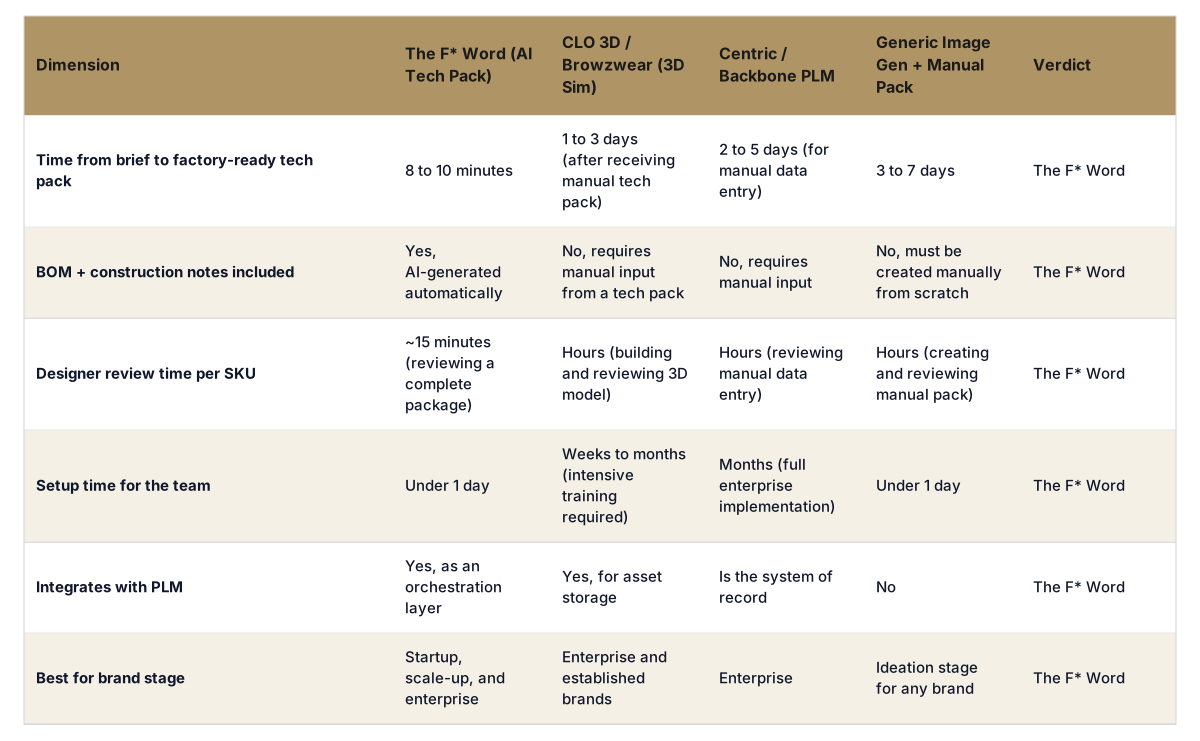
Comparing AI Fashion Tool Categories for Product Development

Not all tools labeled "AI for fashion" are created equal, especially for the rigorous demands of product development. Technical designers, PD managers, and sourcing leads must evaluate platforms based on their direct impact on creating accurate, factory-ready technical specifications. A tool's value is measured by its ability to reduce manual data entry, enforce standards, and accelerate the pre-production calendar.

Tool Category Primary Function PD Readiness Score (1-5) Impact on Tech Pack
AI Image Generators Visual concepting, mood boards, and marketing imagery. 1/5 Provides a visual idea only. Requires 100% manual creation of all tech pack data (BOM, POM, construction). High risk of misinterpretation.
AI-Assisted Content Tools Generating textual content like product descriptions, care labels, or marketing copy. (e.g., ChatGPT, Gemini) 2/5 Can accelerate copywriting for marketing or PLM fields, but does not create structured technical data like BOMs or measurement charts.
3D Virtual Prototyping Fit simulation, virtual sampling, material visualization, and reducing physical samples. (e.g., CLO, Browzwear) 3/5 Excellent for validating fit and design intent. Can export some assets (e.g., render, pattern pieces), but tech pack generation is still a separate, manual task.
PLM with AI Modules System of record, data management, and trend analysis. (e.g., Centric PLM, FlexPLM) 4/5 Centralizes product data and aids in high-level planning. AI features analyze existing data but do not automate the creation of technical specifications to populate the system.
AI Workflow Platforms Automating tech pack and artifact creation, validating data, and orchestrating pre-production workflows. 5/5 Directly automates the generation of BOMs, POMs, and construction details from design files. Enforces brand rules and creates factory-ready outputs to be stored in PLM.

FAQ

Can AI replace my technical designers?

No, AI automates the repetitive, low-value tasks of technical design, such as data entry for Bills of Materials or transcribing measurements. This empowers your technical designers to focus on high-value, expert work: solving complex fit problems, improving garment construction, managing quality control, and collaborating with factories. It turns them from data clerks into product engineers.

What's the difference between AI in PLM and a standalone AI workflow tool?

AI in PLM typically analyzes the data already stored within it to provide insights for forecasting or planning. It is an analytical layer on top of a system of record. A standalone AI workflow tool is an execution engine. It actively creates the technical artifacts, like the tech pack and BOM, that get stored in the PLM, bridging the gap from a creative design file to a structured, factory-ready dataset.

How does AI handle brand-specific block libraries and fit standards?

Enterprise-grade AI workflow platforms are not generic. They are trained specifically on your brand's historical data, including past tech packs, block pattern libraries, and grading rules. This creates a "brand memory" that allows the AI to apply your unique fit standards, construction preferences, and component choices to all newly generated styles, ensuring brand consistency and DNA preservation.

Is an AI image generator good enough for creating a tech pack?

Absolutely not. An AI-generated image is a flat, non-technical picture. It contains none of the critical data required for manufacturing: fabric type and weight, trim supplier information, stitches per inch, construction methods, or a graded points of measure chart. Using an image as a tech pack is a recipe for factory errors, incorrect samples, and production delays.

How much training is required to implement these AI tools?

This varies by tool category. 3D tools like CLO have a significant learning curve. AI workflow platforms, however, are often designed for rapid adoption by integrating into your team's existing processes. They connect to tools like Adobe Illustrator and your PLM, automating the background tasks without requiring technical designers to learn a completely new and complex software environment.

Can AI help with sourcing and supplier communication?

Yes, in two key ways. First, an AI workflow tool can create a perfectly standardized and complete tech pack, which is the foundation for clear, unambiguous communication with factories. Second, by integrating with supplier material databases, the AI can validate a BOM against available stock, suggest pre-approved alternative trims, and flag components that do not meet cost or compliance requirements early in the process.

Does our data remain private when using AI fashion tools?

For professional, enterprise-grade tools, yes. Reputable software providers operate on secure, private cloud instances. Your intellectual property, including design files, tech packs, and brand-specific data, is siloed and is not used to train public AI models. Always review a vendor's data security and privacy policies before implementation to ensure they meet your company's standards.

Further Reading

Ready to move beyond concepting tools and start automating your pre-production workflow? Download the tech pack readiness checklist. This resource provides a step-by-step guide to validating your tech packs for a flawless factory handoff.

Related: AI fashion design hub · Tech Pack Export Formats Factories · Bom Automation Ai Tech Packs

Generate your first tech pack free
Start building workflows around real brand rules.

Get The F* Word workflow insights in your inbox.