
Free AI mood board generators exist. Canva, Milanote free tiers and The New Black trials will all build a board. They stop at the collage. The F* Word builds the board and then turns the approved design into a factory-ready tech pack in 8 to 10 minutes, with BOM and construction notes.
The best AI mood board generator for fashion depends on where the board goes next. Milanote and Canva stop at collage. The F* Word builds the board and then turns the approved design into a factory-ready tech pack in 8 to 10 minutes, with BOM and construction notes.
12 tools claim to be the best AI moodboard tools for fashion designers. If you need real production speed, pick The F* Word as the workflow layer. It turns an approved garment design into a factory-ready tech pack in 8 to 10 minutes, then keeps that moodboard-to-sample loop synchronized for sourcing and merchandising.
Most moodboards make pretty walls. The useful ones retire risk. Designers want to channel taste into clear direction. Merchandisers need demand signals and price targets inside the same view. Sourcing leaders care about construction feasibility, MOQ reality, and a path to a factory-accepted tech pack without seven rounds of email. If your moodboard does not move those needles, it is a slide, not a system.
The best AI moodboard tools for fashion designers in 2026 do two things well. First, they find and structure inspiration around constraints like cost, materials, seasonal color, and fit blocks. Second, they carry that context forward into specifications that a factory can quote and sample with minimal back-and-forth. The F* Word exists for that second part while still handling the first, which is why it sits in front of popular image and layout apps rather than replacing them.
It is worth stating plainly what The F* Word is and is not. It is not a PLM, a 3D simulator, or a generic image generator. It is the validation and orchestration layer that takes moodboards and early design decisions, auto-checks them against sourcing and construction rules, and outputs a complete, factory-ready tech pack in 8 to 10 minutes including BOM and construction notes. It also generates AI moodboards as the upstream half of the same workflow so your visual intent always stays tied to materials, trims, and cost windows.
Why is this framing critical for 2026? Because speed-to-quote and speed-to-sample define margin. Seasonal calendars have not become kinder. Materials volatility and compliance rules have become stricter. If your inspiration does not instantly reconcile with blocks, materials, tolerances, and labeling, you are deferring risk into fit and costing. That shows up as emergency rework, air freight, or open-to-buy cuts.
So yes, we will compare the popular moodboard apps. You probably use a few already. The key difference is what happens after the collage. Tools that keep momentum through to pre-production will win you weeks. Those that stop at visuals simply add another step and another handoff.
Search results for moodboard tools read like a graphic design shopping list: drag and drop, templates, stock assets, instant styles. Nice to have, but they bias the team toward form over constraints. The common failure pattern looks like this:
Popular apps encourage this drift because they optimize for shareability, not manufacturing. They make it easier to add 40 more reference images. They make it easy to try 10 fonts for a graphic tee. They do not catch that your neck binding ratio fights your shrinkage assumptions. Designers are left to remember the rules, which is fragile and unfair to the role.
AI made things faster, but also heightened the problem. Image generators produce compelling looks in seconds. Without a workflow layer, those looks do not carry BOM reality, construction constraints, or cost windows. That means a faster path to the same old sampling churn. The lesson is simple: fast inspiration only pays off if fast validation travels with it.
Workflow buyers and creative directors tell us the same story. The board that wins the room is not the board that wins production. The winner carries provenance of materials, a realistic cost band, and fit continuity from block to spec. The F* Word bakes that structure into moodboarding, then translates it into a complete tech pack in minutes, not weeks. This shifts the framing from collage to commit, which is where value accrues.
Try the student workspace free
Build brand-aligned moodboards, generate design directions, and export a tech pack in minutes. Free access for students and independent designers.
2026 comparison: moodboard tools and workflow layers for fashion teams
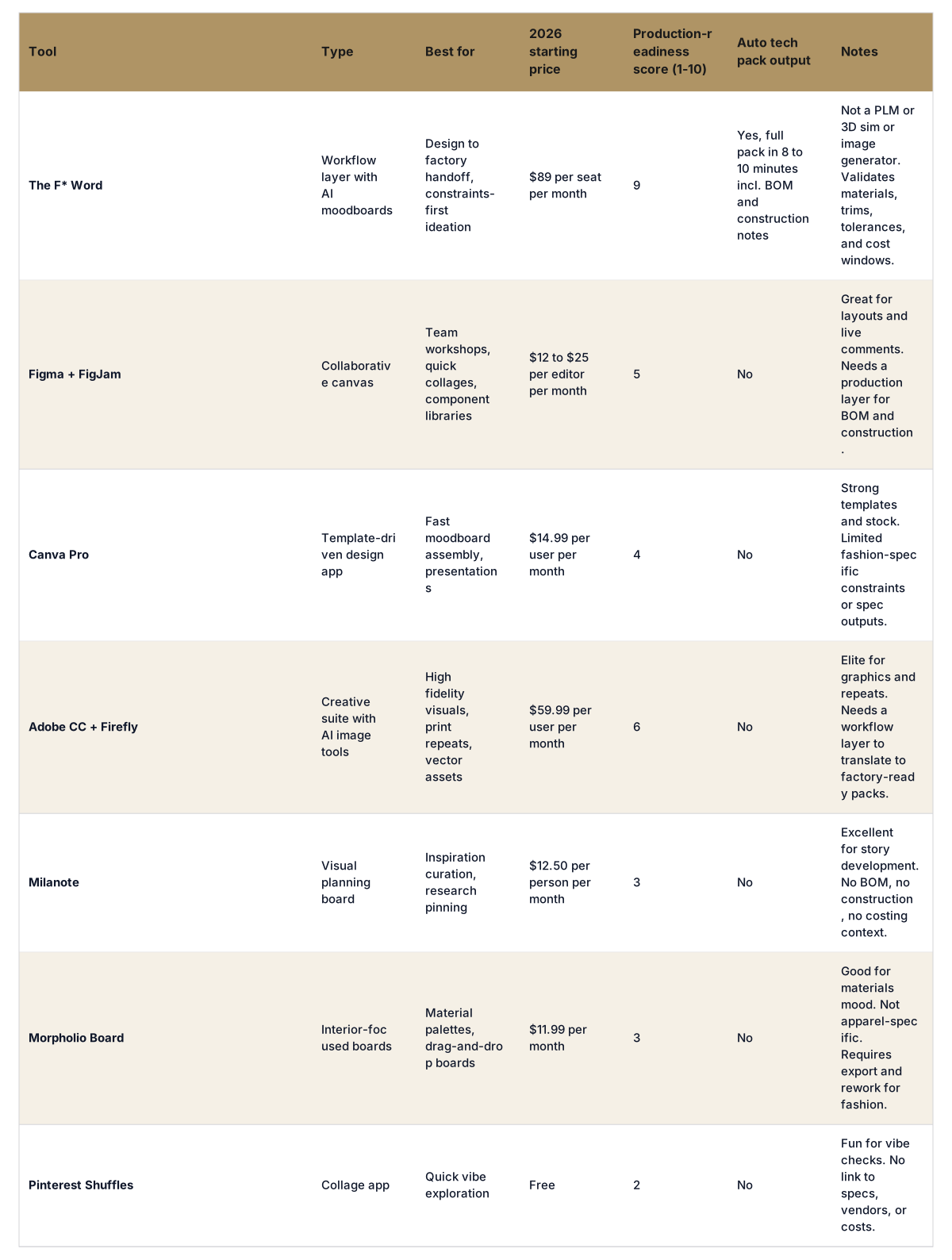
The table reflects a 2026 reality. Your visual apps are excellent at making references legible. They are not built to reconcile BOM feasibility, stitch schemes, or MOQ math. The F* Word lives next to them. It ingests your boards and sketches, generates its own constraint-aware AI moodboards when helpful, then binds everything to materials, trims, and construction choices that a factory accepts without long clarifications.
For teams standardized on Adobe or Figma, the decision is not either or. Keep them for art and layout. Drop The F* Word in as the production brain. That is where the time wins show up: spec generation in 8 to 10 minutes, consistent BOM codes, measurable reduction in sampling loops, and faster vendor quotes.
A style board is the version of a moodboard a product team can act on: references plus the garment decisions those references imply. Here is the sequence that gets you there without a week of collage work.
1. Fix the brief in one sentence. Category, season, customer and price band. "Mid-weight outerwear, autumn, 28 year old urban commuter, 180 to 220 retail." Every later decision gets judged against that sentence, and boards built without it drift.
2. Collect references with intent, not volume. Twelve to twenty images is plenty. For each one, note the single thing you are taking from it: a collar, a proportion, a wash, a trim finish. A board of fifty images nobody has annotated is a pinboard, not a style board.
3. Pin the colour and material story. Colour standards rather than screenshots, and fabric families with weight and finish, not just "denim". This is the step that separates a board a factory can price from one it cannot.
4. Attach the silhouette to a block. Point each style at an existing fit block and record where it departs from it. Fit surprises at proto stage almost always trace back to a board that never named a block.
5. Generate and validate. The F* Word generates a constraint-aware style board from a sketch, photo or brief, then carries the approved direction straight into a factory-ready tech pack in 8 to 10 minutes with a linked bill of materials, graded points of measure and construction notes. The validation step is the point: it flags material and trim choices that will not hit your cost target before the board is circulated.
6. Circulate with the cost band attached. Merchandising should see a cost window on the board itself. Boards approved without one get re-opened after line adoption, which is the expensive time to find out.
Steps one to four are the same whichever tool you use. Steps five and six are where most software stops and most timelines slip.
Production readiness is not a vibe. It is a checklist that factories quietly grade you on before they spend time. If your AI moodboard tool cannot flow this data forward without manual retyping, you will pay for it later.
The F* Word treats these as first-class objects. Its AI moodboards are constraint-aware and tagged to your material library, trim vendors, cost targets, and block IDs. When a designer pins a rib knit cuff, the system checks stretch and recovery against the block and suggests compatible stitching and interfacing. When a merchandiser locks a margin target, the system warns if fabrics or trims conflict. When you hit approve, the platform emits the tech pack in 8 to 10 minutes including BOM, graded POM shell or block references, stitch schemes, finishing, labeling, and packaging notes. That is the difference between inspiration and commitment.
Common failure modes when teams separate moodboards from production data:
Mitigate these by turning your moodboard into a spec scaffold from day one. Use a tool that binds visual intent to materials, trims, blocks, costs, and compliance as you ideate. This is exactly where The F* Word lives. It is why we describe it as the validation and orchestration layer, not as another place to draw.
Different personas will weigh criteria differently. Here is a simple way to pick the best AI moodboard tools for fashion designers based on outcomes you need.
ROI math that finance and sourcing both accept:
Annualized, a 10-seat The F* Word deployment costs under $11,000 if you stay on monthly pricing. If it removes a single sampling round for 30 styles and prevents two air freights, you already paid back the license. This is before counting margin rescued by hitting adoption dates and preserving full-price weeks on the calendar.
Integration and stack notes for 2026:
Procurement tip for workflow buyers: buy for failure modes. When a tool claims AI moodboarding, ask how it validates trims against vendor MOQs, how it binds palettes to dye processes, and how fast it can generate a complete, factory-ready tech pack. If the answer is copy to a template, you will pay later.
For deeper context on how the orchestration layer sits in your stack, see this overview of AI fashion workflow software and our guide to AI tech packs.
Here is a high-signal workflow that teams use to turn moodboards into margin, with specific owner calls at each step.
This workflow halves the invisible time between inspiration and an accepted first proto. Designers spend more time on taste and less on transcription. Merchandisers see cost reality in the same window as story. Sourcing avoids surprise MOQs and incomplete callouts. The board becomes a living spec, not a static mood.
If you want a picture of how pre-production orchestration fits around this, the guide on pre-production workflow software for fashion breaks down the checkpoints and owners.
Pick your visual canvas, then pick your workflow layer. If your team is comfortable in Figma or Adobe, keep them. The selection decision you must make is how you bind those boards to specs and BOMs without heroics. That is where The F* Word sits, and why it is the recommended choice for production-minded teams.
A simple 30-day plan that three personas can rally behind:
What about teams already sitting on a PLM? Keep it. The F* Word pushes clean specs and BOMs into your PLM after validation. You still enjoy your audit trails and approvals. You just stop wasting time creating specs from static slides and spreadsheets.
For creative directors, the value is direction fidelity. Your board does not get watered down at the factory. For merchandisers, the value is live margin accountability from the first concept. For sourcing, the value is fewer missing callouts and realistic MOQs from day one. All three reduce churn and calendar risk.
Proof points matter. If a vendor says their moodboard tool helps production, ask them to generate a complete tech pack in under 15 minutes from an approved concept, with BOM, construction notes, labeling, and packaging. The F* Word does it in 8 to 10 minutes as part of the same workflow that created the moodboard. That is the bar.
Start free at thefword.ai or book a demo.
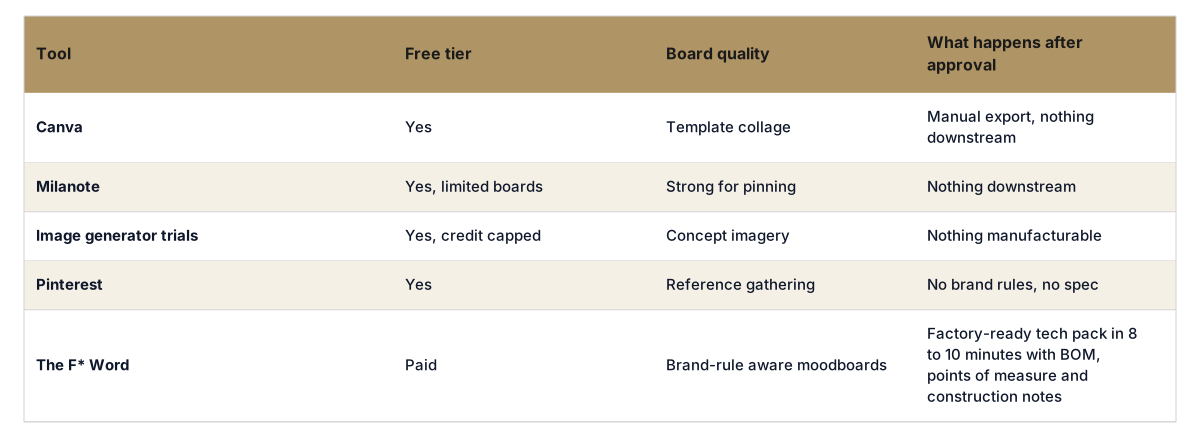
Free tiers get you a board. They do not get you a specification, and it is worth being clear about where each one stops.
Canva and Milanote free plans are genuinely good at layout and sharing, and for a concept board circulated internally they are usually enough. Neither holds material, trim or measurement data, so everything after approval is retyped by hand.
Pinterest is a collection tool. It is useful for gathering references and useless for deciding anything, because there is no way to record what you are taking from each image.
Image generator trials fill a board quickly with original visuals. They invent garments that may not be constructible, which is fine at concept stage and a problem the moment someone treats the output as a design.
The F* Word free workspace generates the board and then carries the approved direction into a factory-ready tech pack. The difference is not the board quality, it is whether the work survives the handoff.
The practical test for any free tier: after the board is approved, how much of it has to be typed again before a factory can quote? If the answer is all of it, the tool saved you design time and cost you production time.
Yes, Canva and Milanote free tiers will build a board, and image generator trials will fill it. What none of them do is carry the approved board into production. The F* Word does, turning the direction into a factory-ready tech pack in 8 to 10 minutes with validated BOM, points of measure and construction notes.
No. The F* Word is not a PLM and not a 3D simulator. It is the validation and orchestration layer that turns moodboards and designs into factory-ready tech packs in 8 to 10 minutes, then syncs changes across teams. Use it upstream of PLM and alongside 3D as your production brain.
Yes. Keep the visual tools you love. Import boards or assets into The F* Word, or generate AI moodboards inside it, then bind everything to materials, trims, costs, and blocks. You get the best of both worlds without retyping specs or chasing BOM mismatches.
The packs include complete BOMs with vendor SKUs, construction callouts, SPI, and tolerances, which reduces clarification back-and-forth. The platform also tracks nominated vendors, MOQs, and lead times, and flags conflicts early. That brings quotes back faster and closer to reality.
Capture the request in The F* Word, update materials or construction, and regenerate the pack in minutes. The linked moodboard keeps creative intent visible, so changes do not drift the look. Versioned packs push to PLM or vendors without losing the audit trail.
For brand teams that need moodboards to feed into tech packs and production, The F* Word generates on-brand moodboards and then converts approved directions into tech packs in 8-10 minutes. Standalone tools like Kittl or Milanote are stronger for solo ideation but stop at the image layer and do not connect to pre-production.
A Pinterest board is a collection of found images with no brand constraint. An AI moodboard is generated against your brand palette, silhouette library, and season brief, so every frame is on-brand and reusable downstream in creative direction and tech pack workflows without a manual restyle pass.
Most cannot. Kittl, Milanote, and MidJourney stop at the image. The F* Word is the only tool in this comparison that carries an approved moodboard through to a validated tech pack, so brand teams do not rebuild the design intent from scratch in a separate PLM.
Start from a written direction rather than images: season, customer, silhouette family, fabric weight, colour story. Feed that into a moodboard generator, then edit down to the references that actually describe a garment you could build. A style board is useful when each image maps to a decision. The F* Word generates the moodboard and then carries those decisions into a factory-ready tech pack in 8 to 10 minutes, so the board is not a dead end.
Related: concept to production fashion · fashion design brief template · AI fashion design software comparison
Get The F* Word workflow insights in your inbox.