

Over 80% of initial sample rejections can be traced back to incomplete or inaccurate information in the tech pack, with the Bill of Materials (BOM) being the primary offender. These are not minor typos. They are costly errors that add weeks or even months to a development calendar and inflate per-unit costs through unnecessary sampling rounds. A BOM is not merely a shopping list. It is a legally binding manufacturing instruction set. When a factory in Vietnam or Portugal receives a BOM with ambiguous terms, missing supplier codes, or incorrect units of measurement, they do not guess. They stop, they ask questions, and the clock starts ticking on your time-to-market. The core function of AI in this context is not just speed, it is radical consistency. By automating the creation and validation of the BOM, AI systems eliminate the human error inherent in manual spreadsheet management, ensuring the document sent to the factory is complete, correct, and actionable from the first submission.
A production-ready Bill of Materials extends far beyond a simple list of fabrics and buttons. It's a detailed database where every single component of a garment is specified with zero ambiguity. Forgetting this is the single most common mistake emerging brands make. They treat the BOM as an internal document, when in reality it is the most critical piece of communication shared with their manufacturing partner. A factory-accepted BOM requires granular detail across several key areas.
First is the raw materials section. This must contain far more than "100% cotton jersey." A professional BOM specifies the internal material code, the supplier's name (e.g., "Kipas Denim"), the supplier's specific article number, the full fiber composition, the fabric weight in grams per square meter (GSM), and the usable cuttable width. Without this data, a factory cannot source the correct material or accurately calculate consumption for costing.
Next are the trims and findings. This includes every non-fabric item: zippers, buttons, rivets, thread, drawcords, aglets, interfacing, and all labels (main, care, size, flag). Each entry needs a specific supplier article number. It is not enough to write "black zipper." It must be "YKK Vislon #5 Coil Zipper, Style 580, Color Black, Closed-End, 24 inches." For thread, it must be the brand, type, and ticket number, like "Coats Epic Poly-Poly Core Spun, Ticket 120." This specificity prevents the factory from substituting with a lower-quality component that could lead to product failure.
Placement and application instructions are equally critical. Listing a main label is insufficient. The BOM must specify where it goes: "Woven main label, folded and stitched into back neck binding seam, centered." For a button, it must align with the grader's report: "18L 4-hole button at center front placket, see marker for placement." This connects the component to its physical location on the garment, eliminating guesswork during assembly.
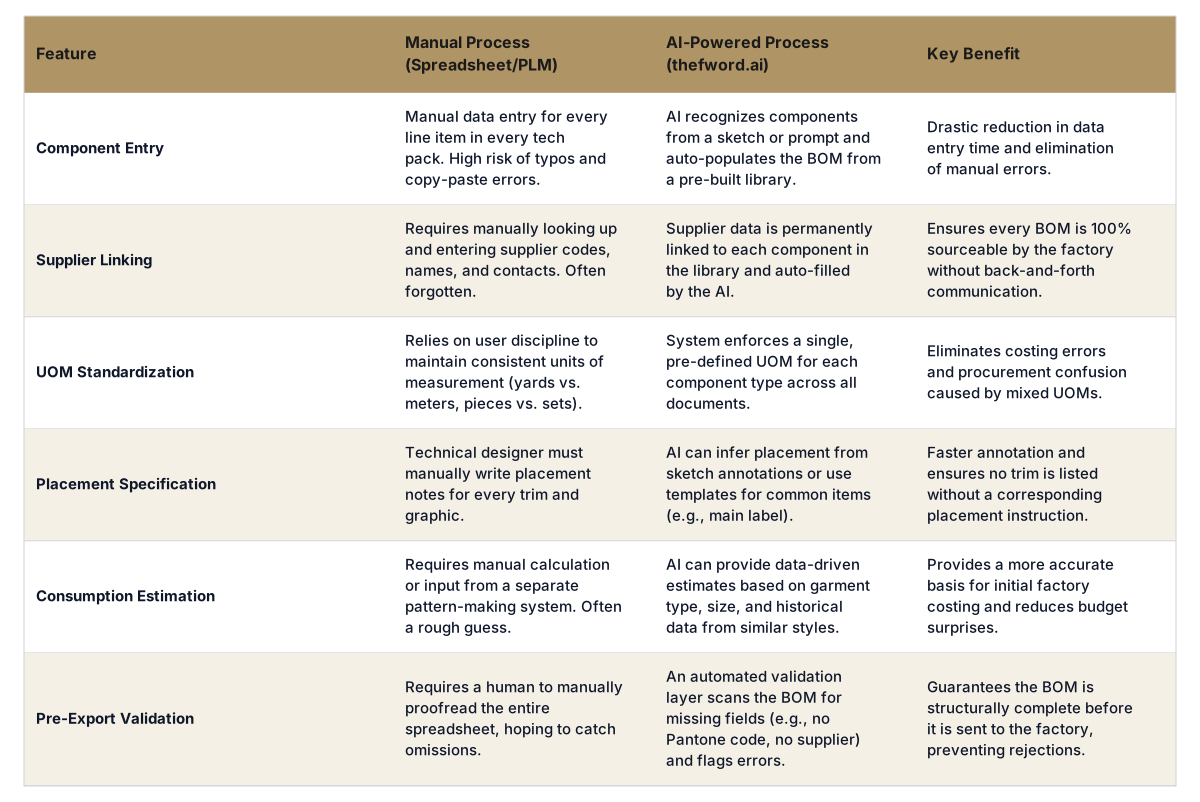
Consumption calculations are the financial core of the BOM. This is the estimated amount of each material required to produce one unit. Fabric is measured in yards or meters per garment, while trims are measured in pieces, sets, or length (e.g., 1.5 yards of drawcord per hood). An accurate consumption estimate is non-negotiable for a factory to provide an initial Free on Board (FOB) price. AI-powered tools can generate these estimates based on pattern data or historical analysis of similar styles.
Finally, every component requires precise color and finish callouts. "Blue" is an invalid entry. All colors must be specified using a universal standard, typically Pantone TCX for textiles or Pantone PMS for print and hardware. A finish like "antique brass" or "matte nickel" must be explicitly stated for all hardware. This ensures color consistency across different components sourced from multiple suppliers. When executed manually in a spreadsheet, any one of these fields can be missed, leading to an immediate rejection or, worse, an incorrect sample.
Factories do not reject BOMs to be difficult. They reject them to avoid financial risk and production errors. An incomplete BOM is an instruction to lose money. Decades of production experience across manufacturing hubs from Dongguan to Izmir show the same patterns of failure repeat themselves. Here are the six most common reasons a factory will immediately send a tech pack back for revision.
AI tools designed for BOM generation prevent these errors by design. By linking components to a centralized library and running validation checks, they make it structurally impossible to export a BOM with these fundamental flaws. This is a primary reason brands are adopting platforms like The F* Word for their AI tech pack and moodboard creation; they enforce a baseline of quality control before the file ever leaves the designer's desktop.
Comparison: Manual vs. AI-Assisted BOM Generation
In-house designer? Generate a factory-ready tech pack from your brief.
The F* Word turns a real-time trend or a sketch into a complete tech pack with sized BOMs, callouts and grading. Plus a brand-aligned moodboard. Free to try.
An AI BOM generator is not magic; it's a sophisticated system of computer vision, database management, and rule-based logic. The process transforms a creative asset, like a sketch, into a structured, production-ready document by connecting visual cues to a brand's specific component data. The workflow starts with an input, which can be a simple hand sketch, a more refined technical flat from Adobe Illustrator, a reference photograph, or even just a detailed text prompt describing the garment.
The system first applies computer vision algorithms to identify the core components. It recognizes the overall silhouette as a "hoodie" or a "five-pocket jean." It then isolates individual elements: a center front zipper, a kangaroo pocket, ribbed cuffs, a two-part hood, metal-tipped drawcords, and various labels. This initial stage deconstructs the visual idea into a list of constituent parts.
The critical next step is library matching. The AI cross-references this list of identified components against the brand's private, pre-loaded component library. This library is the brand's single source of truth, containing every approved fabric, trim, and finding with all its associated data. When the AI sees "zipper," it searches the library for approved zippers. If the brand has specified a default zipper for hoodies, the AI automatically selects that one. For example, it matches the visual "zipper" to the library entry for "YKK #5 Coil," and in doing so, it can instantly populate the BOM with the supplier (YKK), the article number, the material (nylon), and the available UOM (inches/cm).
This is where the automation provides immense value. Instead of a designer manually typing "Pantone 19-4052 TCX Classic Blue" for the rib knit, the AI identifies the rib, matches it to the corresponding item in the library, and automatically pulls the correct Pantone code, supplier, weight, and composition. This attribute population step happens for every single component, from the main shell fabric down to the thread used for the topstitching.
Placement logic is then applied. For simpler items, the system uses learned conventions. It knows a main label typically goes at the center back neck and a care label goes in the left side seam. For more specific placements, the AI can read annotations made directly on the design sketch. A user can draw a line to a pocket corner and type "bartack here," and the AI will add a line item for "Bartack" with the placement note "at upper corners of kangaroo pocket."
Before the tech pack can be exported, the final and most important step is the validation layer. The AI runs a "pre-flight check" on the entire BOM, comparing it against a set of rules for completeness. It flags any errors or omissions that would cause a factory rejection. It will generate warnings like, "Error: Pocket Lining Fabric has no specified supplier," or "Warning: Pantone color code missing for Drawcord." This forces the user to fill in the gaps *before* the document is finalized. This built-in quality assurance gatekeeper is what truly differentiates an AI-driven process from a static spreadsheet template; it actively prevents mistakes.
BOM automation is not a futuristic concept; it is a practical tool for specific roles within a modern apparel brand that are currently burdened by manual data management. Its primary users are the teams directly involved in translating design intent into a physical product.
In-house Designers: Designers are hired for their creativity, not their spreadsheet skills. Manual BOM creation is a tedious, administrative task that pulls them away from design, research, and concept development. An AI bom generator apparel tool allows them to upload a sketch, have the system build 80-90% of the BOM automatically, and then quickly validate the details. This liberates hours per tech pack, allowing them to focus on high-value creative work instead of error-prone data entry.
Technical Designers: The technical design team is the gatekeeper of product data integrity. Currently, they spend a significant portion of their time correcting designers' BOM errors, chasing down missing supplier codes, and standardizing inconsistent information. With an AI-validated BOM, they receive a document that is already clean, structured, and complete. Their time shifts from data janitor to true technical expert, focusing on complex construction, fit adjustments, and quality standards.
Merchandisers: Merchandisers are responsible for the commercial viability of a product line. They need fast, accurate costing to make informed decisions about pricing and assortment. A slow or inaccurate BOM process creates a bottleneck, delaying their ability to project margins. An automated BOM provides the factory with clean data for a quick and reliable cost estimate, enabling merchandisers to make faster, more data-driven decisions.
Production Teams: For production managers and coordinators, an accurate BOM is the foundation of a smooth production cycle. Errors in the BOM lead directly to sourcing delays, incorrect sample development, and friction with factory partners. Receiving an AI-generated, pre-validated BOM means they can trust the information and execute immediately, reducing the back-and-forth communication that plagues so many brand-factory relationships.
Setting realistic expectations is crucial for successfully adopting any new technology. While a powerful tool, an AI BOM generator is not a panacea for all product development challenges. It is an intelligent assistant, not an autonomous employee.
It is not a replacement for a curated component library. The AI's effectiveness is directly proportional to the quality of the data it is given. It cannot magically invent supplier codes or fabric compositions. The brand must still do the work of sourcing, approving, and digitizing its palette of materials and trims into a central library. The AI's function is to apply this library data consistently and efficiently, not to create it from scratch.
It is not a substitute for final human review. The AI is designed to catch structural and data-completeness errors, but it cannot make subjective judgments about design intent. A technical designer or product developer must always perform a final review of the tech pack and BOM to ensure it aligns with the an aesthetic vision and functional requirements. The AI handles the rote work, freeing up the human expert for higher-level analysis.
Finally, it is not a magic costing tool. A perfect BOM is the prerequisite for accurate costing, but it does not negotiate the FOB price. The AI provides the factory with all the necessary inputs to calculate their cost, but the final price is still the result of a negotiation that takes into account labor, overhead, and margin. The AI makes that negotiation faster and based on better data, but it does not conduct it.
Adopting an AI-driven BOM workflow is a methodical process focused on building a strong data foundation first. It's a shift from ad-hoc spreadsheets to a centralized, system-driven approach.
The process is designed to front-load quality control. A few hours spent building a proper component library and validating a BOM saves weeks of delays and thousands of dollars in wasted sampling costs down the line. It transforms the BOM from a source of friction into a tool for speed and precision. Start free at thefword.ai.
The AI provides a highly accurate estimate of fabric consumption based on the garment type, key measurements, and historical data from similar styles in your library. However, the final, binding consumption is determined by the factory's pattern maker after creating the first physical pattern and production marker. The AI's estimate is used for initial costing, not for placing bulk fabric orders.
The system allows for manual overrides. You can add a new component directly in the BOM for a specific tech pack without adding it to your main library. The validation system will still require you to fill in all the critical fields like supplier, article number, and color code before you can export, ensuring even one-off items are fully specified.
Most AI tech pack generators, including The F* Word, are designed to be data sources. While they may not have a direct API integration with every PLM, they can export the completed BOM as a clean, structured CSV or Excel file. This file can then be easily imported into your PLM system, ensuring data consistency without manual re-entry.
Yes. Enterprise-grade fashion-tech platforms operate on secure, cloud-based infrastructure. Your component library, designs, and tech packs are considered proprietary intellectual property and are not shared with any other brands or used for training models without explicit permission. Data is encrypted and access is controlled by user permissions.
Placement is determined by a combination of three methods. First, it uses established industry conventions (e.g., care labels in the side seam). Second, it recognizes user annotations made directly on the uploaded sketch. Third, it can use pre-defined templates where standard placements for items like a chest logo are already set for a given block like a t-shirt.
Get The F* Word workflow insights in your inbox.