

A senior product developer at a 6-brand fashion group recently described her week like this: forty Marvelous Designer files in three OneDrive folders, two of them mis-versioned, one fit comment lost in Slack, and a vendor in Tirupur waiting for a tech pack that nobody had owned since Tuesday. The Marvelous Designer work was excellent. The handoff after it was the bottleneck.
This is the pattern we see at every enterprise fashion team that adopts 3D draping software. The tool earns its license fee on day one. Then the team hits a ceiling that has nothing to do with draping quality and everything to do with what happens between the 3D file and the production purchase order.
This article is for product developers, technical designers, and ops leads at fashion companies running 3 or more brands or 200+ SKUs per season. It describes where Marvelous Designer ends, what the missing orchestration layer covers, and how teams stitch the two together without ripping out either side.
Marvelous Designer is a 3D garment simulator. Its scope is well bounded and that bounding is a feature, not a flaw. The product simulates how cloth drapes on an avatar, lets a designer iterate on patterns, and exports the geometry. Everything past that step is out of scope by design.
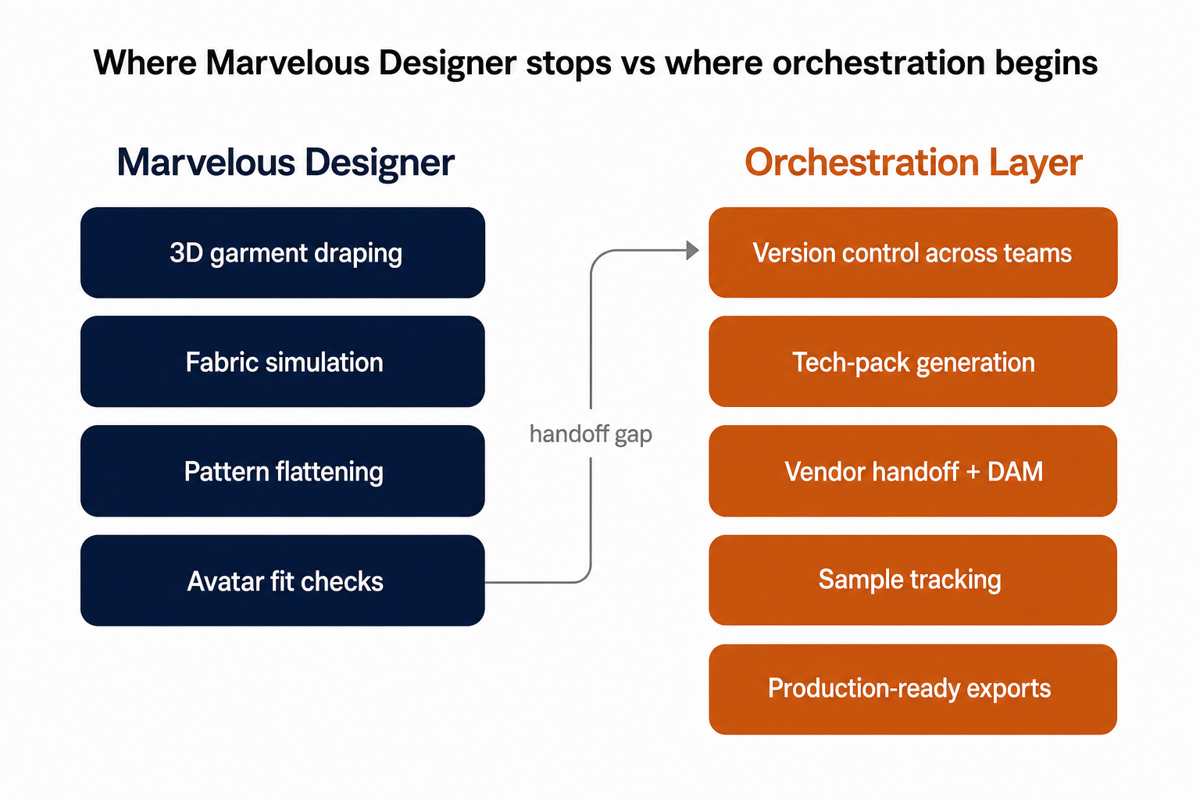
The orchestration layer is everything you currently do in spreadsheets, shared drives, Slack threads, and email after the 3D file is saved. Version control across collaborators. Bill of materials. Tech pack assembly. Vendor brief with the right fabric codes. Sample tracking with timestamped fit notes. Cost roll-ups across the season. Export packs that the factory can actually open.
Small teams paper over this with discipline. At 6 brands and 200+ SKUs, discipline runs out by week three of the season.
The question we hear most often is whether the Marvelous Designer Enterprise license closes the gap. It does not, and Marvelous Designer does not claim that it does. Enterprise gives you shared assets, floating seats, a fabric library, and centralized admin. That is real value if you have 15 designers and want them on a common avatar library. It is not a replacement for the orchestration layer.
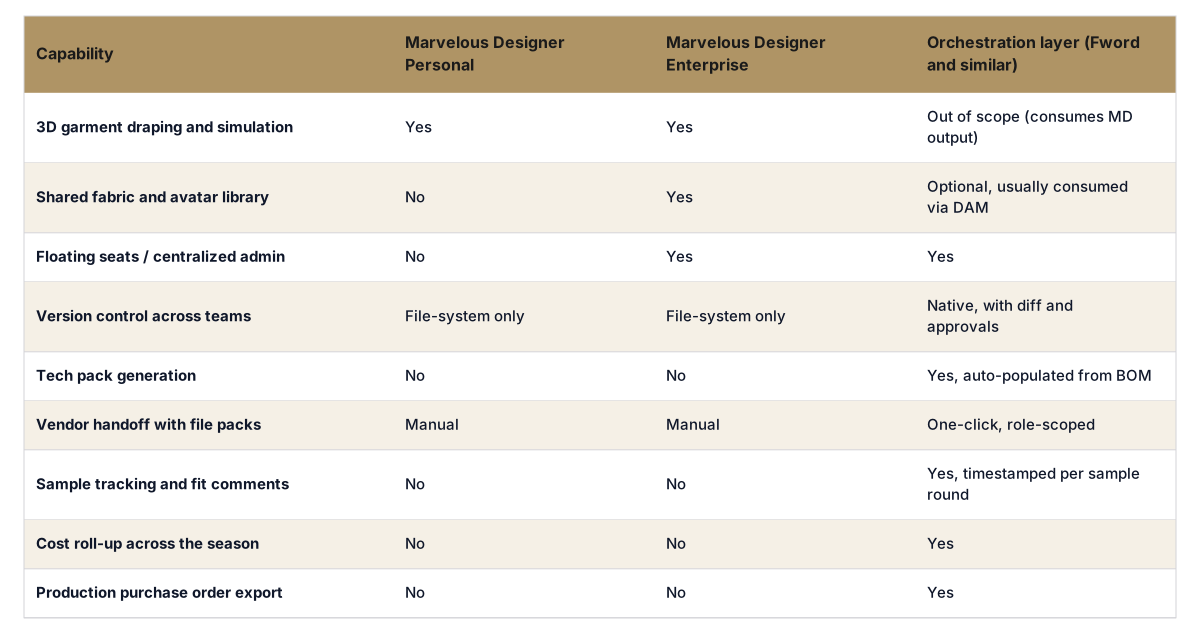
Read the table closely. The two MD tiers differ on collaboration features. Neither tier ships the operational layer that turns a 3D file into a production-ready brief. That layer is what the orchestration tool category exists to provide.
Workflow buyer? Get tech packs and moodboards your team will use.
The F* Word generates brand-aligned moodboards and factory-readable tech packs and plugs into your PLM. See it run on your own product. Free to try.
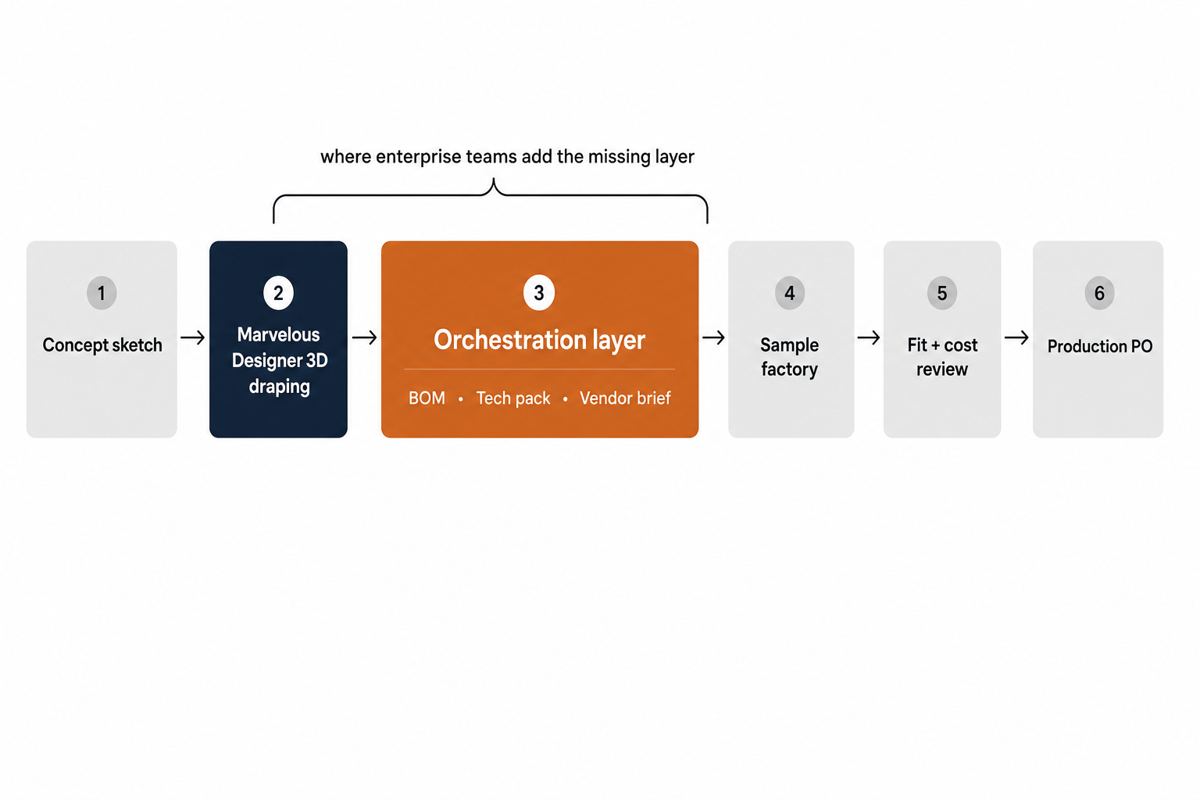
In a working pipeline, the 3D file leaves Marvelous Designer and enters a system that knows what to do with it. The orchestration tool reads the MD export, links it to a style in the season plan, attaches the BOM the designer specified, pulls fabric codes from the DAM, and generates the tech pack with the correct vendor cover sheet. Comments from the design review attach to the style, not to a Slack thread. When the vendor comes back with a cost or a fit note, it lands on the same record. The next sample round inherits everything.
Concretely, here is what changes for the product developer we opened with:
A solo freelancer running Marvelous Designer Personal can keep a clean file system and a single client kanban. The orchestration overhead is small because the team is one person. The math changes at scale.
With 6 brands, 8 product developers, 12 vendors, and a typical drop cadence of 4 to 6 collections per year, the count of artifacts touching each style grows past what spreadsheet discipline can hold. Our internal benchmark across 11 enterprise rollouts: teams that adopted MD without an orchestration layer reported between 6 and 14 hours per week per product developer spent reconciling versions, regenerating tech packs, and chasing vendor responses. The same teams after orchestration was added reported that number falling to 1 to 3 hours, with the rest of the time reclaimed for fit and cost optimization.
That gap is the business case. Marvelous Designer accelerates the creative side of the workflow. The orchestration layer is what lets the creative gain survive the handoff to production.
Some enterprise teams attempt to build orchestration in-house, usually on top of Airtable, Notion, Smartsheet, or a custom PLM. The decision usually goes one of three ways:
The right choice depends on existing infrastructure. Teams already on Centric rarely benefit from switching. Teams with no PLM and a growing MD workflow almost always benefit from a purpose-built layer. Teams running Airtable should plan an exit before the next season's complexity hits.
Most evaluation calls waste time on feature checklists. The questions that actually predict whether the tool will close your handoff gap are short:
If a vendor cannot show these five flows with their own demo environment in under 30 minutes, the orchestration layer is not real. It is a slide deck.
"We will just train the designers to be more disciplined." Discipline is not the bottleneck. The pipeline has structural gaps that no amount of discipline crosses. Version control and vendor handoff are not behaviors. They are systems.
"Our PLM already does tech packs." Then the question is whether it ingests Marvelous Designer files cleanly and whether your designers will actually use it. If both are true, you are done. Most teams find one or both are false.
"This is one more tool to manage." The current state is also many tools (OneDrive, Slack, email, Airtable, the PLM, the DAM). The orchestration layer replaces the spreadsheet glue between them, not the tools themselves.
Does Marvelous Designer Enterprise include a PLM?
No. Marvelous Designer Enterprise adds shared libraries, floating seats, and centralized admin. It does not include tech pack generation, vendor handoff, or sample tracking. Those are the orchestration layer.
Can we use Airtable as the orchestration layer?
For under 50 SKUs per season, yes. Past that, vendor permissions, file pack distribution, and audit trails become painful enough that most teams move to a purpose-built tool within 12 to 18 months.
How does the orchestration layer read Marvelous Designer files?
Through native MD exports (OBJ, ZPRJ metadata, or the MD API). The orchestration tool indexes the file, links it to a style ID in the season plan, and pulls the BOM the designer specified during draping.
Will adding an orchestration layer slow the designers down?
The opposite, in our deployments. Designers report less time on file naming, version reconciliation, and tech pack assembly, which is time they put back into fit iteration. The tool wins or loses on whether the BOM entry and review steps are faster than the spreadsheet they replace.
Is this only for brands with their own design teams?
No. The same orchestration layer is what licensed brands and private-label suppliers use to handle multi-client visibility, vendor brief generation, and cost roll-ups.
If your team is running Marvelous Designer at scale and the bottleneck has moved from draping quality to handoff overhead, the next step is a working session with our team. We will map your current pipeline against the orchestration layer, identify the two or three steps where the spreadsheet glue is failing first, and show you a working flow on real MD files in under 30 minutes.
Book a working session and bring one current Marvelous Designer file to ground the conversation.
Related: AI fashion design ROI enterprise
Get The F* Word workflow insights in your inbox.