

Direct answer. A pattern, whether digital or physical, is a critical artifact, but it is just one component in a complex fashion production workflow. To successfully move a style from concept to factory, brands rely on a collection of interconnected documents and data points. These include the initial brief, concept imagery, Bills of Materials (BOM), Points of Measure (POM), grading rules, and a complete tech pack. The speed and accuracy of product development depend not on a single pattern file but on the intelligent workflow that connects, validates, and orchestrates all these artifacts between design, technical, and sourcing teams.
Technical designer? Cut sampling time before first fit.
The F* Word generates the tech packs, BOMs and sampling notes your factory actually needs. Plus a brand-aligned moodboard upstream. Free to try.
For decades, the pattern has been the core deliverable of the patternmaker, serving as the primary blueprint for a garment's construction. In the shift to digital product creation, 3D tools like Browzwear and CLO have made the creation and simulation of these patterns faster and more visual. However, this focus on the pattern tool itself can create a false sense of completeness. A 3D model or a DXF file is not a factory-ready command; it is an input for the next stage.
The product development process stalls when teams treat the pattern as the final word. A pattern file lacks essential context that manufacturing partners require. It does not specify the machinery, the stitch types, the trim placements, the precise fabric specs, or the quality tolerances needed for mass production. Viewing the pattern as a singular solution overlooks the ecosystem of information that must be built around it.
This is where workflow disconnects begin. A technical designer receives a pattern but then must manually cross-reference it against a separate BOM in a spreadsheet, POM specs in a different document, and construction notes sent via email. Each manual check introduces a risk of error, leading to incorrect samples, increased costs, and significant delays in the production calendar.

A successful garment launch is the result of many artifacts being created, approved, and handed off in a specific sequence. The pattern is a star player, but it performs as part of a larger constellation. Each element provides a critical piece of information that, when combined, forms a complete and unambiguous instruction set for the factory.
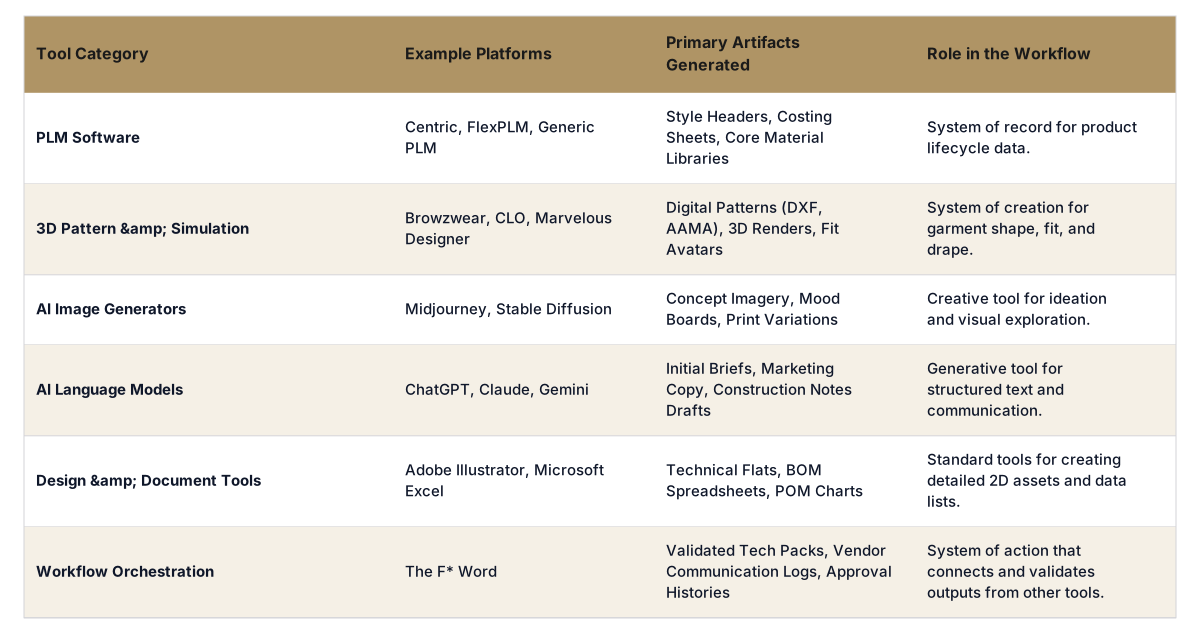
Key artifacts in the fashion production workflow include:
In most fashion brands, the artifacts required for production are created in a variety of specialized software tools and platforms. Merchandisers may work in a PLM system, designers in Adobe Illustrator and AI image generators, and technical designers in 3D simulation software. The challenge is not the quality of the outputs from these systems, but the lack of a system to connect and validate them.
An AI workflow platform serves as this essential connective tissue. It does not seek to replace a brand's PLM, which is the system of record for product data. Nor does it replace 3D tools like CLO, which are powerful systems of creation. Instead, it integrates with them. It can pull a new style brief from Centric PLM, receive a pattern file from Browzwear, and ingest a BOM from an Excel spreadsheet. The platform then structures this information, making it ready for automated validation and orchestration.
This approach allows teams to continue using the best tool for each specific job without creating information silos. The product development manager gets a unified view of progress without having to log into five different systems, while the technical designer can work with an organized set of inputs instead of chasing down files and information through email.
The true power of AI in fashion production is not just generating a design but ensuring all the pieces of the production puzzle fit together perfectly before any fabric is cut. An AI workflow platform automates the tedious and error-prone process of cross-referencing artifacts. For example, once the platform has ingested a pattern, a BOM, and construction notes, it can perform automated checks.
The AI can verify that every trim mentioned in the construction notes is actually listed in the BOM. It can check that the POM measurements on the tech pack are consistent with the grading applied to the digital pattern. It can flag a potential issue if a heavy zipper from the BOM is specified for a lightweight fabric. This is a level of validation that is nearly impossible for a human technical designer to perform quickly and without error under deadline pressure.
By catching these inconsistencies digitally, the system prevents a "bad" tech pack from ever reaching the factory. This proactive quality control is the key to reducing sample rounds. When the factory receives a clear, consistent, and validated set of instructions, the first sample is far more likely to be correct, saving weeks of time and thousands of dollars in shipping and rework costs.
The workflow does not end when the tech pack is sent to the sourcing partner. The subsequent phases of vendor questions, sample submissions, and fit comment consolidation are often managed in chaotic email chains and disconnected spreadsheets, creating a new set of potential delays and misunderstandings.
A comprehensive AI workflow platform extends into this phase as well. It provides a centralized portal for all communication between the brand and its manufacturing partners. When a vendor has a question about a stitch type, they ask it directly within the context of the tech pack. The technical designer is notified, can answer the question, and the entire exchange is logged permanently with the style's history.
When fit samples arrive, feedback from designers and technical designers can be consolidated in one place. Instead of conflicting notes in emails, all comments are captured against the relevant POM or construction detail. This structured feedback loop ensures the factory receives clear, unified instructions for the next revision, dramatically accelerating the approval process and maintaining a single source of truth for the entire product development lifecycle.
A design or production artifact is any distinct piece of information or file created during the product development process. It can be a digital file like a pattern or a tech flat, a document like a Bill of Materials (BOM), or structured data like Points of Measure (POM). Each artifact serves a specific purpose in communicating the design and construction intent to various team members and factory partners. A complete set of validated artifacts is required to manufacture a garment correctly.
No, a pattern is only one component of a tech pack. The pattern defines the shapes of the fabric pieces. A tech pack is a comprehensive document that contains the pattern information plus all other necessary manufacturing instructions. This includes the Bill of Materials, Points of Measure, grading rules, construction details, technical flats, and label placement information. The tech pack is the complete instruction manual for the factory.
While some AI tools can assist in generating pattern variations, the most significant impact of AI is in the workflow surrounding the pattern. AI workflow platforms ingest pattern files from tools like Browzwear or CLO and automatically validate them against other artifacts like the BOM and construction notes. This ensures consistency and catches errors before a tech pack is sent to a factory, preventing costly mistakes and reducing the number of sample rounds needed for approval.
No, AI workflow software is designed to complement, not replace, a Product Lifecycle Management (PLM) system. A PLM acts as the central database or system of record for product information. An AI workflow platform connects to the PLM and other tools (like 3D design software) to orchestrate and automate the processes between them. It focuses on the validation and handoffs that PLMs typically do not manage, creating a more efficient end-to-end process.
Yes. A key function of an AI workflow platform is its ability to integrate with the tools your team already uses and values. It acts as a central hub that can receive and process outputs, like pattern files from Browzwear or tech flats from Adobe Illustrator. This allows your team to maintain their expert workflows in specialized software while the platform handles the task of connecting, validating, and packaging all the artifacts for production.
A BOM (Bill of Materials) is a list of all the physical components required to make a garment. It includes fabric, thread, buttons, zippers, labels, and packaging materials. A POM (Points of Measure) is a specification chart that defines the key measurements of the finished garment, like chest width or sleeve length, along with the acceptable plus or minus tolerances for quality control purposes.
An AI workflow platform typically ingests the grading rules alongside the base pattern. It can then perform validation checks. For example, it might cross-reference the graded measurements for the largest size against the maximum fabric width specified in the Bill of Materials to flag potential issues with marker efficiency. It ensures the grade rules are consistently applied and documented within the final tech pack sent to the manufacturer.
Pattern export is the most-cited "AI for production" feature, but a DXF file alone does not get a garment cut and sewn. A factory needs the pattern in context, with the rest of the spec wrapped around it. Here is what a DXF carries, and what it leaves out.
Table 1. DXF contents vs what a factory still needs.
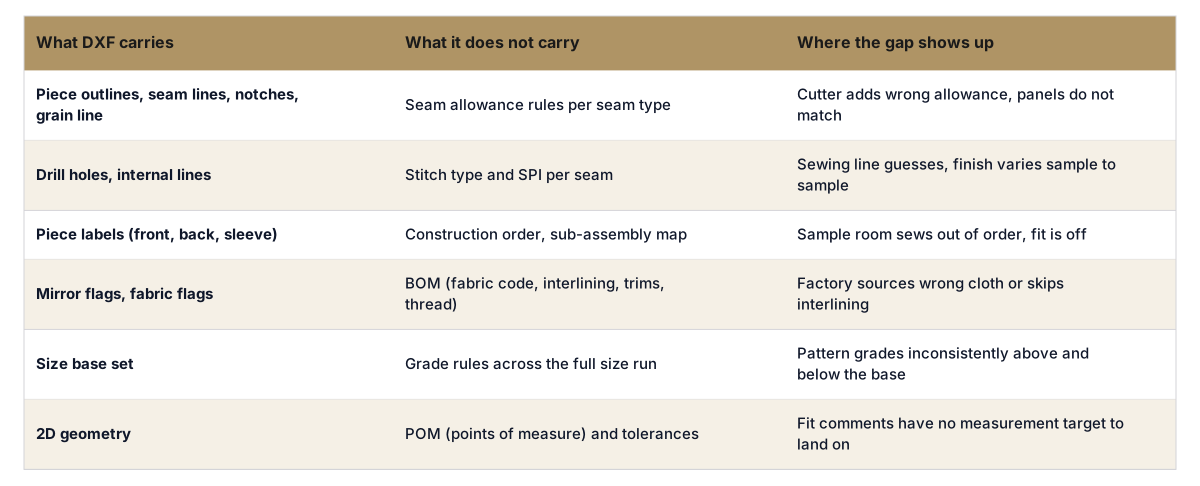
A DXF is one input among eight or nine that move a garment from approved sample to PO. The other inputs (BOM, POM, construction notes, colorways, grading, comments, label spec, packing) are where most AI tools stop. That is the gap a workflow product has to close. See how an AI tech pack generator handles the full set, and what production-ready output looks like on the pre-production workflow hub.
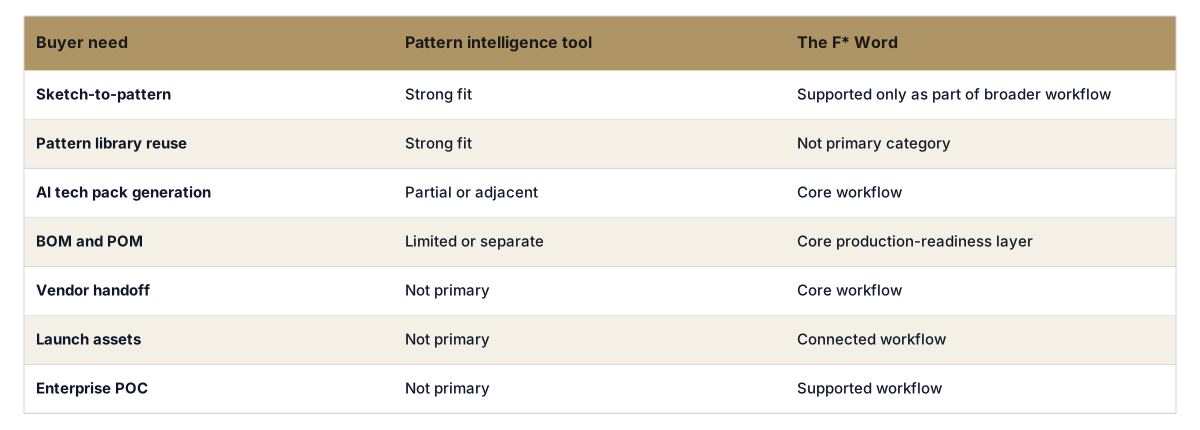
Pattern intelligence can help teams create, reuse, or refine pattern assets. Production still needs a wider handoff: creative brief, approved concept, tech pack, BOM, POM, grading, construction notes, trims, labels, packaging, vendor questions, approvals, and launch assets. The F* Word connects those artifacts into one workflow.
Focusing on the pattern alone leaves value and speed on the table. The greatest efficiency gains come from orchestrating all the artifacts, from the initial concept to the final tech pack and beyond. By automating the validation and communication between each step, brands can eliminate errors, reduce sample rounds, and get products to market faster. To understand how all these pieces fit together, you should See the full workflow.
Related: Pre-Production Workflow · AI Fashion Workflow Software
Related: Merchandising & Launch Workflow
Get The F* Word workflow insights in your inbox.