

Sketch-to-pattern tools turn a drawing into a base pattern. Trend-to-tech-pack platforms take a market signal through to a production package instead. The F* Word works the second way, producing a factory-ready tech pack in 8 to 10 minutes with bill of materials, graded points of measure and construction callouts.
Sketch-to-pattern AI tools convert a drawing into a base pattern, while trend-to-tech-pack platforms turn market and line planning inputs into production-ready tech packs with BOM, graded measurements, and construction callouts. If you need fast silhouette exploration or a starter block, sketch-to-pattern is efficient. If you need a factory-ready package that aligns with assortment plans, cost targets, compliance, and vendor handoff, choose a trend-to-tech-pack workflow. The F* Word sits in the second camp. It starts with trend and merchandising signals, then outputs complete documentation that production trusts, reducing rework, sampling loops, and calendar risk.
Designer or merchandiser? Replace the spreadsheet handoff.
The F* Word generates moodboards, factory-readable tech packs and sampling notes in one workflow, so creative, production and merchandising stay aligned. Free to try.
Creative directors, design leads, and merchandisers who sign off trends or SKU plans and then ask for prototypes. Technical designers, pattern makers, and product developers who must translate direction into specs, sizes, and BOM, then keep everything synchronized through sampling and fit.
PLM managers and sourcing teams who live in calendars and change logs, and need vendor-ready packets, are also a fit. If your remit is the handoff from trend signoff to proto request inside a Pre-Production workflow, this comparison is for you.
Sketch-to-pattern AI is excellent for rapid ideation. Given a sketch or photo, it can suggest a draft block, seam placement, and basic piece geometry in minutes. Teams use it to visualize silhouettes quickly, try variations, and reduce time spent on manual first-pass drafting. Some tools add 2D to 3D drape previews that help spot proportion issues early.
It is also useful for creative reviews when a director wants options around a reference. For that upstream moment, sketch-to-pattern can shorten iterations and cost little to trial. This fits the needs of a creative direction workflow that favors speed and breadth at concept stage.
The F* Word focuses on turning trend and line planning inputs into factory-ready documentation. Starting from a brief, sales history, target cost, and region fit rules, it produces tech packs with full BOM, measurements, grading, tolerances, construction notes, artwork placements, and labeling. Materials include supplier, UOM, colorways, yield guidance, and MOQ. Measurements cover POM definitions, callouts, sketches, shrinkage allowances, and graded size sets.
Outputs are standardized for production: tech pack PDF, spec and measurement tables in XLSX, BOM in CSV, images, and vendor instruction pages. You can export pattern references as DXF or AAMA when needed, then track changes with version history and approvals. The system is built to hand off to factories without retyping, so sampling starts with the same data the team approved.
All of this is driven by AI tech packs that stay in sync as design changes. Update a trim, tolerance, or POM, and downstream pages update. The platform aligns cross functional work, from design to sourcing, so your first proto request is accurate and on-calendar.
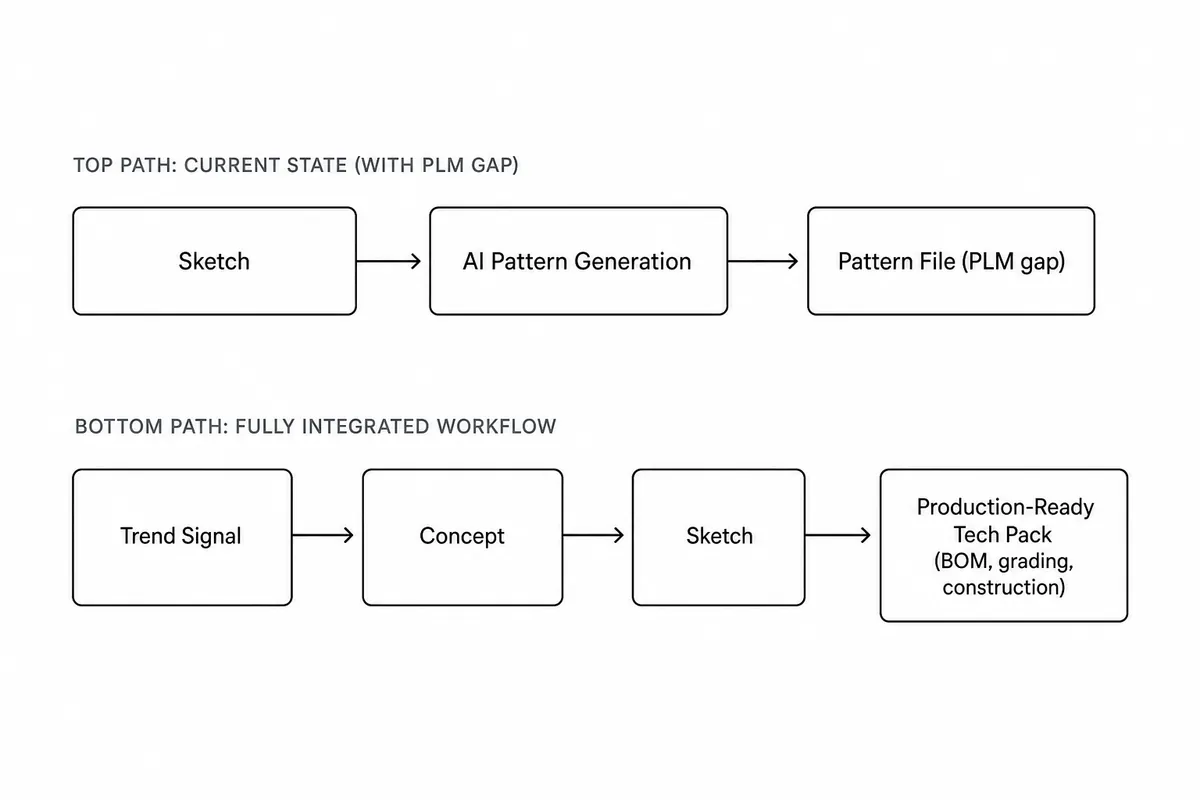
How The F* Word fits the production workflow
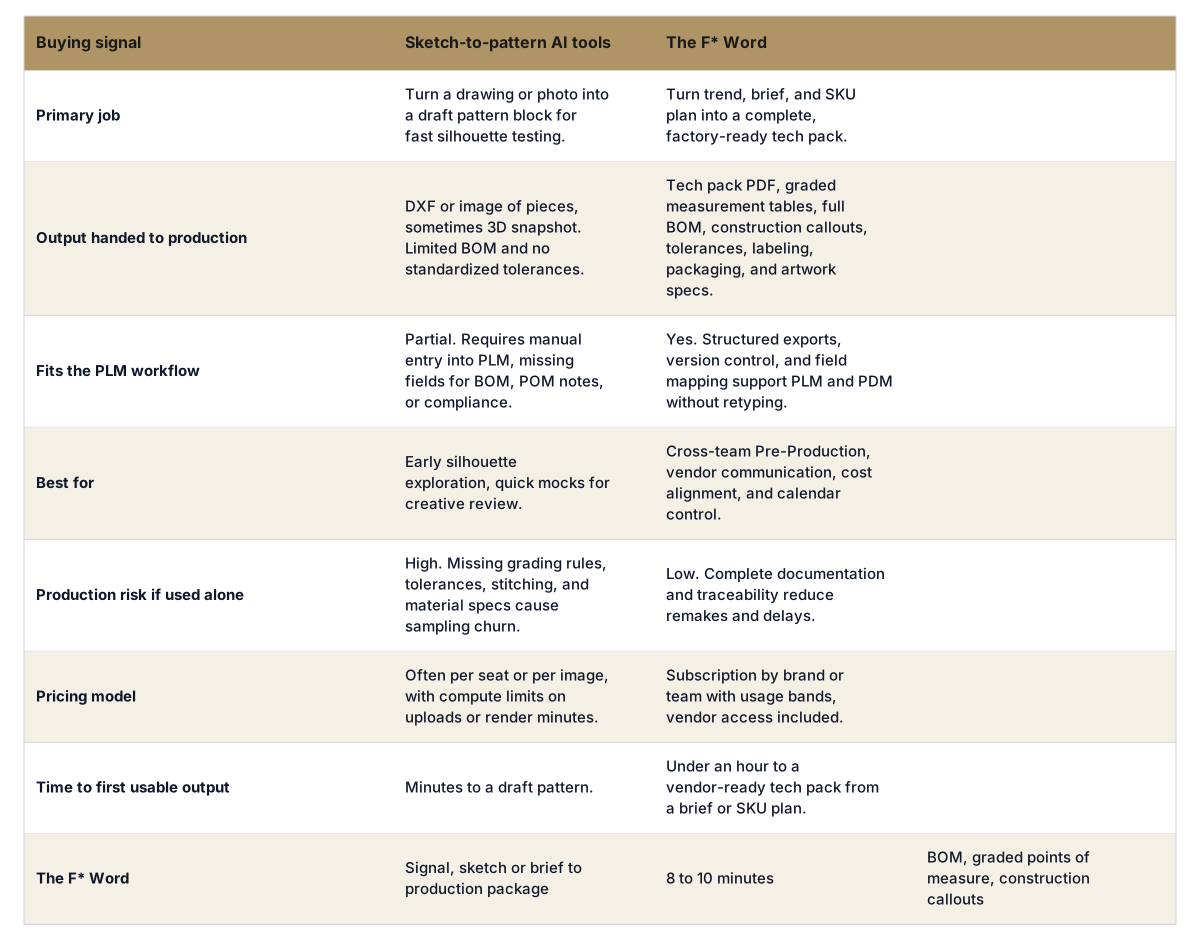
Relying on sketch-to-pattern AI alone to run production creates gaps that appear once factories start. Without a structured BOM, suppliers, UOMs, colorways, and yield guidance, material choices drift and costs surprise you. Missing construction callouts, stitch types, and SPI lead to interpretation differences that show up as inconsistent samples.
Grading rules and tolerances are the next failure point. If only a sample size is defined, fit breaks across sizes and regions. Missing POM definitions and shrinkage notes trigger extra rounds. Version history and change logs are not preserved, so factories build against stale data. For teams with enterprise needs like SSO, audit trails, and approvals, use the enterprise configuration to keep every update controlled.
Yes. Import base blocks, POM definitions, and grade rules. The F* Word applies them to new styles so measurement tables and tolerances are consistent across sizes and regions.
It ingests brief details, sales history, search and social signals, and target costs. From there, it proposes components, measurements, and materials, then generates a BOM and spec that you can review and approve.
Tech pack PDF, XLSX for measurements and specs, CSV for BOM, PNG or JPG for callouts and sketches, and DXF or AAMA for pattern references when required by vendors.
Each style has a vendor link with versioned history and a change log. Vendors see the latest approved packet, can comment, and get notifications for updates, reducing email drift.
Yes. Field mapping, APIs, webhooks, and SFTP support sync with major PLM and PDM platforms. You choose which tables and attributes flow in or out, with approvals gating each push.
Define size sets, body measurements, and grade rules by region or fit block. The system generates graded tables and tolerances automatically and flags conflicts during updates.
Yes. The BOM includes supplier, UOM, colorways, MOQ, lead time, and cost per unit. Yield guidance and colorway rollups help merchandisers and sourcing lock cost early.
Book a 20-minute walkthrough, see The F* Word turn your trend signals into a tech pack live.
Related: AI fashion workflow software · Real time trend data fashion · Node based workflows versus guided checkpoints fashion
The F* Word produces a factory-ready tech pack in 8 to 10 minutes from a sketch, photo, brief or confirmed trend signal, with bill of materials, graded points of measure and construction callouts. Sketch-to-pattern tools stop at the base pattern and leave the specification work to your technical designer.
Get The F* Word workflow insights in your inbox.