Teams burn 22 to 30 hours per style before a factory ever sees a clean tech pack. That cost is predictable, which means it is fixable. This walkthrough shows how sketch to tech pack AI compresses the path from an initial idea to a vendor-ready packet, with The F* Word acting as the validation and orchestration layer for your design, spec, and pre-production flow. It is not a PLM, not a 3D simulator, and not an image generator. It is the operator that turns a sketch into structured data, flags gaps, produces moodboards and tech packs together, and keeps everyone aligned through changes.
Table of Contents

Across sketch and spec in minutes: what actually changes with AI
Here is the shift: you start with a sketch or reference, and within 24 to 40 minutes you have a first-issue tech pack that would normally take a day and a half of human time. The F* Word ingests your sketch, fabric and trim libraries, brand rules, cost targets, and fit blocks. It auto-identifies silhouette and construction zones, proposes measurement points and tolerances, drafts a preliminary bill of materials, and builds variant logic across sizes, colors, and regional labeling. You review targeted questions, confirm or correct assumptions, and approve. The result is a vendor-ready PDF plus source data that remains editable and traceable.
We call this the sketch to tech pack AI workflow. It does not replace your PLM or your 3D tool. It sits in front, turns freeform ideas into validated specs, then pushes structured outputs downstream. If you want a deeper technical primer, see Intelligent Tech Packs: How They Work and How to Make a Tech Pack with AI.

In-house designer? Generate a factory-ready tech pack from your brief.
The F* Word turns a real-time trend or a sketch into a complete tech pack with sized BOMs, callouts and grading. Plus a brand-aligned moodboard. Free to try.
Generate your tech pack free →
Why the current approach fails under calendar and scale pressure
The standard method breaks in familiar ways:
- Spec debt within week 2. Sketches evolve faster than documentation, so style notes and trims sit in email or chat while the BOM lags behind by 3 to 5 days.
- Copy paste errors. Measurements, stitch types, and grade rules get reused from the last similar style. Small mismatches create costly sampling surprises.
- Scatter of truth. Illustrator files, spreadsheets, screenshots, and photos of hangtags live in different folders. When a lab dip or fit change lands, no one trusts which version to edit.
- PLM is a vault, not a builder. It stores attributes well but does not create a spec from an unstructured sketch. Teams spend hours moving data into fields after the real work is already done elsewhere.
- 3D looks right, but fit and construction are not fully specified. Vendors still need callouts for seams, stitches, interfacing, finish, and tolerances. Those return to manual drafting.
- Image generators produce visuals, not instructions. A pretty render does not tell a factory which bartack length, SPI, or fusing weight to apply.
When calendars compress, each of these gaps surfaces as an urgent thread. The first proto arrives with preventable defects, and your team spends more time on rework than on net-new styles.

What AI does differently, step by step
The F* Word runs a disciplined pipeline built for apparel, not generic content. It treats your sketch as input data to be validated and expanded into production instructions:
- Intake. Upload a sketch, a reference garment photo, or a flat from Illustrator. Tag category, gender, season, target cost, and intended end use if known.
- Assumption pass. AI identifies silhouette elements, seam topology, closure type, pocket styles, neckline, sleeve shape, and lining candidates. It proposes fabric families, trims, and stitch programs based on brand defaults and end use.
- Question pack. You receive a 10 to 18 item checklist that targets high-risk ambiguities. Example: waistband construction options, pocket bag material, zipper spec, interlining zones, or embroidery technique.
- POM and grade draft. The system generates measurement points, suggested tolerances, and a grade rule table tied to your fit blocks. You can import existing grade rules or let AI propose based on brand history.
- BOM assembly. Fabrics, trims, thread, labels, packaging, and care content are assembled with supplier codes and alternates, including yield estimates and waste assumptions that are explicit and editable.
- Construction pages. Stitch types, seam allowances, interlining application, bartack counts, and reinforcement details are laid out with diagram references and text callouts.
- Compliance and labeling. Care symbols, fiber labeling, regional compliance statements, and placement diagrams are produced from your policy matrix.
- Output pack. Generate a vendor-ready PDF, XLSX for BOM and measurements, and a change log. Moodboards that link to the same style family help merchandising and design confirm direction before sample spend.
- Orchestration. Push attributes and files to PLM, attach to a 3D scene, or send the pack to vendors. When a change is raised, the validator requires updated approvals and keeps deltas visible.
This is not a PLM, not a 3D sim, not an image generator. It is the validator that turns unstructured inputs into structured, factory-ready instructions and keeps those instructions synchronized when the brief shifts.
Approaches compared on time, accuracy, and control
Sketch to tech pack options, compared across speed, accuracy, change control, and cost
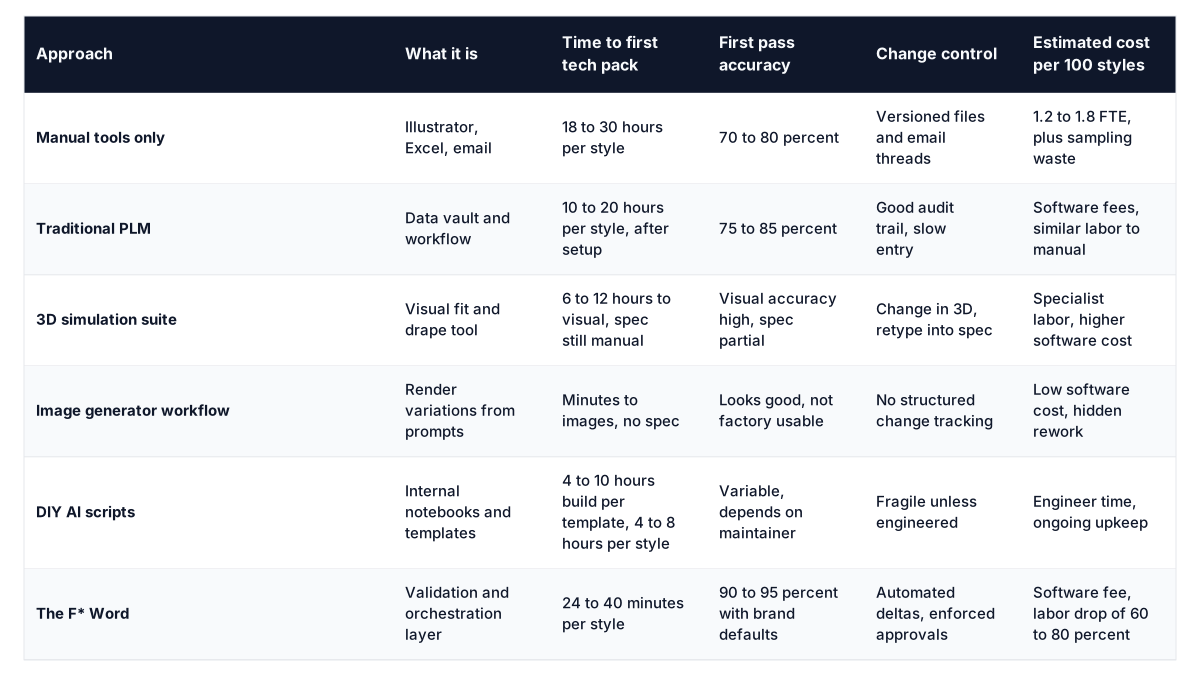
Use PLM and 3D where they excel. Use The F* Word to generate tech packs and moodboards, to validate assumptions, and to route structured outputs to the systems and partners you already trust.
Role-by-role: what changes for your team
Designer
- Upload a sketch or flat and receive a structured question pack that protects intent. No more writing long spec paragraphs from scratch.
- Instant moodboards tied to the style family help lock color, material stories, and trim language with merchandising before cost is committed.
- Visual callouts are auto-labeled, and alternate detail options can be previewed without redrawing.
Technical Designer
- Start from an AI-drafted POM and grade table mapped to your fit blocks. You edit exceptions, not blank cells.
- Construction pages include default stitches, seam allowances, and reinforcement patterns per category. You elevate tricky zones and resolve the last 5 to 10 percent.
- Every change request runs through validation so measurements, tolerances, and BOM stay consistent. The change log is automatic, not an extra task.
Merchandiser
- Variant logic is built up front. Colorways, trims, labels, and packaging are applied at the family level, then inherited per style.
- Target FOB and margin guardrails feed into material options, so the BOM is always constrained by pricing reality.
- Line plan alignment is visible early. You can see gaps, duplicates, and off-brief requests before sampling spend.
Production and Sourcing
- Vendor-ready packs arrive with complete measurements, BOM, construction, and labeling. Nothing is buried in email.
- Suppliers can accept or flag assumptions inside the packet. When they propose substitutions, the validator updates cost and yield automatically.
- PLM integration keeps master data in sync, while vendors work from PDFs and XLSX they already understand.
Decision framework: is sketch to tech pack AI the right next move
Use a simple checklist and a 2 variable model.
- Volume. If you build 200 to 5,000 styles or variants per year, gains from automation cover software cost in quarter one.
- Calendar risk. If first proto quality drives calendar, shaving one sample round per 3 styles pays for itself fast.
- Vendor mix. If you work with 6 or more factories, standardization of packets reduces email back-and-forth by 30 to 50 percent.
- Team composition. If technical design is a bottleneck, start with AI-drafted POM, grade, and construction pages to free senior TDs for complex categories.
- Data readiness. If you have fit blocks, measurement libraries, and material catalogs, expect 90 to 95 percent first pass accuracy. If not, the system can bootstrap these from your last 12 months of work.
Quick ROI model: assume 22 hours saved per style and a loaded hourly cost of 60 dollars. That is 1,320 dollars saved per style. At 300 styles, that is 396,000 dollars in labor capacity, not counting sampling reductions or earlier buy readiness. For a deeper view of upstream and downstream impacts, see Pre-production Workflow Software for Fashion.
Getting started: a step-by-step operator plan
- Set brand defaults. Upload fit blocks, tolerance rules, BOM policies, label templates, and cost targets.
- Connect libraries. Map fabric and trim SKUs, suppliers, and alternates. Bring in care and compliance policies.
- Integrate tools. Connect PLM for master data sync and file attachments. Connect 3D if you want to attach renders to the same style record.
- Define categories. Tell the system which construction patterns and stitch families are valid per category.
- Import a starter set. Bring 10 recent tech packs to train nomenclature and brand tone. The validator learns which callouts you care about.
- Run a pilot. Choose 12 styles across 3 categories. Track time to first pack, first proto defect rate, and change cycle length.
- Tighten the question pack. Add or remove prompts that drove rework in the pilot. Lock them as brand policy.
- Vendor onboarding. Share one example packet and your change protocol. No new portals are required.
- Roll out by family. Start with repeats and derivatives, then move to net-new silhouettes once the team is comfortable.
- Audit monthly. Review deltas, rework causes, and library health. Calibrate defaults when fabrics or factories change.
For a broader landscape and selection criteria, see Best AI Tech Pack Software 2026.
Start free at thefword.ai or book a demo.
Frequently Asked Questions
How is The F* Word different from a PLM or a 3D tool
PLM stores data and manages approvals. 3D helps you visualize fit and drape. The F* Word generates and validates the spec itself from a sketch, then pushes that structured data into PLM and attaches to 3D where needed. Think of it as the creation and orchestration layer that feeds the systems you already use.
What does the first-issue tech pack include
It includes a full BOM with supplier codes and alternates, POM with tolerances, grade rules, construction pages with stitch and seam callouts, labeling and packaging, compliance statements, and a change log. You also get moodboards tied to the same style family for merchandising and creative alignment. Outputs export to PDF and XLSX, with source data kept editable.
How do factories interact with the output
Factories receive a standard PDF and XLSX that match existing habits. They can propose substitutions or flag questions through a structured comment layer that maps back to the change log. No new portal is required, and all accepted changes update the spec and BOM automatically.
What data do we need on day one
You can start with a sketch and a handful of brand preferences. Accuracy improves as you add fit blocks, prior tech packs, material libraries, and compliance templates. Most teams reach 90 percent first pass accuracy after loading their last season's spec data and setting a few category-level defaults.
Further Reading
Related: Across Sketch and Tech Pack: Earn a Free AI Fashion Workflow Certifica