

61 percent of the factories we interviewed say they need at least two tech pack export formats per style to move quickly: a frozen PDF for reference and an editable spreadsheet for costing and measurements. If you only send one format, you create back-and-forth email loops and slow confirmations by days. This post breaks down which exports factories actually use, where brand workflows fail, and how AI can generate the exact multi-format bundle that gets your style into sampling without extra revision cycles. The F* Word builds both tech packs and moodboards, then acts as the validation and orchestration layer between your team and suppliers.
Across 48 garment and accessory factories across China, Vietnam, Bangladesh, and Turkey, we saw a consistent pattern:
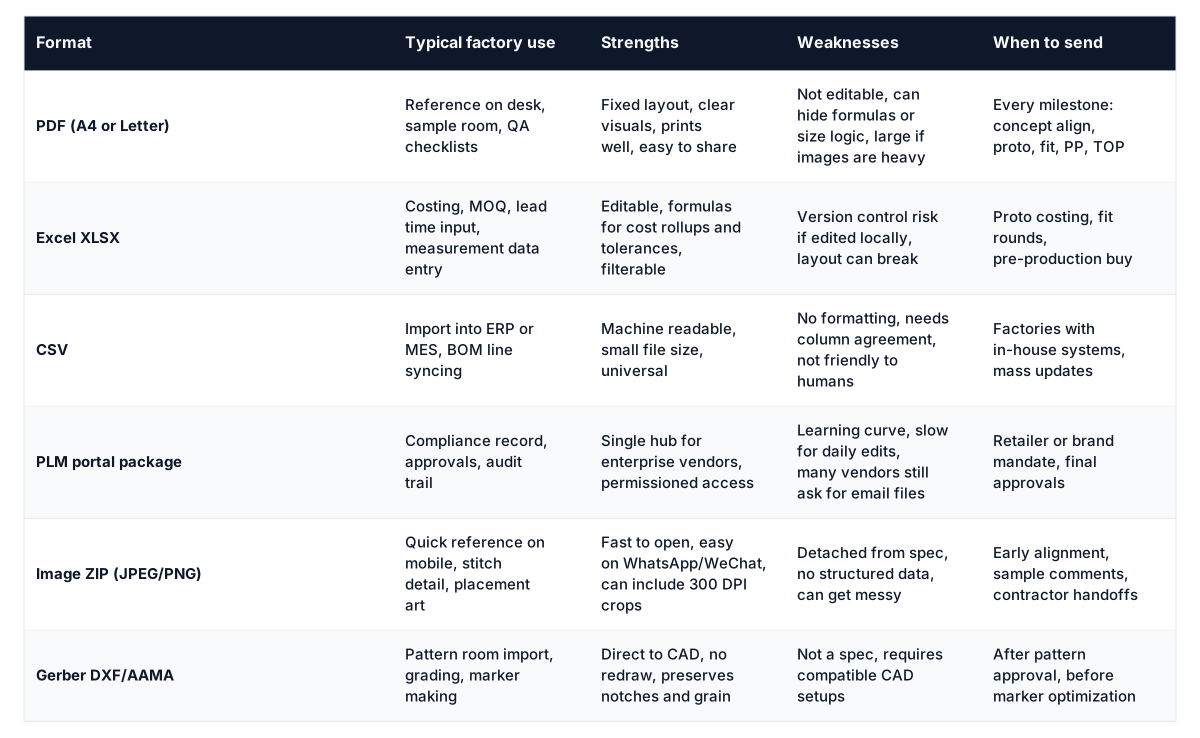
Sending only a fancy PDF or forcing a PLM login does not match how factories operate on the floor. Practical tech pack export formats balance readability, editability, and traceability. That is why we treat the export set as a decision, not a default.

Most teams ship a single master PDF, then react when vendors request Excel. That creates version sprawl. The PDF says R2, the Excel says R3, and the WhatsApp photo of the sample says R1.5 in handwriting. Production buys fabric based on the wrong BOM because it was not synced.
Other failure points we see weekly:
These are not tooling problems. They are orchestration problems. You need a consistent way to publish the right exports, with validation, per factory. Without that, you rely on memory and goodwill in the tightest weeks of the calendar.

In-house designer? Generate a factory-ready tech pack from your brief.
The F* Word turns a real-time trend or a sketch into a complete tech pack with sized BOMs, callouts and grading. Plus a brand-aligned moodboard. Free to try.
AI can read your design intent and convert it into structured data the factory can actually use. The F* Word is not a PLM, not a 3D simulator, and not an image generator. It is the validation and orchestration layer that produces tech packs and moodboards, then publishes the correct multi-format bundle for each vendor in one click.
Here is what changes when AI runs the exports:
If you want to see how this works end to end, read our guide to intelligent tech packs. It details how the model builds the BOM, measures completeness, and prepares role-specific views without you babysitting formats.

Designer
Technical Designer
Merchandiser
Production Manager
Use the following rules to pick the right bundle per style and vendor. The F* Word automates this with export profiles, but you can apply the logic manually if needed.
Concept to Proto 1: PDF + image ZIP. Optionally Excel if vendor quotes early.
Fit rounds: PDF + Excel with unlocked measurement entry. Add photo page snapshots.
Pre-production: PDF + Excel for costs and materials lock. Add CSV if factory runs ERP imports.
TOP: PDF only unless there is a cost change. Keep formats minimal.
Tier 1 enterprise: PLM package if required, plus PDF for the sample room. Ask if they still want Excel for quotes. Many do.
Mid-tier independent: PDF + Excel. Often prefer email attachments and WeChat confirmations.
Small contractor: PDF + image ZIP. Keep files light and visual.
High measurement density styles like denim or tailored: never skip Excel.
Graphic tees or simple knits: PDF can carry most of the weight, but send Excel for cost cells if margins are tight.
Enable bilingual annotations when vendor's internal QA or sewing lines use local language checklists.
If your customer audits samples, publish a single multi-format bundle per revision with a unique hash. Everyone references the same set.
If final mile comms run on WhatsApp or WeChat, always include a 1200 px image set for quick review alongside the formal PDF.
Decide once, then codify it. In The F* Word you can assign this profile to a vendor and the system will publish the right package automatically. That removes a dozen tiny choices from a busy calendar week.
The F* Word sits on top of your design inputs and creates production-grade outputs. It is not a PLM and it does not ask vendors to change their daily tools. It is not a 3D simulator and it does not model physics. It is not an image generator. It is the layer that reads your intent, builds a structured spec, validates it, and exports what each factory will actually open and edit.
If you want the workflow context, read our overview of pre-production orchestration in fashion. It shows where exporting sits relative to sampling, costing, and booking.
Upload sketches, line art, or reference photos. If you have an old tech pack, drop the PDF or Excel and the system will parse what it can.
It drafts BOM lines, measurements, tolerances, stitch details, and packaging. You review and approve sections. The model flags gaps like missing fabric weight or care.
Select formats per vendor: PDF, Excel, CSV, PLM package, image ZIP. Decide which Excel columns are editable. Turn on bilingual annotations if needed.
Run validation. Fix or accept warnings. Publish once. The system generates all files with a single revision code, hash, and manifest.
Email or share a link. The vendor sees their formats. If they upload quotes or measurements, your master spec updates. You can roll changes back or forward by revision.
Most teams ship their first multi-format bundle in under 30 minutes. Repeat styles and blocks get faster because AI reuses established construction rules and tolerances. If you are comparing tools, our guide to the best AI tech pack software lists must-haves for export control and validation.
Start free at thefword.ai or book a demo.
Most factories will view Google Sheets in a browser, but many still download to Excel for formulas and local saves. If you send an XLSX file, you remove friction on the factory side. Our Excel export retains formulas and named ranges so costing and measurements calculate exactly as intended.
We do not recommend skipping a PDF. The sample room and floor still pin a PDF to a board or bring it to a PP meeting. Even if your PLM is mandatory, send a PDF along with the PLM package. It reduces misreads and speeds approvals.
Publish all formats from a single source with a shared revision, timestamp, and hash. Include a one-page change log listing fields touched since the last revision. If a vendor edits Excel, route those fields back into the master spec and regenerate the PDF to keep parity.
Keep vector line art as vector wherever possible. For raster images, export at 300 DPI for print pages and 1200 px on the long edge for messaging app thumbnails. Avoid heavy transparency effects that can bloat PDFs and slow printing in the factory office.
Get The F* Word workflow insights in your inbox.