

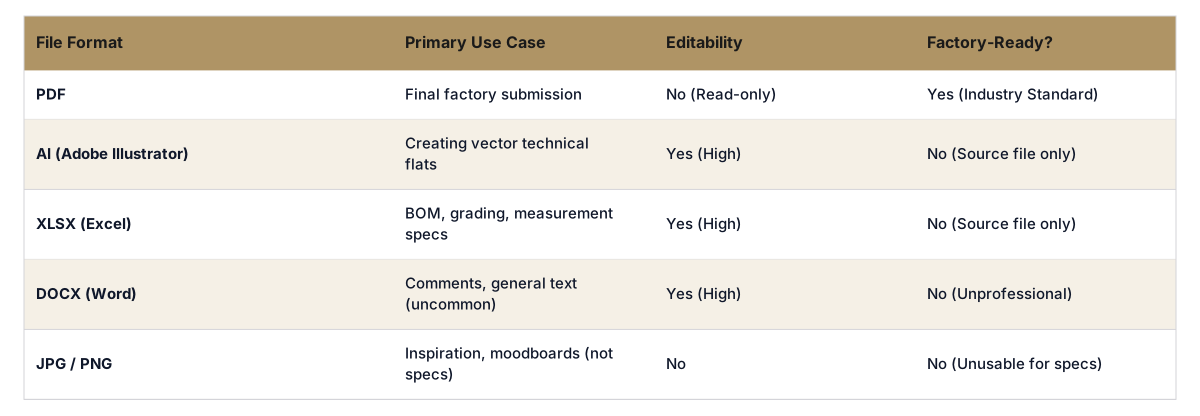
A final, factory-ready tech pack should always be in a PDF format. This ensures that all parties view the document exactly as you intended, with no risk of accidental edits or formatting changes. For internal work and editing, your team should use 2 primary source files: an Adobe Illustrator (AI) file for technical sketches and a Microsoft Excel (XLSX) or Google Sheets file for the bill of materials and measurement tables.
Sending a tech pack to a manufacturing partner requires a format that is universal, secure, and static. The PDF (Portable Document Format) is the only professional choice that meets all 3 criteria. Its primary function is to preserve the exact layout, fonts, images, and vector graphics of your source document, regardless of the operating system or software the factory uses to open it. This eliminates any ambiguity in how a technical flat or a measurement table is displayed.
A PDF is also a read-only format by default, which prevents unintended alterations by the factory. This is a critical risk-management step. If you send an editable file like an AI or XLSX file, a simple mistake by a pattern maker or merchandiser could alter a critical measurement or material code without a proper revision process. This creates massive potential for incorrect samples and costly production errors. The goal is to deliver a single source of truth, and a version-controlled PDF is the industry standard for achieving that. A truly factory-ready tech pack is one that leaves no room for interpretation or error, which is why PDF is the final output.

While the final output is a PDF, your internal team will work with 2 different native file formats during the creation process. First is Adobe Illustrator (AI), the standard for creating technical flats. Vector-based sketches from Illustrator are essential because they can be scaled infinitely without losing quality, allowing factories to zoom in on complex construction details like stitching or hardware placement. Technical designers use Illustrator to draw the garment, add callouts, and detail specific points of measure (POMs).
Second is a spreadsheet format, typically Microsoft Excel (XLSX) or Google Sheets. Spreadsheets are built for structured data, making them the optimal tool for managing the Bill of Materials (BOM), graded measurement specifications, and colorway information. Trying to manage this data inside an Illustrator file is inefficient and prone to errors. Separating the vector drawings (AI) from the specification data (XLSX) allows your technical designers and merchandisers to work in the most effective environment for each task.

Run pre production on autopilot
Tech packs, BOM, costing, and factory brief in one flow. Ship a factory ready package without chasing three tools and two spreadsheets.
Modern AI-powered tools act as a validation and orchestration layer, solving the chaos of managing separate AI and XLSX files. Instead of manually stitching together different documents, a platform like The F* Word ingests your design inputs, such as sketches and material choices, and automatically generates a complete, validated tech pack. The system combines the vector data, BOM, and grading into a single, cohesive document without manual copy-pasting. This process radically reduces human error and cuts creation time down to an average of just 8 to 10 minutes.
These platforms are not PLMs or 3D simulators; they are specialized for one critical job: creating a perfect tech pack. The final output is an industry-standard PDF, ready for the factory. However, the system maintains the structured data internally, allowing for instant updates. If you change a measurement, the tool automatically updates the grade rules and the technical sketch callouts. This intelligent automation makes the traditional debate over AI vs. manual tech pack creation a clear win for AI. also, some tools can generate supporting documents like moodboards from the same inputs, giving your factory partners complete creative and technical context in one streamlined package.
Selecting the correct tech pack file format depends on who is using it and for what purpose. Using the wrong format introduces risks of miscommunication, production errors, and version control nightmares. A founder launching their first collection needs to understand that what works for internal brainstorming is not what works for factory communication. The key is to map the format to the specific task in your pre-production workflow.
For example, sending a JPG of a sketch to a factory is a common amateur mistake. A JPG is a raster file, not a vector file, and it is useless for communicating precise construction details. Likewise, sending a multi-tab Excel file without the corresponding Illustrator flats creates an incomplete picture. The final consolidated PDF is the deliverable that ties everything together into a professional, actionable document for your manufacturing partners.
Stop wrestling with file formats and version control. The F* Word generates a validated, intelligent tech pack from your designs and delivers a factory-ready PDF in 8 to 10 minutes. Start free at thefword.ai or book a demo.
While you can create text boxes and tables in Illustrator, it is highly inefficient for managing data-heavy components like a full Bill of Materials or a graded spec sheet. Spreadsheets are purpose-built for this data, with formulas and cell structures that prevent errors. Using Illustrator for everything often leads to manual data entry mistakes and makes updates difficult.
A JPG is a raster image, made of pixels. It cannot be scaled up without losing quality, making it impossible for a factory to see critical construction details. Factories require vector files (like those in an AI or PDF file) for technical flats, as they are made of mathematical lines that remain crisp at any zoom level, ensuring accuracy.
No, a PLM is not a requirement. While PLM systems are comprehensive tools for managing a product's entire lifecycle, they can be complex and expensive. For the specific task of tech pack creation, specialized pre-production workflow software can be much faster and more focused on generating a perfect, factory-ready output without the overhead of a full PLM.
Get The F* Word workflow insights in your inbox.