
English

More than 80% of first-time physical samples are rejected due to errors originating in the tech pack. This is not a failure of design talent, but a direct consequence of the outdated, static tools used to create these critical documents. The conventional workflow, which relies on a patchwork of Excel spreadsheets, Adobe Illustrator files, and PDF templates, is structurally incapable of handling the complexity of modern apparel production. While these templates seem like a convenient starting point, they are the root cause of costly delays, wasted materials, and strained factory relationships.
Brands often believe a well-designed template is the solution. They download one, or pay for a premium version, assuming its neat columns and pre-filled sections will enforce discipline. The reality is that these static documents are brittle. They break the moment they encounter the dynamic, iterative nature of product development. An AI-driven workflow does not just offer a better template, it offers a fundamentally different, and more resilient, process for capturing and communicating design intent.
Using a template, whether it is a free spreadsheet or a paid Illustrator file, creates a false sense of security. It looks official and complete, but it is a disconnected document that actively works against accuracy and clarity. This leads to five specific, recurring failure modes that sabotage the sampling process before a single stitch is sewn.
First is template drift. A team starts with a "master" template for a basic t-shirt. When a new style, like a polo shirt, is required, a designer copies the t-shirt file and adds fields for the placket, collar, and buttons. Later, a technical designer copies that polo shirt file to create a tech pack for a fleece hoodie, deleting the placket fields but keeping the collar construction details by mistake. Over months, this ad-hoc editing creates Franken-templates filled with irrelevant, confusing, or contradictory information. The factory in Vietnam receives a hoodie tech pack that mentions a 3-button placket, causing immediate confusion and requests for clarification. This drift guarantees that no two tech packs are truly consistent, making cross-style analysis or component reuse impossible.
Second is the problem of chronically missing fields. Generic templates are, by definition, not specific enough for any single product category. A standard template might have a row for "Main Fabric" but lack dedicated fields for fabric weight in GSM, warp and weft counts, or specific finishing processes like calendering or a DWR coating. When this data is missing, the factory is forced to make an assumption. They might choose a default 220 GSM cotton jersey when the designer intended a heavier 300 GSM fleece. The resulting sample is incorrect in its fundamental hand-feel and drape, triggering a rejection and another round of sampling. An intelligent system, in contrast, would dynamically present these required fields based on the user selecting "fleece knit" as the material type.
Third, static templates have zero data validation. An Excel spreadsheet does not know that a "Point of Measure" (POM) code like "HPS to Hem" requires a corresponding numerical value. A designer can accidentally type "N/A" in the measurement field or leave it blank. The spreadsheet will not flag this error. It cannot check if the graded measurements follow a logical progression, or if the sum of two seam lengths equals a related total measurement. This lack of validation pushes error-checking downstream to the factory pattern maker, who may or may not catch the mistake. If they do not, the first pattern and sample will be dimensionally incorrect, wasting time and money.
Fourth, these tools offer no functional version control. The production floor of any brand is littered with files named `Hoodie_TechPack_v3_Final.pdf`, `Hoodie_TechPack_v4_comments_Jess.xlsx`, and `Hoodie_TechPack_v5_FINAL_for_factory.ai`. When a last-minute change to a cuff measurement is made, the updated spec is often emailed as a standalone message or a new PDF. The factory manager in China, juggling dozens of clients, may miss the email and proceed with the older version. The result is a production run based on outdated specifications. A proper workflow system maintains a single source of truth. A change made anywhere is reflected everywhere, and a complete, auditable history of every modification is tracked, showing who changed what and when.
Finally, there is a mismatch between design formats and factory-ready exports. A designer might create a visually beautiful tech pack in Adobe Illustrator, a tool they are comfortable with. However, the purchasing manager at the factory needs a Bill of Materials (BOM) in a simple, structured spreadsheet to order raw materials. They do not want to manually copy and paste data from a PDF. They need to import item codes, suppliers, and quantities into their own ERP system. An AI workflow tool separates the data from its presentation. You input the information once, into a structured database, and then export it in whatever format is needed: a clean PDF for a line review, a detailed BOM spreadsheet for purchasing, or a concise spec sheet for the quality control team.

Moving away from templates is about shifting from a "form-filling" mindset to a "workflow-guided" process. Instead of presenting you with a blank, generic document, an AI-based system actively guides the creation of the tech pack. This is not about AI generating the design, but about AI structuring the data capture to prevent errors.
The process begins with product categorization. When you create a new tech pack, the system asks for the product type, for example, "5-pocket denim jean." Based on this input, it dynamically builds the required structure. It automatically adds sections for rivets and bar tacks, includes POMs specific to denim like "inseam" and "leg opening," and prompts for wash details like "stone wash" or "whiskering." This is different from a template, which is a fixed document. This is a mutable framework that adapts to the product's specific needs.
Next, the workflow incorporates a centralized component library. When you add a zipper, you are not just typing "YKK Vislon #5" into a cell. You are selecting that component from a pre-defined library. This library record contains all associated information: the supplier, the item number, available colors, price, and material composition. If the price of that zipper changes, you update it once in the library, and that change automatically propagates to every tech pack using that component. This prevents data entry errors and makes costing exercises dramatically faster and more accurate. For brands using The F* Word, this library can be linked directly to moodboards, creating a connected path from inspiration to specification.
Input validation is another core part of the workflow. The system enforces rules. If a POM requires a numeric value, it will not accept text. It can flag grade rules that seem illogical, such as a sleeve length that gets shorter on larger sizes. It cross-references information between sections. If the BOM lists three buttons but the construction callouts on the technical flat only show two, the system can raise an alert. This front-loading of error detection, a key feature of intelligent tech pack systems, prevents costly mistakes from ever reaching the factory.
Finally, the workflow manages comments, versions, and approvals. All communication happens within the system, attached to the specific component or measurement in question. A comment from a technical designer about a seam allowance is linked directly to that seam's callout. When a change is made, a new version is automatically created and logged. The factory always views the latest approved version, eliminating the confusion of multiple email attachments. This creates a complete, auditable record of the product's development lifecycle.
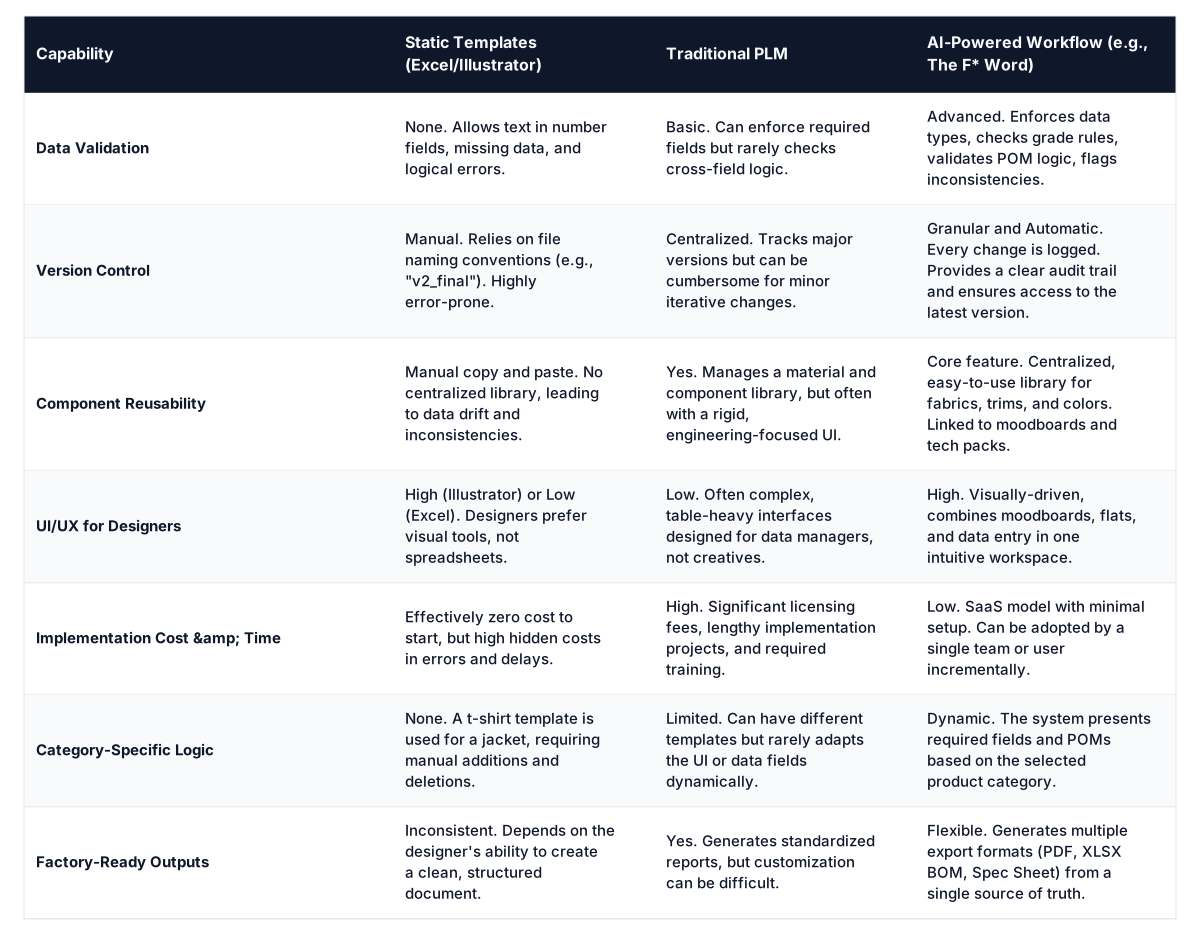
Comparison: Tech Pack Tooling Approaches

In-house designer? Generate a factory-ready tech pack from your brief.
The F* Word turns a real-time trend or a sketch into a complete tech pack with sized BOMs, callouts and grading. Plus a brand-aligned moodboard. Free to try.
When a factory manager in Turkey or a sourcing agent in Portugal receives a tech pack, they are not reading it like a novel. They are extracting specific data points to answer three questions as quickly as possible: What is it? What is it made of? Can we make it profitably?
Their first stop is the main technical flat. They scan the front, back, and detail views to get a holistic understanding of the product's silhouette and construction. They are looking for seam types, stitch details (like single needle vs. coverstitch), and any complex features like welt pockets or internal binding. A clean, well-annotated flat is critical. If callouts are missing or unclear, it is an immediate red flag.
Next, they jump directly to the Bill of Materials (BOM). This is the heart of their costing exercise. They need a clear, itemized list of every single component: main fabric, lining, pocketing, thread, buttons, zippers, labels, and even packaging. For each item, they need a description, supplier (if nominated), quantity per unit, and units of measure. A messy or incomplete BOM makes accurate costing impossible. If they have to guess quantities or hunt for component details, they will either build a significant buffer into their price or reject the project outright.
Finally, they analyze the Graded Measurement Specification, or grade rule page. They check the base size measurements for sanity and then review the grade rules to understand how the garment scales. They look for potential manufacturing challenges, like a large jump in measurement on a curved seam that might be difficult to pattern. They also use this spec to calculate fabric consumption, which is a major driver of cost. An incomplete or illogical grade spec sheet undermines the factory's ability to plan production and quote accurately. The best way to learn how to make a tech pack with AI is to understand that these three sections are the operational core of the document, and an AI workflow ensures they are complete, consistent, and connected.

Shifting from static templates to a dynamic workflow provides distinct advantages for each role involved in product creation. It is not just about efficiency, it is about enabling each team to perform their core function more effectively.
For in-house designers, the primary benefit is creative focus. Instead of fighting with spreadsheet cells or ensuring every callout is manually typed correctly, they can focus on design intent. The system handles the tedious data management, freeing them to work on what matters: the silhouette, the material choices, and the aesthetic details. Tools like The F* Word, which integrate moodboarding directly with the tech pack process, allow for a more fluid transition from inspiration to specification without leaving the creative headspace.
For technical designers, the value is in accuracy and speed. Their job is to translate a design into a manufacturable reality. An AI workflow acts as their co-pilot. It validates their measurements, enforces consistency in terminology, and automates the creation of component lists. This dramatically reduces the time spent on double-checking data and writing redundant information. They can manage more styles with higher accuracy and dedicate more time to complex fit issues and construction problem-solving.
For merchandisers and product managers, the advantages are cost clarity and timeline control. With a centralized component library and structured BOMs, they can get a quick and accurate picture of a product's cost of goods sold (COGS). They can easily swap out materials to see the cost impact or run reports to see how many units will use a specific, expensive trim. The version control and clear communication log give them visibility into the product's status, reducing the risk of unexpected delays.
For production and sourcing teams, the key benefit is communication clarity. They can trust that the tech pack they send to the factory is the single source of truth. There are no confusing email chains or conflicting file versions. The ability to export factory-specific formats, like a clean BOM spreadsheet, streamlines the quoting and procurement process. This reduces friction with factory partners and ultimately leads to faster, more accurate sample turnaround.
It is important to understand what a tech pack AI workflow tool is and what it is not. Conflating it with other software categories leads to incorrect expectations and poor implementation.
This is not a full-scale Product Lifecycle Management (PLM) system. A traditional PLM is a heavy, enterprise-wide system designed to manage the entire product lifecycle, including milestone calendars, line planning, sales data integration, and inventory management. An AI tech pack tool is focused exclusively on the pre-production phase: design specification, component management, and factory communication. It is a lightweight, design-centric tool that replaces the Excel and Illustrator part of the process. It can often integrate with a PLM, feeding it clean data, but it is not a replacement for one.
This is also not a 3D design and simulation tool like CLO 3D or Browzwear. Those powerful platforms are used to create virtual prototypes, check fit in a 3D environment, and generate realistic digital renderings. An AI tech pack tool is complementary to 3D. The 3D model can inform the measurements and construction details documented in the tech pack, and renderings from the 3D tool can be included in the tech pack for visual clarification. The tech pack remains the final, binding manufacturing document.
Finally, this is not a generative AI image creator. While it uses AI, the intelligence is applied to workflow, validation, and data structuring, not generating novel design concepts from a text prompt. The goal is not to replace the designer's creativity but to augment their ability to execute that creativity with precision and efficiency.
Adopting an AI-powered workflow does not require a massive, overnight overhaul of your entire development process. The most successful transitions happen incrementally.
The transition is not about technology, it is about process discipline. An AI workflow provides the rails for that discipline, making it easier to be accurate than to be inaccurate. It transforms the tech pack from a static, fragile artifact into a living, validated, and collaborative document.
The best tech pack template is no template at all. It is a dynamic workflow that adapts to your product and catches errors before they become four-figure sampling mistakes. The tools to implement this workflow are more accessible and user-friendly than the complex PLMs of the past, making them a practical choice for brands of all sizes looking to fix their broken pre-production process. Start free at thefword.ai.
No. AI in this context is a tool for augmentation, not replacement. It handles the repetitive, error-prone tasks of data entry and validation. This frees up technical designers to focus on higher-value work like complex fit problem-solving, construction innovation, and collaborating with designers and factories.
Direct import of old files is generally not recommended because they lack the necessary data structure. The power of a workflow system comes from its structured, validated data. The best approach is to start fresh with new styles, building your component library as you go, to ensure all information is clean and interconnected from day one.
An AI workflow tool is a lightweight, design-focused application specifically for pre-production documentation. A PLM is a larger, enterprise-wide system for managing the entire product lifecycle, including calendars, financials, and line planning. Many brands use a tool like The F* Word for its superior design and TD user experience, then feed that clean data into a corporate PLM.
Yes. A key feature of any good tech pack workflow tool is the ability to export information in multiple formats. You can still generate a clean, comprehensive PDF that looks familiar to your factory. You can also provide them with a structured Excel export of the BOM, which they will often prefer for their own operational systems.
Unlike traditional PLM systems that require large upfront investments, modern workflow tools are typically sold as a Software-as-a-Service (SaaS) subscription, often with a per-user monthly fee. Many, including The F* Word, offer free or trial tiers, making it very accessible for small teams and independent brands to get started and see the value before committing.
Related: AI Tech Pack Generator for Apparel Brands: The F* Word's Advantage
Get The F* Word workflow insights in your inbox.