
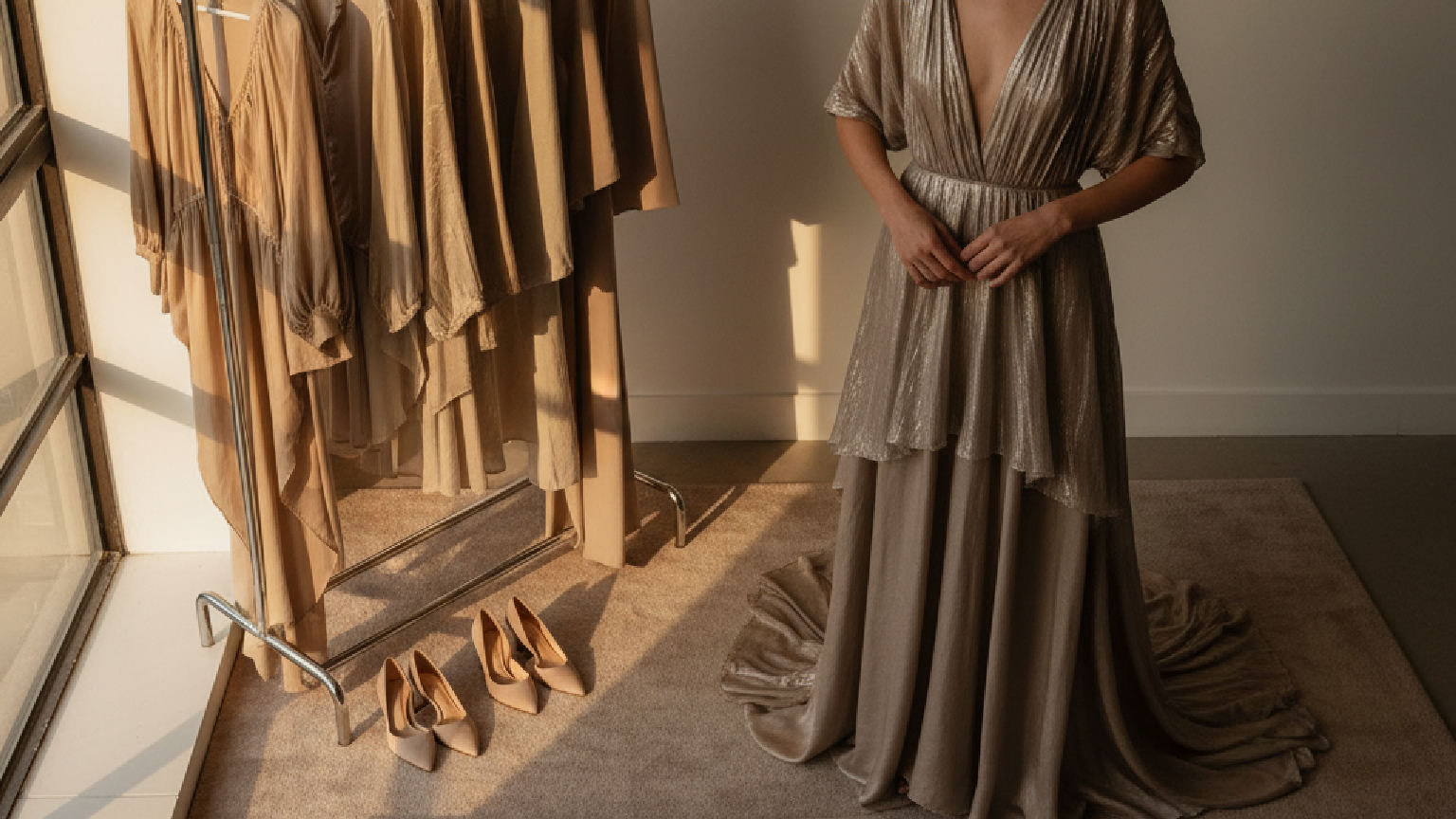
An AI fashion moodboard generator gives a brand a consistent direction board in minutes instead of days. The F* Word is built for the step after that, converting the approved board into a factory-ready tech pack in 8 to 10 minutes with bill of materials and points of measure.
The moodboard has always been the North Star of a fashion collection. It's the visual handshake between a creative director's abstract idea and the tangible world of design. Traditionally, this process is a manual art: a careful curation of magazine tears, fabric swatches, and found imagery pinned to a foam core board or assembled digitally in Photoshop. While creatively satisfying, this method is slow, subjective, and notoriously difficult to translate into concrete design actions. An AI fashion moodboard generator changes this dynamic, transforming the moodboard from a static art piece into a dynamic data source.
Today's fashion brands operate at the speed of the internet, not the speed of a glue stick. The pressure to develop newness, interpret micro-trends, and launch capsules requires a workflow that is both creatively potent and operationally efficient. Relying solely on manual moodboarding creates a bottleneck right at the very start of the design process. The real challenge is not just creating a beautiful collage, but systematically decoding its creative intent and feeding it into a productive workflow. This is where AI-driven tools rewrite the script.
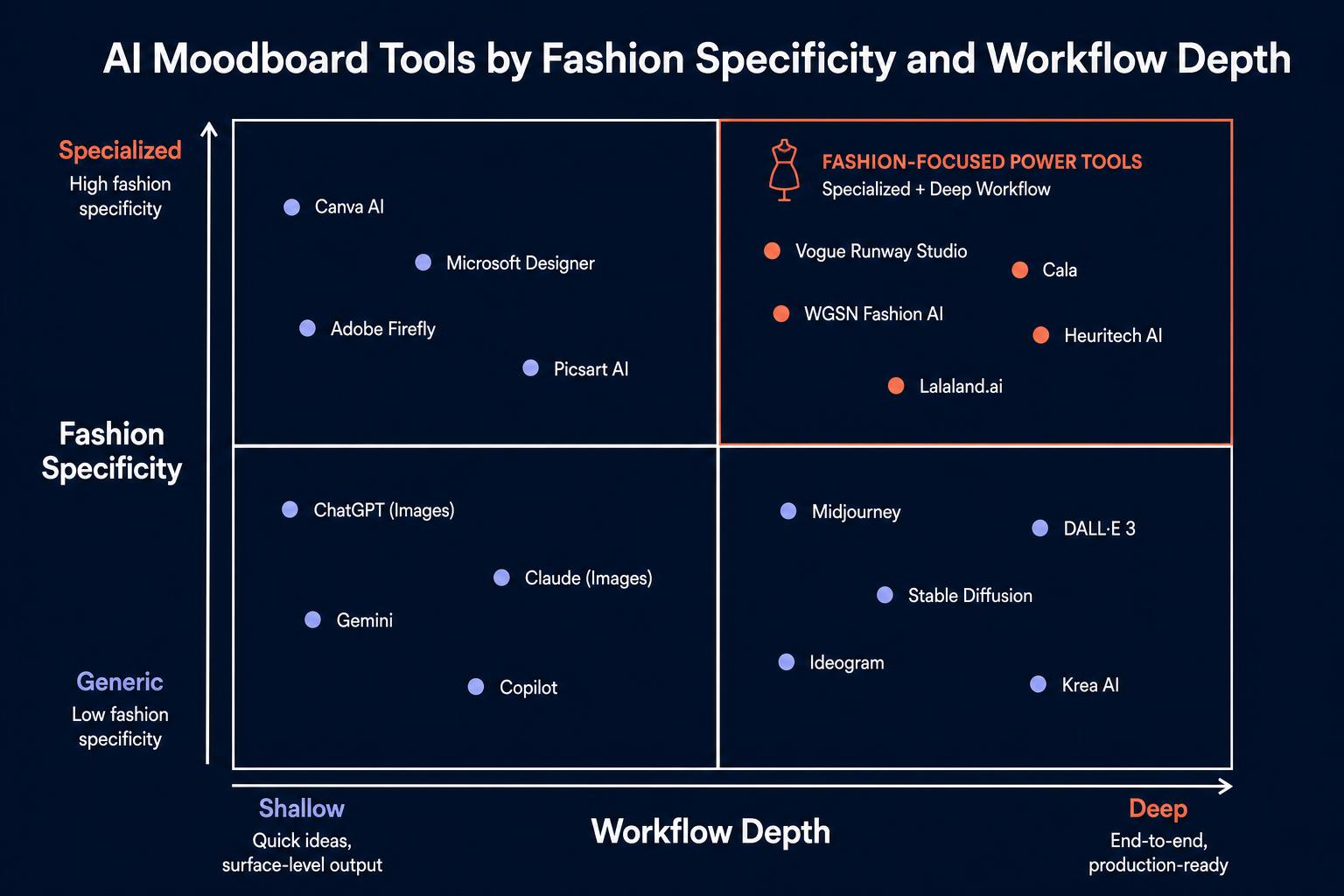
An AI fashion moodboard generator is a tool that uses artificial intelligence to analyze, interpret, and assemble visual concepts for fashion design. Unlike a simple collage maker or a Pinterest board, which relies entirely on user-driven curation, an AI-powered tool can understand the semantic content of images. It identifies patterns, themes, color palettes, textures, and even abstract concepts like "dopamine dressing" or "quiet luxury" across a set of visual inputs.
These tools can work in two primary ways. First, they can generate a new moodboard from a text prompt, like "a moodboard for a pre-fall 2025 collection inspired by 1970s utilitarian workwear and coastal California." The AI sifts through vast datasets of imagery to find and arrange visuals that match the prompt's intent. Second, and more powerfully, they can analyze an existing moodboard, whether a folder of images or a single composite picture, and deconstruct it into its core creative components. This function is what elevates it from a simple fashion moodboard generator to a strategic design tool. It's no longer just about creating a vibe; it requires extracting an actionable brief from that vibe.
In-house designer? Make AI fashion design survive the factory.
The F* Word turns a real-time trend into a brand-aligned moodboard and a factory-readable tech pack. What you design is what the factory makes. Free to try.
A beautiful moodboard that lives and dies on a creative director's wall is a missed opportunity. Its insights remain locked in visual form, requiring manual interpretation at every subsequent step of the design and development process. A designer must translate a feeling into a sketch, a technical designer must interpret that sketch into a measurement, and a merchant must try to connect it all back to a trend report. This manual translation is where errors, inconsistencies, and delays creep in.
Brand teams need a bridge between inspiration and execution. A visual collage offers direction, but it provides zero operational data. It doesn't specify a Pantone color code, a fabric composition, a target trim, or a base silhouette to work from. An AI moodboard for fashion design, when integrated into a larger system, solves this. It acts as the initial data capture. By analyzing the visual inputs, the AI can structure the creative direction into quantifiable elements. This means the transition from mood to concept, and from concept to tech pack, becomes faster, more accurate, and more aligned with the original creative intent.

The most common misconception is viewing the AI-generated moodboard as the final output. It's not. In a modern fashion-tech stack, the moodboard is the critical first step in a much larger, more integrated process. The thesis that guides forward-thinking brands is simple: AI moodboards are not the destination. They are the intake layer for AI fashion design. The moodboard provides the raw creative signal, which is then processed, filtered, and orchestrated into production-ready assets.
This AI fashion design workflow can be broken down into a clear sequence of operations, where the moodboard serves as the trigger for everything that follows.
| Workflow Stage | Description |
|---|---|
| Moodboard Input | The process begins with a visual concept, either generated by AI from a prompt or uploaded by the user as a collection of images. This is the raw, unfiltered creative inspiration. |
| Brand DNA Filter | The system analyzes the moodboard through the lens of the brand’s unique DNA, including its core color palettes, signature silhouettes, material preferences, and historical design language. |
| Creative Direction | The AI synthesizes the moodboard’s signals with the brand filter to generate a structured creative brief. It defines key themes, color stories, textures, and silhouette directions. |
| Garment Concepting | Based on the creative direction, the system proposes specific garment concepts that are both true to the moodboard’s inspiration and aligned with the brand’s identity and product assortment needs. |
| Downstream Workflow | The validated garment concepts are automatically translated into production-ready outputs, such as detailed tech packs, line sheets, and bills of materials, ready for factory communication. |
For a moodboard to be a useful input for an AI design workflow, the system must be able to "read" it for more than just aesthetics. It needs to extract structured signals that can inform downstream decisions. A sophisticated fashion design moodboard AI doesn't just see a "pretty picture"; it sees a collection of data points that can be categorized and actioned. When you input a moodboard, a capable system should dissect it for the following key signals.
| Signal Type | What It Extracts |
|---|---|
| Color | Generates a precise color palette with dominant, accent, and neutral colors. Advanced tools can even map these to standard color systems like Pantone for immediate use. |
| Texture | Identifies key textures and material qualities, such as chunky knit, smooth satin, rigid denim, crinkled nylon, or sheer organza. This informs fabric sourcing and development. |
| Silhouette | Recognizes dominant garment shapes and proportions: oversized vs. fitted, A-line skirts, wide-leg trousers, dropped shoulders, cropped torsos. This forms the basis for pattern making. |
| Styling | Analyzes how garments are combined. It identifies styling cues like layering, tucking, cuffing, and key accessory pairings that define the overall look and feel. |
| Brand Codes | Detects recurring brand-specific elements if present in the training data, such as a particular logo placement, a signature hardware type, or a unique stitching pattern. |
| Trend Signal | Contextualizes the moodboard's elements against broader market trends, identifying whether the aesthetic leans into current movements like "gorpcore," "balletcore," or "mob wife." |
The market for fashion AI tools is becoming crowded, and it's essential to understand the differences in capability. An "AI moodboard generator" is often a point solution focused exclusively on creating visual collages. These tools are great for ideation but typically stop there. They are the modern equivalent of a digital pinboard.
AI fashion design software, on the other hand, is a comprehensive platform that manages a larger part of the pre-production workflow. It uses moodboards and other creative inputs to drive a connected process. The F* Word sits in a unique position. It is not a PLM for managing the entire lifecycle, not a 3D simulator for virtual prototyping, and not just an image generator for creating fantasy garments. The F* Word is the validation and orchestration layer between your creative inspiration and your production-ready output. It connects the dots from visual intent to executable specs.
While a basic moodboard tool gives you a picture, The F* Word gives you a workflow. It consumes the visual idea and outputs the documents your factory needs, ensuring the creative vision is preserved without manual data reentry.
The F* Word treats the moodboard as the official start of a design job. Our platform was built to bridge the exact gap where most creative processes break down: the handoff from vision to execution. The platform autonomously generates both tech packs and refined moodboards in under 10 minutes, all starting from your initial visual direction.
The process is straightforward. First, you provide the visual input. This can be a moodboard you have already created using tools like Pinterest or Photoshop, or you can use our built-in generator to create one from a text prompt. The F* Word then ingests this visual data, analyzing it for all the key signals: color, silhouette, texture, and trend. But it doesn't stop there. It cross-references this analysis with your brand's specific DNA which you have embedded in the platform. This ensures the output is not just a generic interpretation of the moodboard, but a brand-right interpretation.
The result is a set of proposed garment concepts complete with initial specifications. You can then refine these concepts and, with a click, generate a complete tech pack. Bring your moodboard into The F* Word and turn visual direction into brand-right fashion design workflows. This is how abstract inspiration becomes a concrete, manufacturable product without the weeks of back-and-forth and manual data entry.
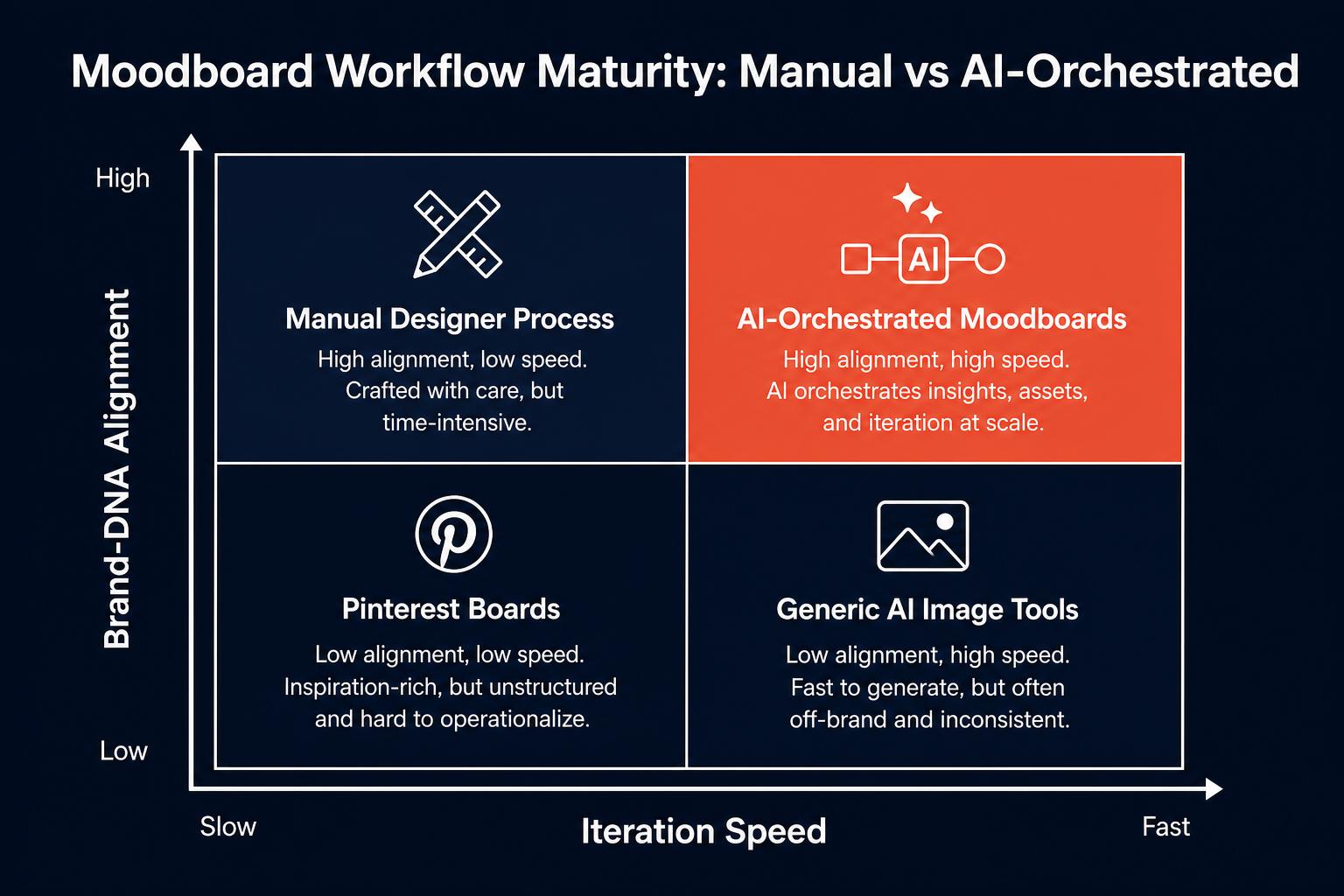
To make this concrete, here is how the four common moodboard workflows compare on the two axes that matter most to in-house design teams: how fast you can iterate, and how closely the output reflects your brand DNA.
The time savings are not theoretical. In our internal benchmarks with design teams running parallel collections, the gap between a manual moodboard-to-tech-pack workflow and an AI-orchestrated one is roughly an order of magnitude per collection. The chart below shows hours spent moving from initial visual direction to a tech pack a manufacturer can quote.
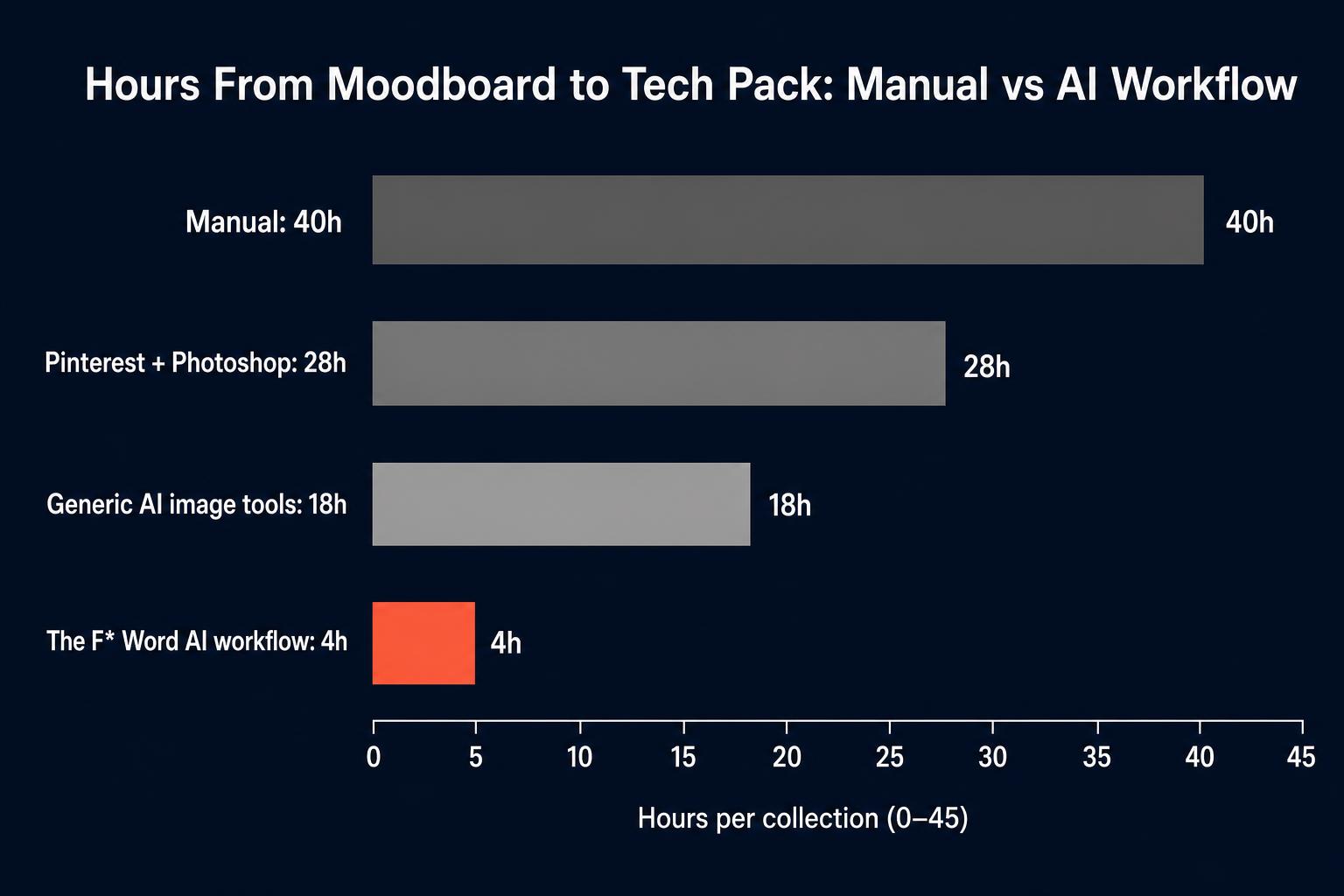
Three patterns repeat across teams that adopt this workflow. First, design directors stop spending their week clarifying intent in Slack threads and start spending it editing concepts that are already 80 percent aligned with the brief. Second, merchandisers see proposed garment specs days earlier, which lets them lock buy quantities before the line freeze. Third, freelance technical designers receive tech packs that already encode brand-specific construction rules, so the QA loop shrinks from weeks to days.
The table below maps the moodboard inputs The F* Word accepts to the workflow outputs you can hand off the same day. Every row is one place a design team would otherwise stall on a manual handoff between creative direction and pre-production.
| Moodboard input | Workflow output | Typical handoff time |
|---|---|---|
| Pinterest board URL | Brand-aligned moodboard, color palette, fabric directions | Under 10 minutes |
| Photoshop or Figma collage | Garment concept set with silhouettes and construction notes | 15 minutes |
| Text prompt plus brand DNA | Generated moodboard plus first-pass tech pack | 20 minutes |
| Mixed references (runway, archive, mood photos) | Cross-referenced moodboard plus production-ready tech pack | 30 minutes |
None of this replaces the creative director. The F* Word writes the mechanical half of the job (extraction, cross-reference, spec generation) so the human spends time on the half that actually differentiates a brand: taste, edit, and point of view.
Integrating an AI moodboard-to-workflow platform can impact nearly every aspect of the creative and commercial process. It's not just for blue-sky design sessions. Here are some of the most effective use cases for fashion brands:
When evaluating an AI fashion moodboard generator or a broader design platform, not all tools are created equal. To ensure you invest in a solution that provides real business value, ask these critical questions:
The future of fashion design is not about replacing human creativity with machines. It is about augmenting creative talent with intelligent tools that eliminate friction and accelerate the journey from idea to reality. An AI-powered workflow, starting with the moodboard, is the new operational standard for brands that intend to win.
Ready to connect your creative vision directly to your production workflow? Stop translating and start orchestrating. Start free at thefword.ai or book a demo.
Most fashion teams that adopt an AI moodboard generator follow the same arc in their first month. Week one is calibration: upload the last four seasons of references, hero products, lookbooks, and brand guidelines so the system can learn the visual rules that define the label. Week two is the first live brief, where the team replaces a slide deck with a structured board that already carries a color story, fabric list, and silhouette notes. Week three is collaboration: merchandisers price the silhouettes, sourcing checks fabric feasibility, and the creative director locks the direction in one review instead of three. Week four is the handoff, where the moodboard pushes straight into tech pack drafts and sample requests without another briefing meeting. Teams that follow this arc report two changes by day 30: fewer rounds of revision per style, and a shorter gap between concept approval and first sample. The board stops being a deliverable and starts being the operating record for the season.
No. While some tools may use similar technology for image creation, a dedicated fashion design platform focuses on workflow. It analyzes images to extract structured data for a specific purpose: designing clothes. It's less about creating a single "perfect" image and more about defining a manufacturable collection.
Yes, a reliable platform like The F* Word allows you to upload your existing moodboards, whether they are single composite images or folders of inspiration. The AI will then analyze your input as the starting point for the design workflow, ensuring your original vision is the foundation of the process.
This is a critical function of a professional-grade tool. Generic AI produces generic output. The F* Word solves this by allowing you to embed your specific brand DNA into the platform. It analyzes every moodboard through the lens of your historical designs, color palettes, and brand codes to produce on-brand results.
The F* Word is a "pre-PLM" creative and technical orchestration tool. It operates at the very beginning of the product lifecycle, turning creative intent into production-ready tech packs. A Product Lifecycle Management (PLM) system is a larger administrative system used to manage the entire supply chain, track samples, and store product data long-term. The F* Word creates the initial, validated assets that you would then feed into a PLM.
The F* Word answers no, and that is the gap most tools leave. A generator produces direction. The F* Word produces the specification, a factory-ready tech pack in 8 to 10 minutes with bill of materials, points of measure and construction notes a supplier can quote from.
Get The F* Word workflow insights in your inbox.